AI-based customer service: SLA improvement in 30 days
AI
AI-based customer service: SLA improvement in 30 days | Syneo
How to improve your customer service SLA within 30 days with AI-based solutions: triage, agent assist, RAG knowledge base, integrations, measurable KPIs, and data protection.
digitalization, AI, customer service, SLA, triage, agent assist, RAG, knowledge base, integration, GDPR, KPI, pilot, 30 days
February 23, 2026
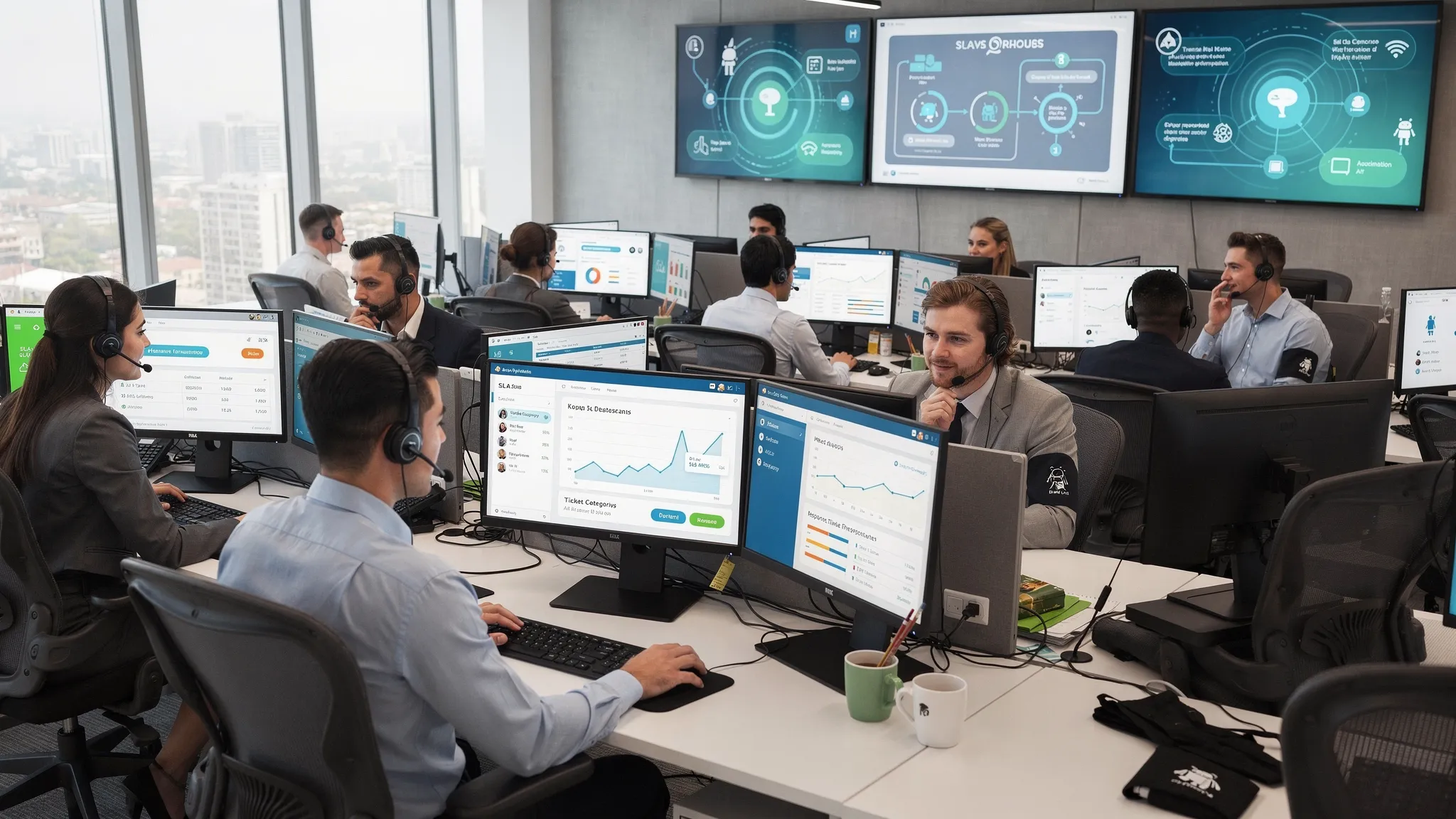
The deterioration of customer service SLAs is rarely a "people" problem. More often than not, it is caused by a combination of processes, data, and tools: poor categorization, slow triage, incomplete knowledge bases, fragmented channels (email, chat, forms), and back-office responses trickling back manually. The good news is that with AI-based customer service, many of these issues can be fixed, resulting in measurable improvements in SLA performance within 30 days.
In this article, I will show you what a realistic, risk-reduced 30-day approach looks like, what metrics are worth using, what technical and security conditions are required, and where implementation usually fails.
What AI-based customer service will mean (and not mean) in 2026
AI-based customer service is not the same as a chatbot on a website. In 2026, the best solutions will typically consist of multiple layers:
AI triage and routing: automatic tagging of incoming requests, distribution by priority and team.
Agent assist: suggested responses, references, and next steps for colleagues, based on the knowledge base and previous notes.
Self-service (RAG-based knowledge base): quick answers to simple user questions, with sources and relevant forms.
Deterministic automations: status messages, form validation, follow-ups, SLA alerts, approvals.
What is almost always a mistake: applying generative AI to all customer communications "out of the box" without a knowledge base, good ticket taxonomy, or human control.
Why SLAs are deteriorating, and where AI can quickly improve them
SLAs (e.g., first response time, resolution time, response rate, wait queue) are typically driven by:
Triage delay: tickets go to the wrong team, bounce around multiple times.
Incomplete information: the customer does not provide the necessary data, the colleague asks for more information, wasting days.
Knowledge scattered: descriptions, PDFs, emails, "Kati knows" type information.
No integration: CRM, ERP, order management, RMA, invoicing, and logistics operate separately, requiring manual intervention by administrators.
Peak times and capacity: seasonal workload, campaigns, product launches.
The essence of the 30-day SLA improvement is that we do not want to automate everything at once, but rather we take minutes and hours out of the steps that cause the longest turnaround times, which add up to days.
The 30-day SLA improvement principle: baseline, quick wins, controlled scaling
If the goal is specifically to improve the SLA within 30 days, then it is worth treating the project as a sprint:
let's set a baseline (where we start from)
be narrow in scope (1-2 channels, 1-3 ticket types)
measurement (KPIs and dashboard)
be guardrail (human approval, logging, data protection)
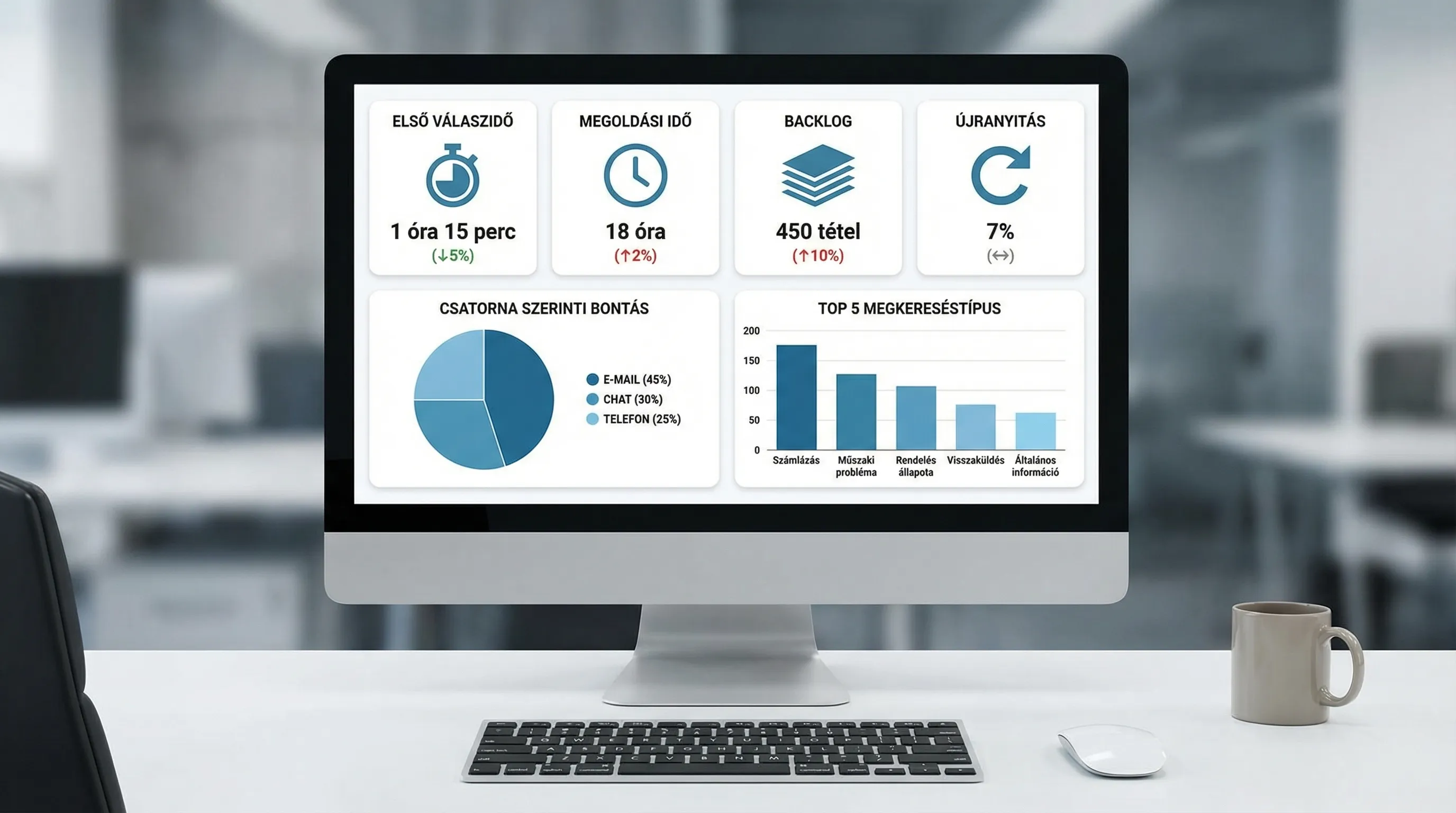
The table below shows a practical set of KPIs that are sufficient for rapid iteration and do not require months of data platform development.
KPI | What does it measure? | Why is it important for SLAs? | Typical data source |
First response time (FRT) | time of first substantive response | direct SLA indicator | helpdesk system, e-mail log |
Time to resolution (TTR) | time elapsed until closure | cost and satisfaction | help desk, CRM |
Reopening rate | percentage of returned tickets | quality, indicator of poor automation | help desk |
Handover/bounce | number of team changes | incorrect routing, incorrect category | help desk |
Self-service ratio | Percentage of cases solved by AI | capacity release | bot/KB analytics |
30-day implementation plan (based on actual implementation logic)
The plan below is not an "all-in" digital transformation. It is specifically optimized to improve SLAs in the first month, while keeping risks (incorrect responses, data management issues, poor customer experience) manageable.
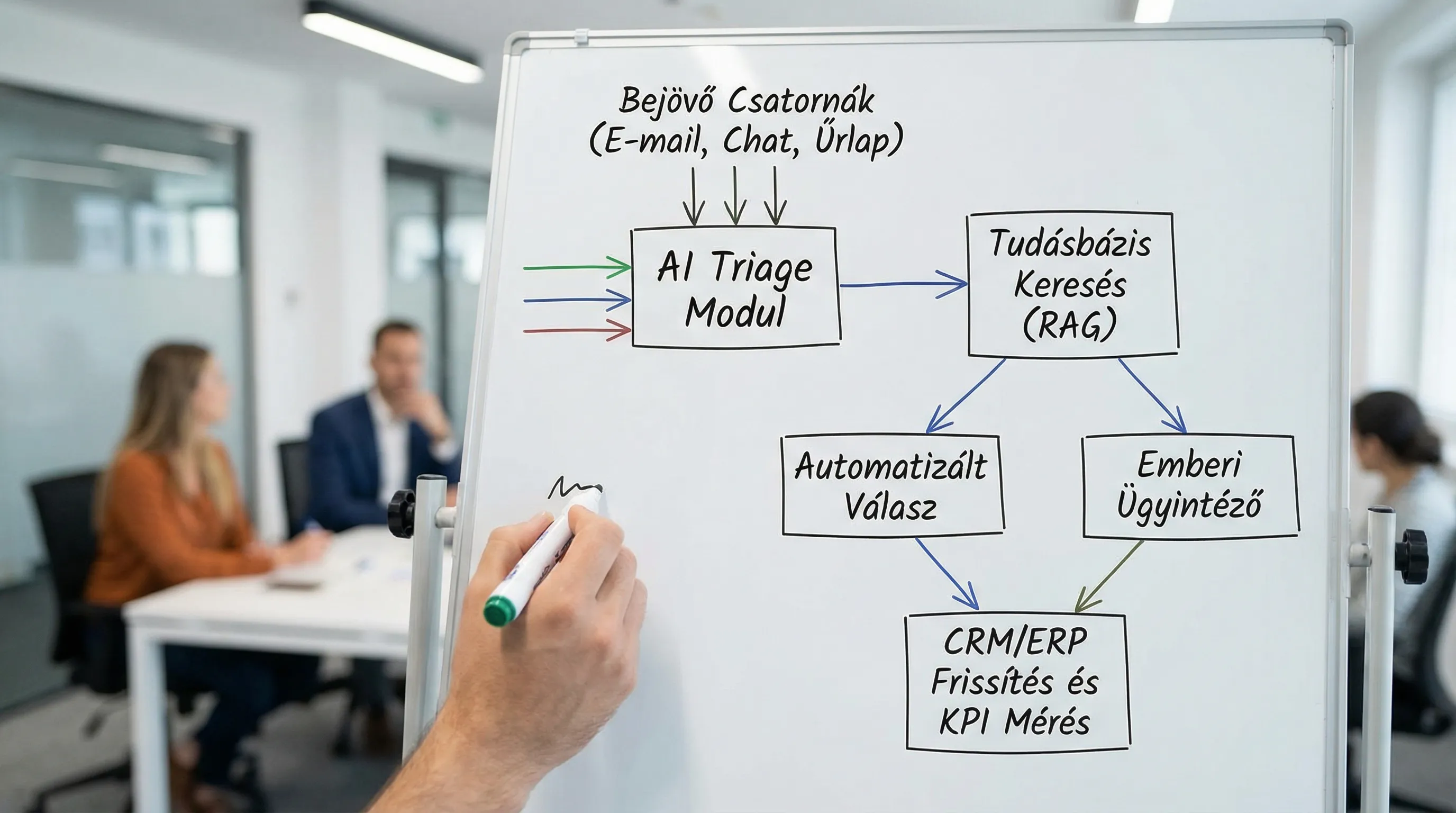
Days 0–3: Assessment, SLA baseline, scope closure
At this stage, the goal is to work with data rather than opinions.
Outputs you shouldn't leave without:
Top 10 search types (volume, seasonal patterns)
SLA baseline per channel (FRT, TTR)
Minimal organization of ticket taxonomy (categories, priorities)
Deciding what to automate now and what not to automate
This is also where it is decided whether AI will actually respond to customers in the first round or only assist the internal team as an agent assist. Agent assist has a faster impact on SLAs because there is less risk on the customer side.
Week 1: Quick triage, mandatory data, templates
The goal for the first week is to reduce the number of bounces and callbacks.
Typical quick wins:
Automatic subject and content-based tagging (order, invoicing, complaint, technical question)
Dynamic forms: only request relevant data (e.g., order ID, device type)
Approved response templates (not AI, but standardization)
These accelerate on their own and pave the way for generative AI because they receive cleaner input data.
Week 2: Organizing the knowledge base and RAG-based response suggestions
Generative AI works reliably in customer service when it searches rather than invents.
Typical focus for Week 2:
Minimum knowledge base: 30–60 articles on top questions
Designation of sources (public FAQ, internal SOP, product documentation)
RAG setting: the model quotes from the knowledge base and indicates the referenced source
Escalation rules: when it is mandatory to assign to a person (e.g., complaint, legal, data change)
An important quality rule: the system should not only provide answers, but also ask questions if critical data is missing. This often results in greater SLA gains than a "nice" long answer.
Week 3: Integrations with critical systems (CRM, ordering, RMA)
Week 3 brings the thing that can really bring down TTR: backend system integration.
Typical integration goals:
Searching for and linking CRM records (customer identification)
Order status inquiry (delivery, payment, package number)
Initiate RMA or service process (if applicable)
Agent summary: what has happened with the customer so far, on one screen
Here, AI often "only" coordinates, while the actual operation is performed by a deterministic workflow. This makes it auditable and secure.
Week 4: Go-live, monitoring, fine-tuning SLA
The goal of week 4 is controlled sharpening:
Limited channel or customer group (e.g., web chat only, or Hungarian language only)
Quality measurement: reopening rate, satisfaction, fallback rate
SLA alerts and capacity management (hypercare)
A brief example: why a quick response is critical for personalized products
With personalized products, inquiries are often time-sensitive: "Will it arrive in time for the birthday?", "Can the inscription be changed?", "Can I get a preview?" For a web shop that creates personalized pet portraits, such as PawsLife, it is typically best if the customer immediately receives the next step, such as what kind of photo is ideal, when to expect a preview, and how to request changes. In such situations, AI triage and knowledge base-based response suggestions can quickly improve the initial response time, while automatically directing more complex cases (special requests, multiple animals in one photo, urgent orders) to a human agent.
Data protection and security: minimum controls that must be maintained for at least 30 days
Introducing AI into customer service also raises data protection and information security issues. The minimum package that should be required even in a 30-day pilot:
PII masking: regulated handling of personal data (name, email, phone number)
Access management: role-based access to the knowledge base and ticket data
Logging: who responded, from what source, with what prompt (auditability)
Human control: approval or mandatory transfer in risky cases
Data retention and deletion principles: in accordance with the GDPR
If you operate in a regulated industry, early involvement of legal compliance and internal policies (such as incident management) will save you a lot of rework later on.
Common pitfalls that can delay your 30-day SLA repair
Too broad a scope: all channels, all languages, all product lines at once.
No knowledge owner: the knowledge base is not updated, so the AI's responses deteriorate.
The "AI will figure it out" attitude: unsourced answers, risk of hallucinations.
Delaying integrations: the team is still searching manually, but now there is also a chatbot.
Implementation without KPIs: no baseline, no demonstrable improvement.
Practical decision: when is 30 days realistic, and when is it not?
Realistically improve the SLA within 30 days if:
there is a helpdesk system where times can be measured
the top search types are easily identifiable
most of the knowledge content exists (it is just scattered)
At least one critical integration is available (e.g., CRM or order management)
Not realistic, or only to a limited extent, if:
no measurable ticket data or no unified channel
the processes are not defined (there is no definition of "what it means to close")
access and data management are not clarified (security risk)
Frequently Asked Questions
Which brings faster SLA improvement, chatbot or agent assist? Agent assist is typically a faster and safer first step because a colleague checks the answer. It is worth activating a chatbot when the knowledge base is stable and the fallback to human agents works well.
What is the minimum data required for an AI-based customer service project? At least 3–6 months of ticket history (if available), categories, solution notes, and the most important knowledge materials (FAQs, internal descriptions). If this is not available, the first half of the 30 days is often spent organizing data and knowledge.
How can we prevent AI from giving wrong answers? Through a source-based approach (RAG), mandatory citations, prohibition of risky topics, and human transfer rules.
What should you pay attention to from a GDPR perspective? Minimizing personal data, access control, logging, data retention, and what data is sent to external service providers. It is worth conducting a data protection review at the beginning of the pilot.
How many channels should you start with? One channel, typically web chat or email. The goal is to establish a working model and measurable SLA improvement, then you can expand.
Next step: 30-day AI customer service pilot with an SLA-focused measurement plan
If your primary goal is to improve your SLA in a short period of time, the best way to start is with a small, measurable pilot: selected search types, one channel, baseline and dashboard, followed by controlled rollout.
The Syneo team provides consulting and implementation services for digitalization and AI projects, especially when the key to success is integration, measurability (KPI), and keeping information security and operational aspects in mind. If you wish, we can help you assess your current customer service process, define a 30-day scope, and build an AI-based solution that actually improves your SLA, not just looks "smart."
Contact us at https://syneo.hu and request a brief SLA-focused assessment to launch the pilot.
