AI Software Development 2026: What Cursor and Co. Really Know
AI
Jan. 27, 2026

By 2026, artificial intelligence-based development tools will have become a natural part of programming work. Cursor has achieved a leading position in this field, especially for projects requiring easy integration. Statista surveys show that the use of AI-supported coding solutions is growing steadily. At the same time, more and more developers are looking for alternatives.
Built on the Cursor GPT-4 model, it does speed up code writing, but it also has its limitations. It is essentially specialized in in-editor code generation, without full application development capabilities. Meanwhile, alternatives such as Windsurf (formerly Codeium AI IDE) offer significant free capacity. Common problems in enterprise environments include Cursor's usage limits, data management issues, and lack of compliance checks.
This article introduces the capabilities of Cursor 2026, explores why developers are looking for other solutions, and analyzes four major AI development tools in detail. Each offers different advantages for today's developer needs.
Why are developers looking for an alternative to Cursor in 2026?
It is becoming increasingly common in the developer community for teams and individual professionals to look for other solutions. Behind this are specific, measurable problems, which in many cases translate into business decisions.
Costs and licensing restrictions
A subscription to Cursor "Ultra" costs 15,691.52 forints per developer per month, which is a significant expense for larger teams. Engineering managers are right to ask: is such an expensive tool necessary for every junior programmer just to add simple code?
There are additional costs beyond license fees. Seven hidden factors in AI implementation include:
Development of data management infrastructure
Creation of new roles and training courses
System integration developments
Compliance and security costs
The complexity of the licensing structure poses a particular challenge. Changes to AI Builder licensing since November 2025 clearly show that this area is still evolving. Cursor's pricing model is difficult to understand and has fixed conditions.
Closed system and lack of customization
Cursor's operation is simple: code goes to their servers, subscription fees come back. However, this black box approach conflicts with developer needs.
Alternatives such as Void run locally or use their own API keys (Anthropic, OpenAI, Gemini). The "inline diff" and "chat with repo" functionality remains, but control remains with the developer.
The popularity of open, API-based solutions is no coincidence: new models and services can be easily integrated. This is critical from a data protection perspective—with free alternatives, the loss of data sovereignty is a real risk, especially in the case of sensitive intellectual property or regulated sectors.
Only code completion – no complete application generation
Cursor is essentially specialized in code completion. Developers open files, describe their requirements, and the agent performs edits as they go. Other AI solutions take a more structured approach to the task.
Kiro, for example, is an "AI IDE for adults" — an AWS-based agent-based IDE+CLI that starts with specifications, not chat. Developers first describe the goal, Kiro turns it into structured requirements and a design document, and then agents implement it and synchronize it with the repository.
Superblocks Clark AI generates complete applications from natural language—this goes beyond Cursor's basic code completion role.
In a corporate environment, it is particularly important that AI tools do not operate in isolation. Covering the entire development process, integrating with existing systems, and fully supporting the application development cycle is now an expectation, not a luxury.
Cursor AI – What can it really do?
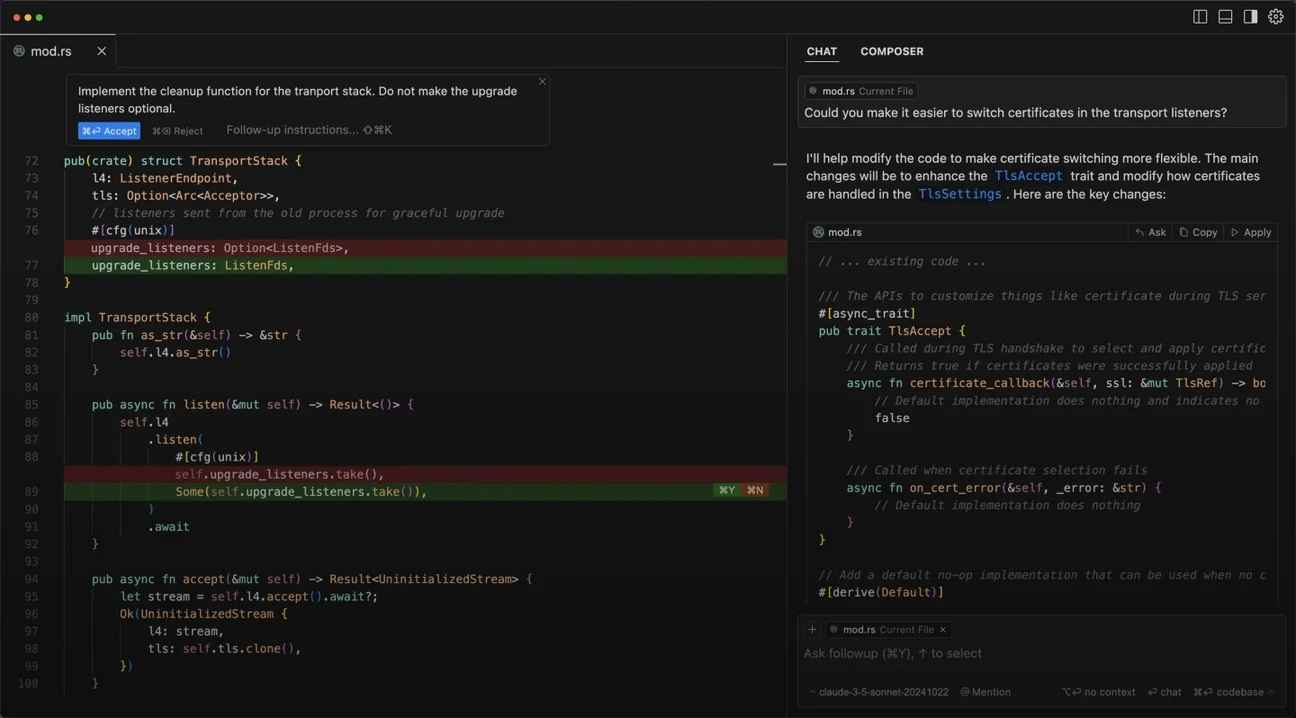
Image Source: SentiSight.ai
Before exploring alternatives, it is worth taking a clear look at what Cursor AI has to offer in 2026. It is an advanced code editor equipped with artificial intelligence that supports programming with natural language commands.
GPT-4-based code completion and refactoring
The core power of Cursor lies in the GPT-4 model, which enables intelligent code completion and automatic corrections. Developers can enter simple text commands, which the system immediately converts into executable code. For example, if we issue the command "Create a Python function to sort a list using merge sort," the tool automatically generates the appropriate code with correct syntax.
During refactoring, Cursor analyzes complex code snippets and identifies technical debt. It recommends a strategy for converting the code to modern patterns and then consistently updates the affected parts of the code base to new API formats.
Cursor generates complete functions, algorithms, and components while maintaining code quality and following project style. It is particularly useful when migrating old frameworks to newer ones or optimizing performance-critical code.
Understanding code base in VS Code environment
A key feature of Cursor is its ability to understand and analyze the entire code base. It is built on Visual Studio Code, so it is compatible with existing extensions, themes, and keyboard shortcuts. Developers can easily integrate it into their familiar workflows.
Code base analysis allows you to ask questions about the code: "Why is this function needed?" or "How does this class relate to the others?". Cursor understands the syntax of the code, its semantic meaning, and the context of the project.
The 2026 version has a built-in browser and testing system. It not only generates the code for the web application, but also opens and tests it immediately. If it finds an error, it automatically corrects it until the result is satisfactory.
Privacy mode and SOC 2 certification
Data protection is key for any AI development tool. Cursor has a "Privacy Mode" feature that guarantees that code is not sent to remote servers. In active mode, code data is not stored by model providers and is not used for training. This is the default setting for team members, and more than 50% of users use it.
The level of data flow depends on the use case. For large language model providers (OpenAI, Anthropic), Cursor does not store the code directly, but relevant code snippets are forwarded for processing when an API request is made.
Cursor has SOC 2 Type II certification, which certifies compliance with industry data security and data protection standards. Annual penetration tests are conducted by reputable third parties.
Despite these capabilities and security measures, many people are looking for alternatives, especially those who want complete control or need to meet specific corporate requirements.
1. Windsurf – The best free AI coding tool
Windsurf has achieved a strong position in the AI development tools market in 2026. Renamed from Codeium, the platform differs from other tools with its agent-based operation and extensive free features.
More IDE support and real-time preview
Windsurf works with forty different IDEs, including the entire JetBrains product range. This provides flexibility: developers can keep their familiar environment. Despite Cursor being limited to VS Code, this is a significant advantage for teams using diverse tool environments.
With real-time preview, the impact of code changes is immediately visible. Web applications appear directly in the IDE, and any element can be selected for modification with a click. Cascade AI then helps refine styles and elements. Continuous preview updates are particularly effective during UI development.
The platform automatically creates test cases and integrates seamlessly into CI/CD processes. Features include early error detection with intelligent alerts, as well as customizable test scenarios and coverage reports.
Agent mode for beginners
Agent mode goes beyond simple code completion. It interprets the entire project structure, analyzes dependencies, and suggests changes between files. After approval by the developer, it implements the changes.
An AI companion that thinks in context is available. The Cascade feature keeps track of tasks for complex jobs and performs automatic troubleshooting and repairs.
AI Flows is particularly useful for beginners: it generates or modifies code, requests approval before running, and then clarifies objectives with interactive questions. This iterative method helps users understand programming concepts while learning to work with AI.
Privacy options: local execution
Windsurf offers well-thought-out solutions in the field of data protection:
The entire code base can be exported and stored anywhere.
Strict data protection rules for personal data
Immediate data deletion upon request
Support for local execution is a critical advantage: sensitive code does not leave the developer's system. In a corporate environment, this is a fundamental requirement for the protection of intellectual property.
The free package provides 25 prompt credits per month, with application previews and one-click installation. This is more generous than other free alternatives and appealing to cost-conscious developers.
Of course, there are limitations: it works best with modern codebases and may need refinement for older systems. Some advanced features take time to learn. Despite this, Windsurf is an excellent choice for those looking for an effective, free AI tool.
2. Superblocks – Complete internal applications with AI
Developing internal corporate applications often poses a complex challenge for development teams. Superblocks addresses this problem: an AI-centric platform that goes beyond code completion and can create complete applications.
Clark AI: application generation from natural language
The core component of Superblocks is Clark AI, which generates complete enterprise applications from natural language descriptions. If a developer asks, "create a Salesforce performance dashboard," Clark will create a responsive interface in minutes, complete with real CRM data, business logic, and tests.
Clark creates real applications – not just code suggestions. It provides complete deployable solutions with database connections (Postgres), REST APIs, and authentication systems. Clean React code is generated in the background, which developers can edit.
The main features of Clark are:
It uses reusable components and corporate themes, so anyone can create applications with a consistent look and feel.
You can work with the generated code in any editor (Cursor, Windsurf, VSCode).
We can also refine the application in a visual editor.
A distinctive feature of Superblocks is two-way synchronization. Developers can modify React code in their own IDE, and the changes will immediately appear in the visual editor.
RBAC, SSO, and audit logs for enterprises
In a corporate environment, security is as essential as efficiency. Superblocks offers a comprehensive security framework for corporate use.
The platform features granular role-based access control (RBAC). Administrators can precisely define who can see and modify what. This is particularly important in regulated industries where auditability of access rights is mandatory.
Superblocks integrates with enterprise single sign-on systems such as Okta and Entra. Clark AI recognizes Okta/Entra groups, ensuring accurate permission management at the integration and API levels.
To support compliance, it offers comprehensive audit logging for both developers and end users. These logs can be fed directly into your existing monitoring system or SIEM solution, simplifying regulatory compliance.
On-premise agent in VPC
Superblocks offers a unique solution to data protection issues through its on-premise agent. This open-source component runs within the company's own environment, ensuring that sensitive data never leaves the organization's network.
The agent can be installed in minutes using Docker or Kubernetes on AWS, GCP, or Azure platforms. As a stateless service, it connects the Superblocks platform to data without leaving the network.
During application development, customer data is transferred directly from the database to the browser via the on-premise agent and never reaches the Superblocks cloud. Furthermore, the Superblocks cloud cannot initiate incoming connections to the company's network, which provides an additional layer of security.
The open source agent offers additional benefits: security teams can audit the agent's code and dependencies, use their own vulnerability scanning tools, and suggest fixes that Superblocks will incorporate.
This approach combines the advantages of modern cloud software with the security of on-premise solutions, avoiding their disadvantages. It is an ideal choice for regulated industries such as finance, healthcare, or public administration.
3. Replit Ghostwriter – Browser-based AI development
In the field of browser-based development, Replit Ghostwriter takes a different approach than traditional desktop tools. Instead of installation, all you need to do is open a browser, and you can start using the entire development environment with AI support.
Real-time collaboration and instant hosting
The key innovation of Replit is instant sharing. By sending a URL, you can immediately share your project with anyone—you can work together in the same editor, in real time. This multiplayer feature has changed the way many people learn to code.
The platform supports more than 50 programming languages within a single interface. Python, JavaScript, Ruby, or even rarer languages such as Go and Rust—we can use the same environment for all of them.
The ability to install immediately is a particular advantage. Instead of complicated configurations, you can activate the application with a single click and modify it on the fly. This is particularly practical for quick testing and demonstrations.
Multilingual support and AI debugging
Ghostwriter is not just a code complement—it actively participates in debugging. It automatically offers suggestions for console errors and generates entire code blocks with a single keystroke, without switching IDEs.
According to research, more than 50% of developers accept conversation-based code suggestions, and 75% rate the AI assistant experience positively.
The advantage of Ghostwriter is that it knows the context of the project. From the first query, it takes into account the characteristics of the code base, providing more accurate answers. The team was the first to integrate an AI assistant into the IDE, with full visibility into the software stack, build information, and runtime data.
Ideal for beginners and educational purposes
Ghostwriter is a particularly valuable learning tool. When used with programs such as "100 Days of Code," it greatly simplifies code learning. It provides detailed, step-by-step explanations for any code.
It also reduces friction in the development process—it's as if it can read our minds. After selecting code, we can ask it to modify or refactor it, and the AI will perform the task.
The "Explain Code" feature helps you understand new concepts, while "Generate Code" provides guided practice. With immediate feedback, developers can learn best practices right away.
Replit Agent goes even further: it builds a complete application from a simple description. It's like having a whole development team at your disposal—you tell them your idea, and they automatically build the application. The result can be installed and shared immediately.
4. Claude Code – Terminal-based AI assistant
Among developer tools, Claude Code has chosen a different path. For programmers who are comfortable working in the terminal, Anthropic's solution may be the natural choice in 2026. This is not a simple code complement—it is a well-designed developer companion that accepts instructions in natural language.
Multi-file context management with Claude Sonnet 4 model
The Claude Sonnet 4.5 model's 200,000-token window size is remarkable in itself. For large projects, this means that the context of the entire code base remains accessible. The model is capable of 30+ hours of concentrated work, which is a valuable feature for complex development tasks.
Claude Code sees the relationships between files. When refactoring, it not only modifies the current component, but also tracks dependencies. Of course, the developer retains control—all proposed changes can be reviewed in your own IDE before we accept them.
Integrations: GitHub, Datadog, CircleCI
Integration into corporate development processes is crucial. Claude Code is also effective in this regard:
GitHub: Using the @claude tag in pull requests triggers automatic responses to review comments and fixes CI errors.
Datadog: Listing CI pipelines via MCP server, analyzing service logs, flexible metric queries
CircleCI: Displaying and analyzing CircleCI job data on the Datadog interface
Model Context Protocol servers provide access to external devices, databases, and APIs. This expands the possibilities for use in the DevOps field as well.
Terminal, VS Code, and JetBrains support
The terminal is home to Claude Code, but graphical environments are not left out either. The VS Code extension provides a graphical panel, while the JetBrains plugin works in IntelliJ IDEA, PyCharm, and WebStorm environments.
Quick launch is possible with the Cmd+Esc (Mac) or Ctrl+Esc (Windows/Linux) keys. The "claude" command also launches it in the integrated terminal. The IDE's diagnostic information is automatically shared, so the context always remains up to date.
The advantage of the terminal-centric approach is that it fits naturally into existing workflows. For many people, text-based interaction is more natural than a graphical assistant.
Conclusion
In the 2026 AI development tools market, one thing is clear: Cursor's monopoly is coming to an end. While it remains strong in GPT-4-based code completion, costs and closed operation are driving more and more developers away from it.
There are significant differences between the alternatives. Windsurf excels mainly in cost-effectiveness, with its abundant free features and broad IDE support. Superblocks is tailored for enterprise environments, with full application development capabilities and strict security standards. Replit Ghostwriter focuses on browser simplicity and educational use. Claude Code targets terminal-oriented developers with advanced context management.
There is no such thing as the "perfect" choice. The decision is determined by the specific project requirements, budget, security requirements, and team preferences.
One thing is certain: these tools really do increase developer efficiency. From beginners to senior programmers, everyone can benefit from them if they choose wisely.
The future will be exciting. As the underlying models evolve, so will the possibilities. Development work in 2026 is already radically different from what it was a few years ago—and this is just the beginning.
Frequently Asked Questions
Q1. How will AI change software development by 2026?
AI significantly increases developer productivity, automates routine tasks, and enables natural language code generation. However, human developers will still be needed to solve complex problems and verify AI-generated code.
Q2. What advantages does Windsurf offer among free AI coding tools?
Windsurf is compatible with over 40 IDEs, provides real-time previews, and has an agent mode to help novice developers. It also supports local execution for data protection and offers a generous free plan.
Q3. How is Superblocks different from other AI development tools?
Superblocks' Clark AI feature can generate complete applications from natural language descriptions. It also offers enterprise-grade security features such as RBAC and SSO, and provides an on-premise agent for running in VPC.
Q4. What advantages does Replit Ghostwriter offer in browser-based development?
Replit Ghostwriter offers real-time collaboration, instant hosting, and multilingual support. It is particularly useful for beginners and educational purposes, and features built-in AI debugging.
Q5. What makes Claude Code's terminal-based AI assistant unique?
Claude Code provides multi-file context management with the Claude Sonnet 4 model, integrates with tools such as GitHub and CircleCI, and supports VS Code and JetBrains environments. Its terminal-based approach fits seamlessly into developers' existing workflows.
