How does cloud-based software reduce costs?
Other
January 30, 2026

The use of cloud-based software offers significant cost savings for businesses. The most important advantages are as follows:
Elimination of hardware and infrastructure costs: There is no need to purchase and maintain expensive servers. Cloud providers take care of updates and hardware replacement.
Reduced operating costs: IT teams' workloads are reduced as service providers handle system updates and security patches.
Flexible scaling: You only pay for the resources you actually use, avoiding the costs of oversized capacities.
Optimization of licensing costs: The subscription model makes costs more transparent and flexible, eliminating the problem of unused licenses.
Automation: Automating repetitive tasks saves time and money while reducing human error.
Reduced energy costs: Cloud providers' optimized data centers ensure lower energy consumption.
Cloud-based software not only offers a cost-effective solution, but also simplifies business operations. The key is careful planning and continuous monitoring.
Virtual machine migration Cost reduction with Azure
https://youtu.be/URun2AIIf_k
Reduction of hardware and infrastructure costs
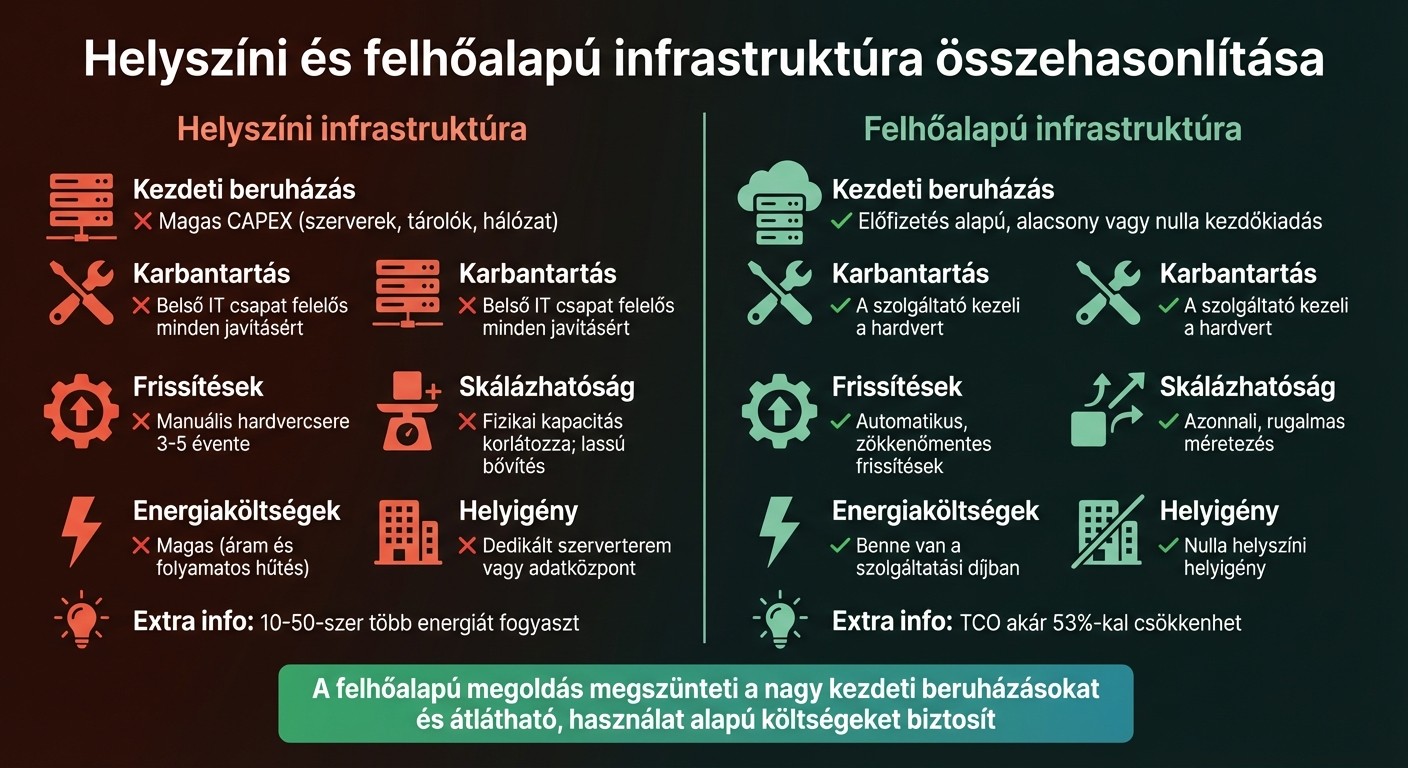
On-premises vs. cloud infrastructure cost comparison
For businesses looking to optimize their spending, one of the most important steps is to reduce hardware and infrastructure costs. One of the biggest advantages of cloud services is that they eliminate the need to purchase and operate physical servers. Instead, you can instantly access the resources you need on a subscription basis, without having to spend millions on servers, network equipment, or data centers.
Operating costs instead of investment costs
Building a traditional IT infrastructure requires a significant initial investment. The purchase of servers, storage devices, and network hardware can cost millions of forints, which places a serious burden on the budget.
In contrast , the cloud services model is based on predictable monthly operating expenses (OPEX). You only pay for what you actually use—whether it's processor capacity, memory, or storage. This approach not only simplifies financial planning, but also improves cash flow, as there is no need for large upfront expenditures.
"Using cloud services is generally cheaper than operating a data center, as you only pay for what you use." - Oracle
Avoiding hardware replacement costs
In the case of on-site infrastructure, hardware needs to be replaced every 3-5 years, which represents another significant expense.
Cloud providers take this burden off your shoulders completely. They take care of hardware maintenance, updates, and replacements, so you don't have to worry about outdated equipment. For example, using Oracle Cloud Infrastructure (OCI) can reduce your total cost of ownership (TCO) by up to 53%.
Comparison of on-premises and cloud-based infrastructure
Cost item | On-site infrastructure | Cloud-based infrastructure |
Initial investment | High CAPEX (servers, storage, network) | Subscription-based, low or zero upfront costs |
Maintenance | Internal IT team responsible for all repairs | The service provider manages the hardware |
Updates | Manual hardware replacement every 3-5 years | Automatic, seamless updates |
Scalability | Limited physical capacity; slow expansion | Instant, flexible sizing |
Energy costs | High (power and continuous cooling) | Included in the service fee |
Space requirements | Dedicated server room or data center | Zero space requirements on site |
This comparison clearly illustrates why more and more people are choosing cloud-based infrastructure. On-site data centers consume 10 to 50 times more energy than a traditional office building. This is reflected not only in the electricity bill, but also in the costs of cooling systems, uninterruptible power supplies, and physical security. Cloud providers already include these costs in their service fees, while operating much more efficiently thanks to their optimized infrastructure.
Reduction of maintenance and operating costs
Cloud-based services help reduce costs in a number of ways. Cloud providers take over infrastructure management, reducing the burden on IT teams and lowering costs. In addition, providers automatically take care of system updates and maintenance, eliminating the associated expenses.
Automatic updates and security fixes
Cloud providers perform system updates and security patches continuously, without manual intervention. In the case of IaaS and SaaS models, the provider uses built-in machine learning to automatically perform routine tasks, ensuring that systems are always up to date and protected against the latest threats. This not only increases security, but also improves energy efficiency.
Reduced energy costs and environmental impact
Operating on-site data centers involves significant costs, particularly due to continuous cooling and power supply. Cloud providers' data centers, on the other hand, are more efficient because they use shared resources and operate with optimized cooling systems. Energy consumption, cooling system maintenance, and facility operation are all included in the service fee.
"We can also show where and to what extent a company can reduce its emissions simply by introducing cloud technology." - Gábor Strén, Account Director of the Financial Sector, Microsoft Hungary
In addition to reducing costs, the cloud also allows IT professionals to focus their attention on strategic tasks.
Reassigning IT staff to business priorities
Moving to the cloud eliminates the need for IT professionals to deal with repetitive tasks such as maintenance, database management, or manual application monitoring. As a result, IT teams can devote more time and energy to strategic projects such as data analysis, implementing machine learning solutions, or improving the customer experience.
"Migrating frees skilled employees from the mundane work of 'keeping the lights on' in the data center and allows them to focus on supporting new business opportunities." - Jeff Erickson, Tech Content Strategist, Oracle
Flexible scaling and resource management
Cloud-based platforms enable resources to be dynamically aligned with current needs. This eliminates problems caused by excess capacity or performance shortages and is closely linked to strategies for reducing infrastructure and operating costs. Large companies in the United States waste between 28% and 44% of their cloud budgets each year, representing a total loss of approximately $200 billion. This is often due to oversized resources, idle instances, and inadequate workload planning. Let's take a look at how the cloud helps with scaling and efficient resource management.
Usage-based pricing
The usage-based model, also known as pay-as-you-go, ensures that companies only pay for the resources they actually use. Pricing is often accurate to the minute or second, so costs are aligned with business needs. The right-sizing strategy, which is based on the analysis of CPU, memory, and storage resources, can result in cost reductions of up to 94% for appropriate workloads. In addition, reserved instances and savings plans can offer savings of up to 38-72% for predictable, stable workloads.
Automatic resource adjustment during peak periods
In addition to the pay-as-you-go model, dynamic scaling ensures that the system always delivers performance tailored to current needs. Cloud systems automatically increase resources during busy periods and then reduce them when demand drops. ML-based autoscaling can reduce the load on virtual machines by up to 3-50 %. Predictive scaling uses AI-based forecasts to help the infrastructure adapt before traffic increases.
"Maintaining performance and cost efficiency in cloud computing is achieved through effective resource management." - HUN-REN Cloud
Cost tracking and budget planning
Cloud monitoring tools offer real-time cost tracking. With tools such as Azure Cost Management or AWS Cost Explorer, companies can set budgets, configure automatic alerts, and assign expenses to teams or projects. For example, on GeekyAnts' logistics platform, predictive resource planning reduced excess computing costs by 42% during peak traffic periods, while maintaining SLA performance levels. Early adoption of resource tagging is also key to accurately assigning costs—whether to applications, departments, or owners.
"Label early. Manage continuously. Costs spiral when environments scale without ownership and accountability." - Kumar Pratik, CEO, GeekyAnts
In the next section, we will examine ways to reduce software licensing costs to gain a more comprehensive understanding of cost optimization.
Reduction of software license costs
The subscription model for cloud-based software offers a new approach to cost management and licensing transparency. Instead of having to invest large sums up front, companies pay monthly or annual fees. This solution eliminates the problem of "shelf licenses," i.e., user seats that are paid for but never used.
How cloud-based licensing models work
The SaaS (Software as a Service) model allows companies to quickly adapt to changing needs. They can easily increase or decrease the number of users while only paying for the features they actually need, such as financial, HR, or inventory management modules. This modular pricing helps avoid unnecessary costs that would otherwise be incurred by a comprehensive but underutilized package. However, for effective migration, it is important to accurately determine licensing requirements.
Characteristic | Traditional (Perpetual) | Subscription (SaaS) |
Initial cost | High (License + Hardware) | Low (Subscription fee) |
Scalability | Slow and complicated | Simple and fast |
Updates | Manual, costly | Automatic, as part of your subscription |
Maintenance | Internal IT responsibility | Responsibility of the service provider |
Payment model | Capital expenditure (CapEx) | Operating expenses (OpEx) |
Avoiding license duplication during migration
Before migrating to a cloud-based system, it is worth thoroughly reviewing existing software licenses and user data. This will help avoid transferring unnecessary or inactive accounts to the new system. A gradual rollout of the migration—for example, testing one department or site at a time—allows for a more accurate assessment of licensing requirements before implementing the entire system. Data cleansing and validation are also essential, as removing redundant or outdated information reduces storage and processing costs. These measures not only save costs, but also ensure compliance.
Maintaining compliance and cost control
The built-in reporting and analytics tools offered by cloud platforms provide real-time insight into software usage. This allows managers to easily identify and eliminate underutilized accounts. Continuous user management and system monitoring ensure that licenses are only assigned to active users. An additional benefit is that most cloud providers automatically build in compliance with data protection and security regulations, reducing the risk of fines and the cost of manual checks.
In addition, total cost of ownership (TCO) analysis helps to identify factors beyond the initial annual subscription fee, such as ongoing support and administrative burdens. These tools and analyses not only enable better cost management, but also contribute to the achievement of the company's digitalization goals.
Cost savings through process automation
One of the major advantages of cloud-based software is that it can automate repetitive tasks, allowing employees to devote their time to activities that create real value. ERP systems, for example, combine financial, HR, inventory management, and CRM functions on a single platform, eliminating data fragmentation and reducing administrative burdens. This not only saves time, but also significantly reduces unnecessary tasks and the chance of human error. Let's take a closer look at how this works at the level of unified platforms.
Unified platforms: connecting processes
When business functions converge in a cloud-based system, data is accessible from a central source. AI-based automation, for example, seamlessly connects processes from ordering to invoicing, drastically reducing manual administration. In finance, activities such as general ledger accounting, quarterly reporting, and payroll (including time tracking) can all be automated. This frees up employees to spend more time on strategic decisions and planning.
Automated workflows and accurate data tracking
AI-based scheduling is particularly useful for field teams, as it reduces response times and operating costs. Mobile cloud applications allow technicians to record the necessary information on site, paperlessly, which not only improves data quality but also increases efficiency. In addition, cloud providers automatically take care of system updates and security patches, eliminating the need for manual IT intervention or costly system modifications. Now let's see how efficiency gains can be calculated using TCO.
How can efficiency gains be measured?
The total cost of ownership (TCO) formula is often used to measure cost savings and efficiency gains: TCO = (purchase, implementation, operating, and integration costs) / system lifetime (e.g., 5 years). Productivity gains can be tracked by reallocating IT staff time: they can spend the time they save on strategic tasks. Oracle Cloud Infrastructure (OCI), for example, delivered a 474% five-year return on investment (ROI) and a 53% reduction in TCO.
"Migration frees skilled employees from the monotonous work of 'keeping the lights on' in the data center, allowing them to focus on supporting new business opportunities." - Oracle
Preventing unexpected costs and managing risk
During the transition to the cloud, improperly sized resources can cause serious financial burdens. Eric Berg, Azure's chief architect, put it this way: "If you don't have a plan for what you're going to do with Azure, it's going to hurt." One of the most common mistakes is "as-is" migration, where servers are moved to the cloud without any changes. This can result in significant cost increases: for example, using 16 GB of RAM instead of 8 GB can increase costs by 100-200%. A poorly sized M-series virtual machine with Windows and SQL Server Enterprise licenses can cost up to $58,000 (approximately 21 million forints) per month. Therefore, thorough planning and continuous monitoring are essential.
Avoiding configuration errors and resource waste
To reduce unexpected expenses, it is worth assessing the infrastructure for at least 1-3 months before migration to accurately understand usage peaks and avoid oversizing. It is also important to introduce a labeling policy, because if all resources are placed in a single subscription without labeling, it will later be impossible to determine which department or project is responsible for the costs. Identity management is also key: the immediate implementation of MFA (multi-factor authentication) and privileged identity management is essential, as their absence can result in security incidents that are much more costly than the introduction of the tools themselves. Once these mistakes have been eliminated, continuous cost control becomes the next step.
Regular cost review and capacity planning
Tracking cloud service costs is essential. Tools such as Microsoft Cost Management allow you to monitor invoices, forecast costs, and set up automatic alerts. Monthly or quarterly cost reviews and accurate resource tagging help avoid waste and make spending management more efficient. It is also important to regularly identify unused resources, such as inactive virtual machines, and optimize underutilized assets. Conducting architecture reviews on a monthly or quarterly basis can help minimize risk and adapt to new, more favorable services.
Security and compliance investments
Another key to reducing costs and risks is implementing appropriate security measures. These can not only prevent costly data breaches and regulatory fines, but also ensure the long-term integrity of the system. Identity is now central to security, which is why solutions such as Azure Active Directory, MFA, and privileged identity management are essential. Cloud providers such as Microsoft devote enormous resources to security—for example, 34,000 engineers work exclusively in this area. The use of automatic updates and patches also reduces the risks associated with unpatched systems.
Summary
One of the biggest advantages of cloud-based software is that it eliminates large initial investments, replacing them with usage-based, predictable costs. This can be particularly attractive to companies, as they can achieve savings of up to 40-70% on labor costs during cloud migration and operation by involving Hungarian IT specialists, while also complying with EU regulations. Outsourcing infrastructure and maintenance, automatic scaling, and process automation ensure that companies only pay for what they actually use.
The secret to a successful transition is careful planning and continuous monitoring. These are essential for developing an effective cloud strategy. As Gábor Strén, Director of Financial Services at Microsoft Hungary, put it:
"The bank can replace IT operating costs with modern, usage-based services that rely on cloud technology."
The growing interest in cloud technology is well illustrated by the fact that 57% of Hungarian companies plan to increase their cloud-related spending in the coming years.
These benefits have been proven not only in theory but also in practice. A concrete example: in 2023, a software company called Drift saved $2.4 million, or approximately 870 million forints, by using the CloudZero cost analysis platform.
In the long term, moving to the cloud not only reduces costs but also provides access to the latest technologies, such as AI and machine learning, without the need for significant hardware investment. What's more, the Hungarian ICT sector, which accounts for around 6% of the country's GDP, provides an ideal backdrop for companies to find skilled, cost-effective support for implementing their cloud strategy.
Frequently Asked Questions
How can a company prepare for the introduction of cloud-based software in order to optimize costs?
Before embarking on the introduction of cloud-based software, a company can do several things to optimize its costs. First, it is worth taking a close look at current operating expenses and identifying areas where cloud-based solutions can reduce costs. Cloud services, for example, allow companies to pay only for the resources they actually use, thus avoiding unnecessary expenses associated with maintaining oversized infrastructure.
Secondly, it is worth understanding cloud service pricing models, such as the "pay-as-you-go" system. This can help the company avoid unnecessary expenses. However, before making the switch, it is essential to develop a detailed migration plan. This process may include a thorough evaluation of existing systems, selecting the appropriate cloud solution, and training employees to use the new system effectively. A well-thought-out plan can help minimize transition costs and operational disruptions.
Careful preparation not only helps to reduce costs, but also contributes to making the company's operations more efficient and achieving better business results in the long term.
How does cloud-based software help IT staff focus on strategic tasks?
Using cloud-based software means that IT staff spend less time on everyday tasks such as managing servers or performing software updates. This allows them to devote more energy and resources to strategic goals such as digitizing business processes or supporting data-driven decision-making.
These solutions not only make operations more cost-effective, but also improve the company's flexibility and enable it to adapt more quickly to new market challenges. For IT professionals, they provide an opportunity to acquire new skills and keep pace with technological developments, enabling them to play an even more valuable role within the company.
How can unexpected costs be avoided when using cloud-based services?
To avoid unexpected expenses, it is essential that your business carefully plan its use of cloud-based services. Accurately assess your needs and resource requirements to avoid oversizing or under-planning, both of which can generate unnecessary costs.
Take advantage of pay-as-you-go pricing models that allow you to pay only for the resources you actually use. This is not only more cost-effective, but also gives you greater flexibility in managing your expenses.
In addition, it is worth monitoring and optimizing costs on a regular basis. Cost monitoring tools can help identify unwanted expenses, while cost control solutions offered by service providers make expenses more transparent and reduce the risk of unexpected costs.
