NAV e-Invoice Login: Permissions, Roles, Error Codes
E-Invoice
NAV e-Invoice Login: Permissions, Roles, Error Codes | Syneo
Practical guide to logging into the NAV e-invoice system: assigning roles and permissions, managing technical users, and common API/web error codes for quick troubleshooting.
NAV, e-invoice, authorization, role, technical user, API, KAÜ, error code, integration, invoicing, security
March 15, 2026

By 2026, NAV Online Invoicing and e-invoicing processes have already become “critical infrastructure” for many companies: if users cannot log in, lack the necessary permissions, or encounter a technical error, it can immediately halt invoicing, data reporting, accounting, and customer service.
In this article, we’ll walk you through practical issues specifically related to logging into the NAV e-invoice system: what permissions and roles are typically required, how to assign them at the company level, and how to interpret the most common error codes and error messages (both on the web and via the API).
NAV e-invoice login: what exactly are we talking about?
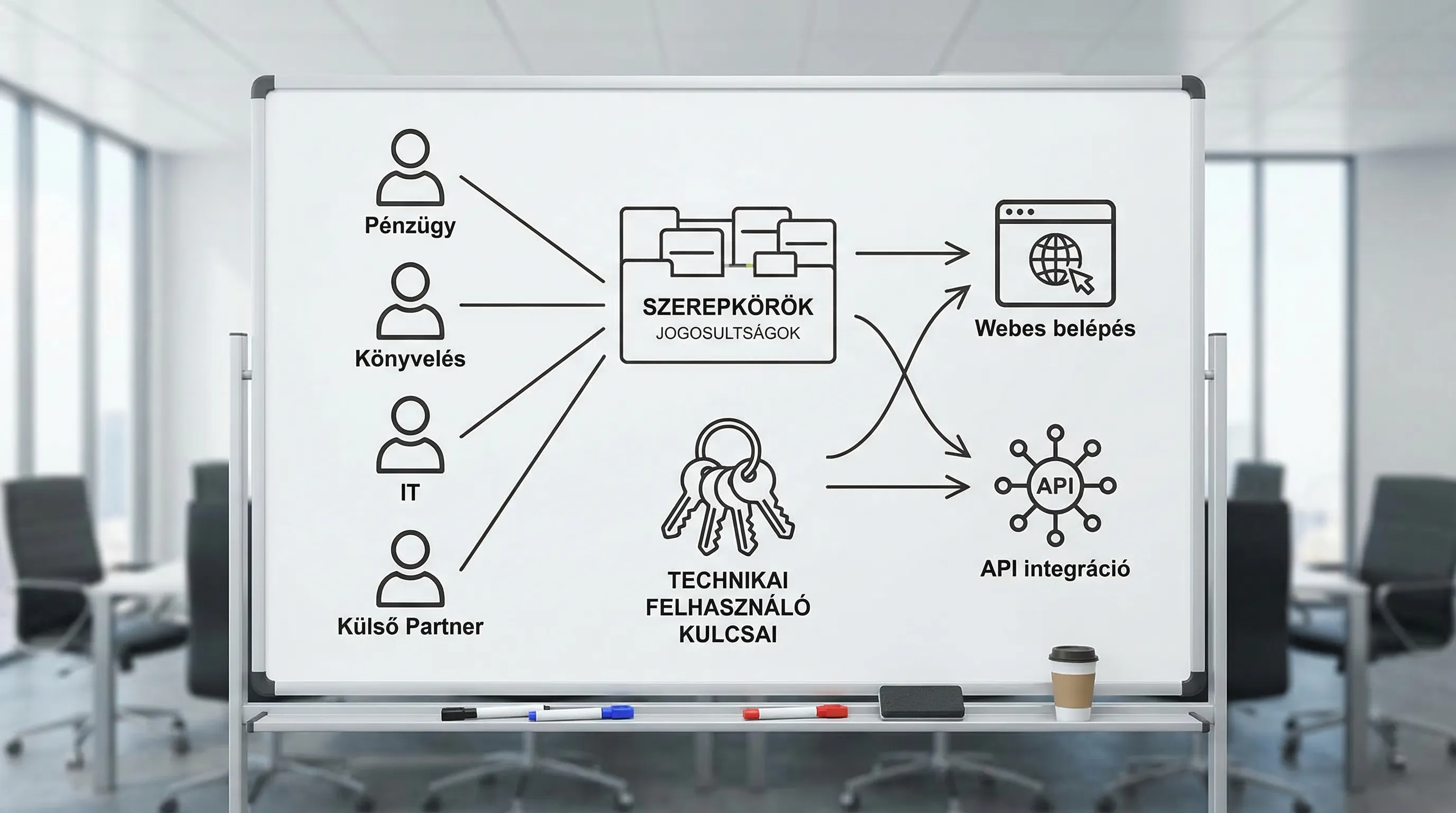
In reality, two interconnected but distinct “worlds” of entry tend to overlap:
Web interface login (for human users): via KAÜ authentication (e.g., login via the Client Portal), followed by company context and NAV Online Invoice permissions.
Machine-to-machine access, integration (API, technical user): the billing system, ERP, middleware, or integration service “communicates” with the NAV using a technical user and keys.
Most of these problems stem from the fact that the company only considers one layer of the system, while treating the other on the assumption that “the developers will figure it out.”
Roles and permissions: the bare minimum that works in practice
When assigning NAV access rights and permissions, the goal is not to make everyone an administrator, but rather to:
billing and data reporting should not be interrupted due to human error,
so that an audit can determine who did what,
In the event that an account is compromised, the damage should be limited.
If you’re interested in learning more about access management and security best practices (RBAC, MFA, logging, and rules for admin and service accounts), we recommend reading Syneo’s related article: E-invoice Login: Access Management and Security Best Practices.
Typical roles within a company that are subject to NAV
The following classification is not a "NAV designation," but rather a corporate operating model that can be adapted for NAV web and API access.
Role (corporate) | Who is usually there? | What do you need access to? | A common risk when you have too many privileges |
NAV Chief Administrator (Owner) | Chief Financial Officer or designated representative | User management, role assignment, technical user lifecycle management | A single account failure or compromise can have a major impact |
Billing provider | billing specialist, back office | Daily operations, monitoring feedback, and first-level troubleshooting | accidental setting changes if granted admin privileges |
Accounting/Controlling | internal accounting or SSC | data retrieval, reports | Data protection transparency (multiple companies, multiple tax ID numbers) |
IT/Integration Manager | IT, system integrator, operations | Support for technical user configuration, key management, and monitoring | Key management error if there is no process and no rotation |
External service provider (accountant, developer) | partner company | only the necessary scope (limited in terms of time, function, and taxpayer group) | "Permanent" access, difficult to revoke upon leaving |
The "three distinct rights" that many people confuse
When logging into the NAV e-invoice system, there are typically three overlapping levels of authorization that need to be clarified:
Authentication permission: whether the user can log in via central authentication.
Authority to act on behalf of an organization (in a corporate context): whether a given person is authorized to act on behalf of the organization in its affairs.
NAV Online Invoice System Permissions: Which functions you can access within the NAV interface (for the given tax number).
If the error message says “I can’t see the company,” it’s almost always a problem with representation or permissions within the NAV system—not a “password error.”
Quick check: where might you run into trouble when logging in?
If the NAV e-invoice login isn’t working, it’s a good idea to troubleshoot the issue “step by step”; this way, within 10–15 minutes, you’ll know which team (Finance, IT, or the integrator) needs to address it.
1) KAÜ/identification layer
Typical phenomena:
Logging in redirects you back to the login page,
Authentication was successful, but it cannot proceed to the NAV interface,
the user logs in using an "unexpected" method (for example, using personal identification instead of a company-level procedure).
Here are the most common causes: using multiple accounts on the same device, browser session issues, or a browser environment that is heavily regulated by corporate IT.
2) Selection of a company and tax ID number, representation
A common issue: the user logs in, but the section associated with the tax ID number is "empty," or the relevant taxpayer cannot be reached.
In such cases, it is often not a NAV error, but rather:
the chain of representation is not in order,
The person who should have become the "main admin" didn't
If there are multiple tax ID numbers, the entry is in the wrong context.
3) NAV Online Invoice permissions within the interface
A common issue: the menu items are there, but when you try to perform an action, you get a "permission denied" message.
The solution here is generally to assign the appropriate roles and access rights within the NAV system and to clarify who the authorization manager (main admin) is for the given tax ID number.
4) Technical users and API integration
A common issue: web access works fine, but the billing/ERP system “can’t submit” data, and the monitoring system reports 401/403 errors.
In such cases, it is best to handle them separately:
Is the technical user active?
Are the keys correct, have they expired, or have they been overwritten?
Did the IP restriction or environment setting (production vs. test) get messed up?
Check whether the system's time synchronization is correct (some authentication mechanisms may be sensitive to the time).
Error codes and error messages: here’s how to figure out the cause quickly
Important: In NAV systems, an “error code” can refer to a user interface error message, an API response code (such as HTTP 401/403), or a business validation error (such as invalid data). The most accurate and up-to-date code lists are always provided in NAV’s official documentation, particularly on the developer portal.
In practice, however, most errors can be accommodated within a few samples.
Common Errors and Solutions (Web + API)
Symptom / error code | Most likely cause | Urgent action | Who does it belong to? |
"Invalid username/password" error | incorrect authentication method, incorrect account, session stuck in the browser | private window, clearing cookies, using the correct username | user + IT support |
You can log in, but you can't see the tax ID number | lack of authority to act or incorrect context | Verify user permissions and clarify the designation of the main administrator | Finance/Legal/Administration |
"You do not have permission to perform this operation" | There is no role defined within NAV | Assignment of roles, review of minimum permissions | NAV Chief Administrator |
HTTP 401 (Unauthorized) on API call | Technical user information, signature, and keys are incorrect | Verify keys, load the correct values from the secret manager | IT/Integration |
HTTP 403 (Forbidden) on API call | Authentication is present, but there is no permission or the scope is incorrect | Verification of technical user permissions and environment (test/production) | IT/Integration |
HTTP 429 (Too Many Requests) on API call | Too many requests, faulty retry logic | rate limit, backoff, scheduling optimization | Development/DevOps |
XML/Structure Rejection | Schema or required field error, version mismatch | XSD/structural validation before submission | development |
"Submission successful," but later rejected by the company | Business rule violation (partner data, tax base, dates) | Validation rules and master data maintenance | Finance + IT |
What to save in case of an error (so the error ticket isn't just a "screenshot")
If you're looking for a quick solution (especially when working with an external developer or integrator), the following information is invaluable:
exact date and time and applicable tax number
user type (human user or technical user)
On the website: error message text, affected menu item
For the API: HTTP status code, response body, correlation IDs (if any)
Were there any changes (permission changes, key replacement, release, network rule changes)?
This is important because a significant portion of NAV-related issues arise after a change, and answering the question “What has changed?” cuts troubleshooting time in half.
Access Control Design in 2026: A Workable, Audit-Friendly Model
Many companies make the mistake of “setting up” their NAV access once and then leaving it untouched for years. In 2026, however, typically:
several systems are linked to invoicing (ERP, e-invoicing, DMS, accounting),
involves multiple teams (finance, sales, IT, external accountant),
The lifecycle of keys and access rights (rotation, revocation) is becoming increasingly important.
A tried-and-true example:
There should be two designated NAV chief administrators (a primary administrator and a deputy), and their responsibilities should be documented.
Technical users' keys should not be stored in email or Excel, but rather under controlled access controls.
External partners should be granted only time-limited, revocable access.
Digitalization isn’t just a matter of finance and IT. You see the same controlled, role-based access in digital healthcare services as well, such as in solutions involving 3D planning for digital orthodontics, where it is particularly important to determine who has access to what, given the need to manage patient data and treatment plans.
When should you consult an expert?
NAV e-invoice access and permissions typically become "project-ready" when:
there are multiple locations, multiple tax ID numbers, and multiple accounting units,
Data reporting is sent from the ERP system or from multiple invoicing systems,
frequent crashes (401/403, authorization errors),
Due to an audit or internal controls, you must demonstrate your access management practices.
In such cases, it’s not enough to simply “set up” the system; the entire process must be stabilized: roles, key management, monitoring, error handling, and documentation.
Frequently asked questions (FAQ)
What is the difference between web-based NAV access and a technical user? Web-based access is performed by a human user (using KAÜ identification), while a technical user is required for API integration, when a system communicates automatically with NAV.
Why can I log in but can't see the company's tax ID number? This is typically due to issues with company representation or access permissions within the NAV system. In such cases, the problem is not usually related to a password or browser error, but rather to verifying company representation and NAV roles.
What do the 401 and 403 errors mean in the NAV API? A 401 error typically indicates an authentication issue (key, signature, technical user), while a 403 error often indicates a permission or access restriction issue (scope, environment, access rule).
What information should I send to the developer/IT team so they can resolve the issue quickly? The date and time, tax ID number, the operation involved, the error message or HTTP status code and response, and whether any changes were made (key change, permissions, release).
How can we ensure that access rights are not managed by a single person? By designating two main administrators (an owner and a deputy), documenting access rights, and implementing controlled lifecycle management for access credentials and keys (issuance, rotation, and revocation).
Stable NAV e-invoice login and integration: Syneo support
If you regularly encounter issues logging into the NAV e-invoice system (due to permissions, roles, technical user accounts, or API errors), the quickest solution typically involves a brief assessment and establishing a clear operational model: who is the main administrator, what roles are needed, where are the keys stored, how do you monitor the system, and what is the error-handling process.
The Syneo team provides digital and IT consulting as well as integration support to help you get your NAV-related access points and associated systems (ERP, invoicing, operations) up and running. To get started, check out our services at Syneo.hu, and let’s discuss your specific situation.
