Electronic Invoice in XML Format: Fields, Validation, EN 16931
E-Invoice
Electronic Invoices in XML Format: Fields, Validation, EN 16931 | Syneo
What should an EN 16931-compliant e-invoice XML contain? Field groups, XSD and Schematron validations, PEPPOL/UBL decision criteria, and tips for NAV and ERP integration.
digitization, e-invoicing, XML, EN 16931, UBL, PEPPOL, validation, XSD, Schematron, NAV, ERP, data quality, integration
March 25, 2026

In structured e-invoicing, PDFs are now at best a supplementary document for human readers; machines and partners’ systems look for the essential content of the invoice in XML. If the fields don’t match, validation fails; if validation fails, processing stops (or worse, the invoice is quietly posted incorrectly). By 2026, as expectations surrounding EN 16931 intensify, this will be less of an “IT technicality” and much more of a financial and compliance risk.
This article provides exactly what an IT team supporting finance and a project manager leading an implementation need: what the typical field groups are in the XML format of electronic invoices, what the multiple layers of validation look like, and what all of this means in terms of EN 16931 (the European e-invoice standard).
What does “e-invoice XML” mean, and how is it related to EN 16931?
In practice, the term “electronic invoice in XML format” does not refer to a single file structure.
EN 16931 is a European standard that primarily describes the semantic data content of an invoice (which data elements, according to what logic, and in what relationships).
This semantic model can be “mapped” to XML using various syntaxes; the most common ones are:UBL (frequently used in B2B integrations; PEPPOL is also based on this) andUN/CEFACT CII (also widely used in the European context).
In addition, the XML format used for NAV Online Invoice data reporting is a separate system in Hungary, which in many cases coexists with e-invoicing from an integration perspective. Since the purposes of the two XML formats may differ, it is not advisable to assume that the fields correspond on a one-to-one basis.
Valid starting points:
European Commission e-Invoicing Background Documents (EN 16931): European Commission e-Invoicing
PEPPOL BIS Billing Specification and Validation Materials: PEPPOL BIS Billing
NAV Online Invoice Technical Documentation: NAV Online Invoice
Typical structure of an invoice XML (logic of field groups)
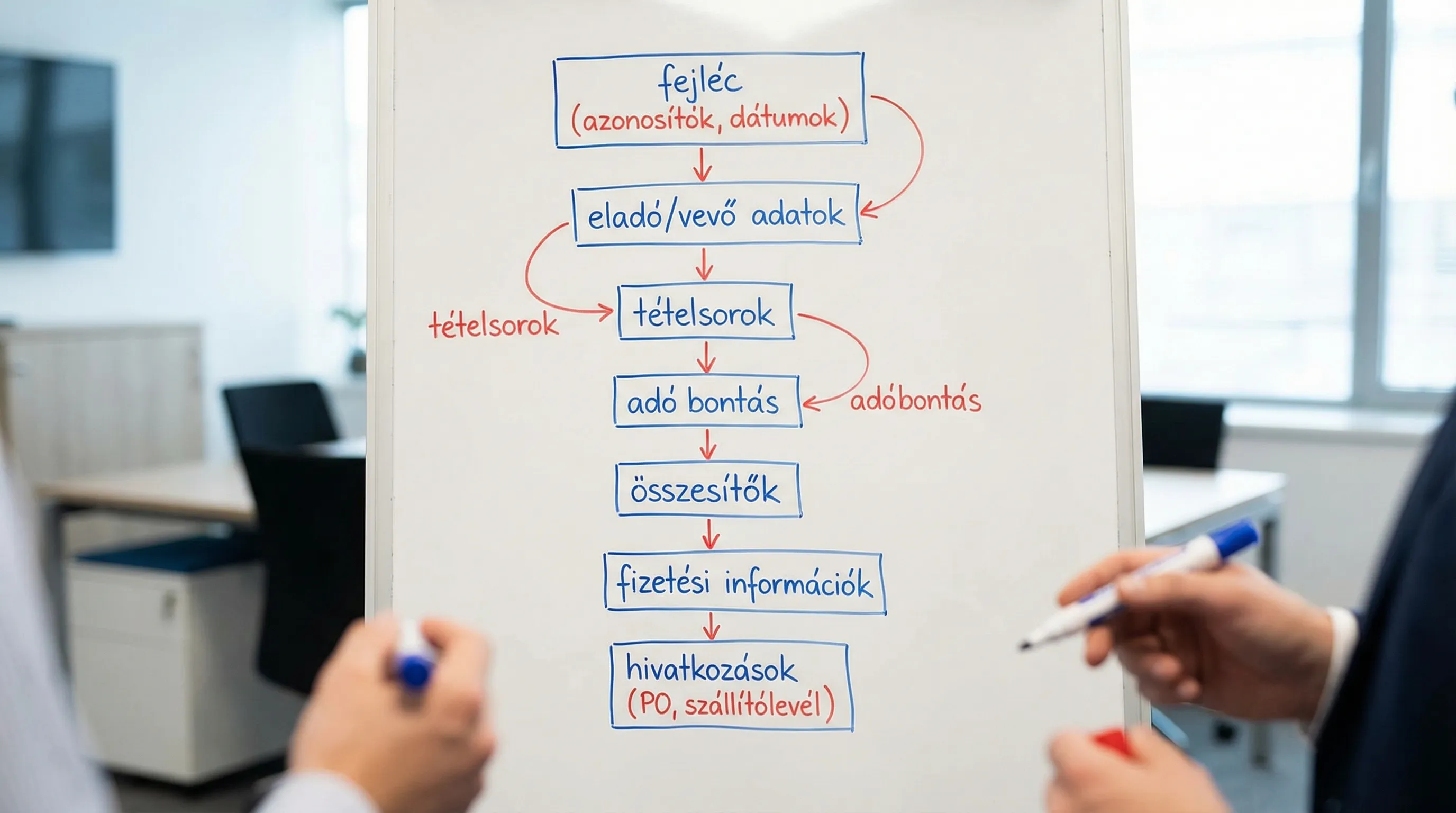
No matter which standard XML format you look at (UBL or CII), the structure is very similar from a business perspective: header, parties, lines, taxes, totals, payment, and references.
The table below is not a "tag dictionary," but rather an implementation checklist: it outlines the role of each data group and where issues typically arise.
Field group | Why is it critical? | Common mistakes (from real projects) |
Invoice identifiers (invoice number, serial number, type) | Uniqueness, Accounting, References | Duplicate invoice number, incorrect type (invoice vs. reversal/correction), missing reference for a modifying document |
Dates (issuance, fulfillment, due date) | VAT deadlines, payments, reports | The completion date is inconsistent with the issue date; missing due date; incorrect time zone/formatting |
Supplier information | Legal entity identification, taxation | Incorrect tax ID format, missing country code, inconsistent address and company information in the master data |
Buyer's information | B2B processing, partner validation | Customer ID (e.g., VAT number) is missing, incorrect address format, partner-specific field marked as required |
Line items | The Basics of Automatic Bookkeeping and Account Assignment | Quantity unit is missing; handling of negative rows is incorrect; item number and description do not match |
VAT and tax breakdown | Mandatory legal and accounting logic | Tax base and taxable value do not match the total; incorrect breakdown for multiple tax rates; discrepancy due to rounding |
Totals (net, VAT, gross) | Validation Focus | The subtotal and total in the header don't match; discounts were applied incorrectly |
Payment information (method, due date, IBAN) | Automatic payment, partner processing | Missing payment method, non-ISO-compliant currency, incorrect bank account format |
References (order, delivery note, contract) | 3-way reconciliation, audit | Incorrect format, unclear identifiers, poor handling of multiple orders |
From the perspective of EN 16931: What makes an e-invoice XML "good"?
The essence of EN 16931 is not that the invoice “must be in XML,” but rather that it must contain data elements that are machine-processable and have a uniform meaning. In practice, this means three things:
1) Required data elements and consistency
Most rejections occur not because the "XML is incorrect," but because required data is missing or contradictory (for example, the VAT breakdown does not match the total).
Practical tip: The quality of your master data (partners, items, tax codes) matters far more than the elegance of your serializer code.
2) Code lists and standard identifiers
The foundation of interoperability is that everyone understands the same thing by the same value. Typical examples:
Currency: ISO 4217
Country: ISO 3166-1
Unit of measurement: often UN/ECE code lists
If you enter these as "free text," they will likely be rejected by partner processing systems, PEPPOL channels, or validators.
3) CIUS and partner-specific rules
In many contexts, there is a restriction or extension to EN 16931 (such as CIUS or network profiles). PEPPOL BIS Billing, for example, is one such case: it specifies not only the fields but also business rules.
Result: Of the two "EN 16931-compliant" XML files, one is sent to the partner, while the other is not, because the partner expects a different profile.

Validation: XSD, Schematron, business rules, and what they're used for
Many people think of the term “validation” as a single step. In reality, there are several layers, and each one catches different errors.
Type of validation | What does it check? | What doesn't it catch? | When should you run it? |
XSD (schema) | Structural compliance (elements, data types, required elements in the schema) | Consistency of amounts, business logic, profile rules | Immediately after XML generation, before sending |
Schematron / business rules | Mathematical and logical rules, profile requirements (e.g., PEPPOL) | Your internal process rules (e.g., a mandatory PO number for a specific supplier) | Before sending and when processing incoming invoices |
Partner / Integration Validation | Specific customer requirements, EDI mapping, additional fields | General standardization when the partner is poorly specified | Continuously sampling in real time during the pilot phase |
Operational controls | Idempotence, retry/backoff, statuses, logging | Semantic correctness | Continuously, in live operation |
Why isn't XSD enough?
An invoice can be validated using XSD even if the gross amount in the header does not match the sum of the line items, or if the VAT breakdown is incorrect. These are business rules that are typically defined at the Schematron level.
A fast yet auditable validation sample
Even if you don't have much time to do it "properly," it's still worth keeping at least this much order:
Pre-flight: XSD and business rule validation for all generated outputs.
Error handling: Store the validation error (rule code, field path, invoice ID) and make it available for reporting in the backlog.
Sampling: Regularly check even the successful outputs (for example, new partners, new VAT rates, new currencies).
If NAV data reporting is also involved, here’s a helpful resource from the practical troubleshooting page: NAV e-invoicing: common errors and quick solutions for businesses.
Critical areas where most projects fail (and how to avoid them)
VAT breakdown and rounding
This is where most automatic processing errors occur. Typical causes:
Mixing row-by-row rounding with cumulative rounding.
The line allowance is being deducted in the wrong place.
On invoices with multiple VAT rates, the breakdown does not match the total.
Recommendation: Coordinate the rounding rules with the finance team in advance and document them in your test cases (not just "at the code level").
Identifiers: tax ID numbers, partner IDs, references
In many cases, the company name alone is not sufficient for e-invoices. Automation requires identifiers:
tax ID number / VAT number,
company registration number or other registration identifier,
partner-specific identifier (such as a customer ID).
If these are missing from the master data, the XML will not be processable, no matter how "clean" it is.
Items: unit of measurement, quantity, unit price
The item list forms the basis of AP automation and ERP accounting logic. Common errors:
The product of quantity and unit price does not match the net value of the line (rounding, discount).
The unit of measurement is not in the code list; the partner's validator rejects it.
The handling of negative items during adjustments or reversals is inconsistent.
Currencies and Exchange Rates
If there is multi-currency billing:
Specify the currency in which the VAT and the total amount are calculated,
make it clear where the exchange rate is displayed and what date it refers to,
Ensure compliance with accounting requirements (particularly regarding exports and intra-Community transactions).
Implementation Decisions: UBL or CII, PEPPOL or Direct Integration?
The right decision depends on your partner ecosystem and compliance requirements, not on which XML format the developers prefer.
Practical decision-making criteria
Partner requirement: If customers request PEPPOL, you must comply with the BIS profile.
Ecosystem: If the invoicing system/ERP already provides stable support for a particular syntax, it is advisable to prioritize that syntax and align the mapping with the standard.
Validation tools: Which approach provides the team and the supplier with a reliable set of validation tools?
Useful background information on the regulatory context and deadlines: E-Invoicing 2026: What Every Business Owner Needs to Know About the New Rules.
Testing and Acceptance: What "Evidence" Should You Request from the Supplier?
If you’re adopting an e-invoice XML implementation (invoicing system, ERP add-on, middleware, iPaaS), simply being told “we’ve sent you three samples” isn’t enough. The minimum requirements to ensure lower operating costs in the long run are:
Sample package: typical and special cases (multiple VAT rates, discounts, foreign currency, advance payments, corrections, reverse charge, exports).
Validation report: XSD and business rule validation results for each sample.
Field map: master data field → XML field group logic (specifically tax codes, units of measure, partner IDs).
Error handling specifications: what happens in case of a rejection, where the error is displayed, who fixes it, and what the retry policy is.
Archiving and audit trails: how to prove data integrity and access control retrospectively.
From the perspective of archiving and issuance, here is an SME-friendly, auditable checklist: E-Invoice 2026: Checklist for Issuance and Archiving.
Operations and Stability: XML Is Just the Beginning
Many projects run into trouble because the XML is generated and "passes validation," but the production process is unstable.
Minimum operational requirements for e-invoice integration:
Statuses (completed, validated, sent, delivered, rejected, retried).
Idempotent submission (the same invoice should not be sent twice due to a network error).
Retry/backoff and alerts (no need for a person to monitor errors 24/7, but there should be an SLA).
Logging and auditability (who sent what, when, and with what validation result).
If both channel and process security are concerns, it is important to clearly understand the role of digital signatures: Digital signatures on electronic invoices: will they be required in 2026?
How can Syneo help if your XML e-invoicing gets "stuck"?
The implementation of e-invoice XML in accordance with EN 16931 typically involves multiple systems (invoicing, ERP, tax reporting, DMS/archive, banking, EDI/PEPPOL). In such cases, the issue rarely lies with a single XML tag, but rather with a combination of data, integration, and processes.
In such situations, Syneo can typically provide support tailored to specific needs:
clarification of requirements and partner profiles (EN 16931, CIUS, partner-specific expectations),
Developing a data map and data quality rules for ERP/invoicing master data,
Designing a validation pipeline (XSD + business rules + operations),
integration stabilization and monitoring (error handling, idempotence, state models),
Auditable minimum standards for archiving and access management.
If this topic is also relevant from an integration architecture perspective, see the related background article: System Integration: How to Integrate ERP, CRM, and BI.