Receiving electronic invoices: a checklist for accounting
E-Invoice
Receiving electronic invoices: a checklist for accounting | Syneo
Practical checklist for accountants and finance teams on electronic invoice processing: channels, validation, duplicate checks, archiving, and automation.
electronic invoice, receipt, accounting, e-invoice, AP, archiving, duplication, validation, automation, NAV, EN 16931, PEPPOL, digitization
April 14, 2026

Many people still talk about electronic invoicing from the “issuer’s” perspective, even though most of the day-to-day risks arise on the buyer’s side—that is, during the receipt of the electronic invoice. This is where accounting first encounters reality: mixed formats (PDF, XML), varying levels of supplier compliance, incomplete master data, duplicates, and an increasing demand for automated processing.
This article provides a practical checklist for accountants, financial managers, and accounts payable (AP) process owners. The goal is not to turn “everything into a project,” but rather to establish a solid baseline: an auditable process, fewer errors, faster turnaround times, and seamless integration with the general ledger.
Note: This article does not constitute legal or tax advice. If you have a specific situation (cross-border, public sector, EDI, PEPPOL), you should consult with an auditor or tax advisor.
0) Basic Concepts: What Counts as an Incoming E-Invoice?
On the receiving end, there are typically three "realities":
Structured e-invoice (typically in XML format according to the relevant standard): easily automatable, machine-validatable, and integration-friendly.
“Electronic” PDF (email attachment, download from a portal): readable, but often only partially automatable (OCR, data extraction, human verification).
EDI / network channel (e.g., PEPPOL): high level of control, good auditability, but requires integration capabilities and partner readiness.
The intake checklist works when Accounting and IT are on the same page regarding what constitutes an “incoming invoice”: which channels are considered official, where the system-of-record is located, and how the path from receipt to accounting can be verified.
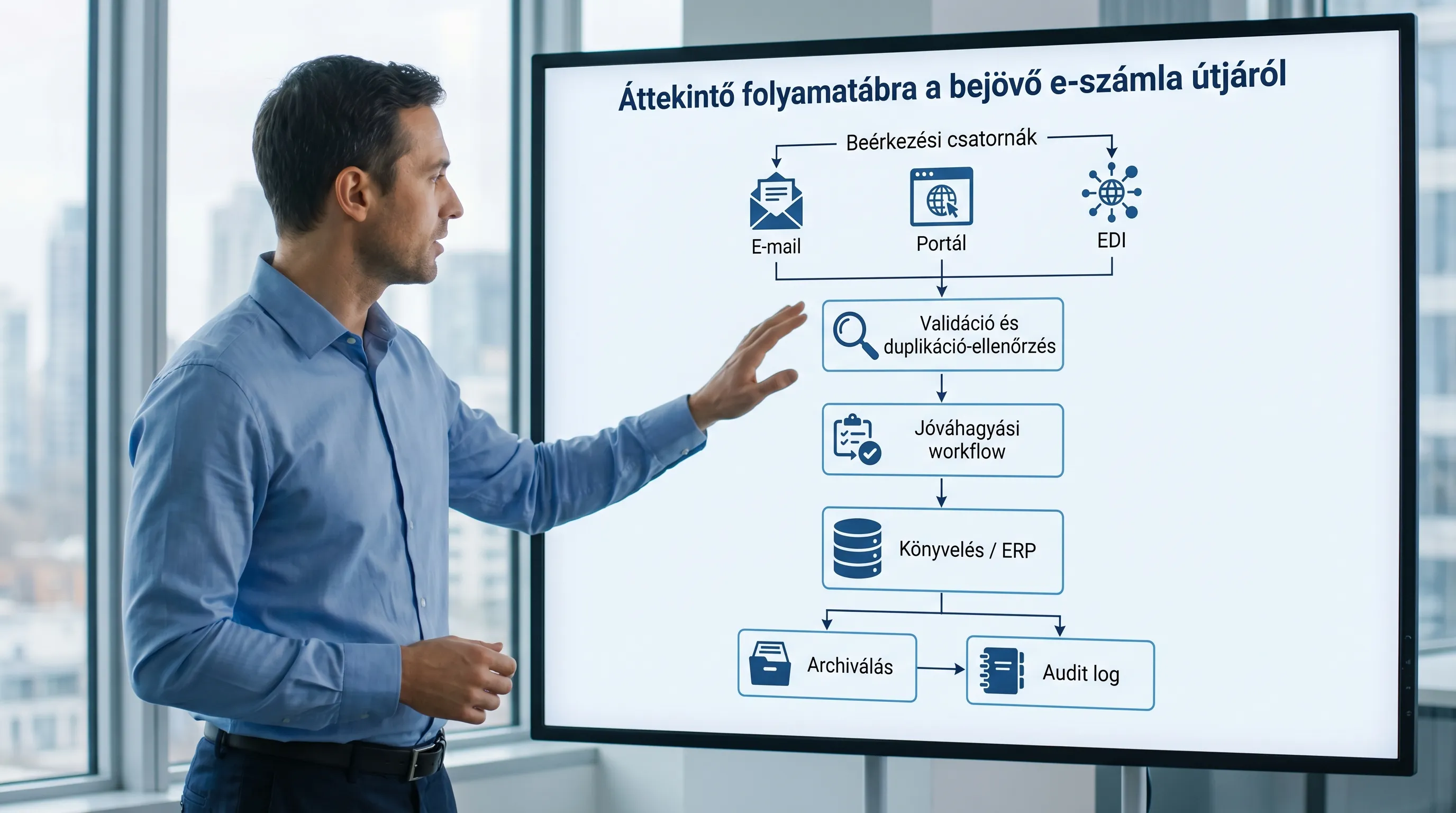
1) Checklist: Channels and Responsibilities (Before You Automate Anything)
Most mistakes aren’t in the invoice itself, but rather in questions like “which mailbox did it go to?” and “who saw it first?”
Minimum requirement: There must be a documented onboarding model approved by both Finance and IT.
Check the following
There is a designated official channel (or channels) for receiving shipments, and suppliers use it.
There is a dedicated AP email address/inbox, and access is restricted (it is not a "shared password" solution).
With portal-based suppliers, it is clear who is responsible for the download and how it will be tracked (log, ticket, saved in the DMS).
For EDI/PEPPOL, operations are documented (monitoring, error handling, retries, SLA).
The system of record (typically a DMS, AP automation tool, or ERP) must be specified, and it is strictly prohibited to “leave it in email only.”
Quick Risk Map (useful for internal coordination)
Channel of receipt | Typical risk | Minimum control |
Email attachment (PDF/XML) | It gets lost, duplicated, and access is chaotic | Dedicated mailbox, automatic routing to the DMS/AP system, access controls, and logging |
Supplier Portal | “I downloaded it, but I can’t find it”—no audit trail | Download manager, backup policy, traceable identifier (e.g., account number + partner) |
EDI / PEPPOL | Integration errors go unnoticed | Monitoring, error queue, operations runbook, regular reconciliation |
Paper + Scanning | Quality varies, OCR makes mistakes | Scanning standard, field-level verification, exception handling |
2) Checklist: validation of form and content (minimum accounting requirements)
Receipt does not simply mean that “a file has arrived.” The goal is to ensure that it can be recorded in the books and processed for VAT purposes, and that it remains verifiable and retrievable at a later date.
Minimum formal requirements
The invoice is human-readable (not just machine-readable).
The supplier can be clearly identified (name, tax ID number, and address details that can be matched to your internal master data).
It includes the account number, date of fulfillment, date of issue, payment due date, and currency.
The items and amounts appear to be mathematically consistent (net, VAT, gross).
Content validation: something worth making a standard
Partner master data match: The partner data on the invoice matches the internal supplier master data (or there is a workflow for master data correction).
Duplicate check: There must be a check for (at least) the combination of invoice number, supplier, amount, and date.
PO / Contract reference: Where required, the absence of this information should automatically be treated as an exception.
3-way match (optional, but recommended): order, goods received (GRN), and invoice.
VAT principles: reverse charge, exemptions, and foreign VAT should be handled in accordance with accounting rules (exception handling and professional review are particularly important here).
If you receive structured e-invoices (XML), part of the validation process can be automated. Useful background information on the European framework for standard e-invoicing: summaries of the EN 16931 e-invoicing standard.
3) Checklist: authenticity of origin and integrity of data content (audit approach)
From an accounting perspective, one of the most important questions is: if there is a dispute or audit two years from now, can it be proven that:
the invoice came from the sender it claims to have come from (origin),
and has not been altered along the way (integrity),
and can be retrieved and understood later (readability).
This can be ensured in several ways (digital signatures, EDI/PEPPOL, or auditable internal controls). The key is a documented and consistent process.
Client-side controls that are strongly recommended
Clear channel rule: only accept invoices received through the designated channel.
Recording/logging: Include a timestamp indicating when the entry was received, who recorded it, and the ID used.
Change tracking: If any changes are made (such as re-uploading or replacing a file), they must be versioned and accompanied by a justification.
Separation of duties (SoD): The person who records transactions should not be able to approve and post them on their own.
If you often wonder about the role of digital signatures, you might want to read Syneo’s summary: Digital signatures on electronic invoices: Will they be required in 2026?
4) Checklist: Approval Workflow and Exception Handling (Not Just Finance)
Recording scales when the accounting system does not “investigate” but rather applies a set of rules.
Minimum workflow elements
Approval levels based on spending limits (and documented substitutions).
Categories (CAPEX/OPEX, project, cost center) that support accounting.
Exception codes (such as “missing PO,” “partner not in the master file,” “different VAT rate,” “suspected duplicate”).
SLA-related requirements (when a delay is considered a violation, when to escalate).
Tip: The exception rate is one of the best management metrics because it reveals whether the problem lies in supplier discipline, master data, or the rules.
5) Checklist: Accounting Entries and General Ledger Quality
This is where it becomes clear whether automation truly adds value or simply produces inaccurate accounting records more quickly.
Check the drop-off locations
Posting rules (default general ledger accounts, VAT codes, cost centers) are up to date.
The partner and item master data can accommodate the required fields.
The accounting date logic (recognition, period, accrual) is consistent.
The payment status (paid, partially paid, canceled) can be tracked.
If you're considering automating your processes from e-invoices to the general ledger, this Syneo article is a great place to start: Digitizing Accounting: Automation from E-Invoices to the General Ledger
6) Checklist: Archiving and Retrievability (Putting an End to the Question “Where’s the Invoice?”)
From the perspective of the receiving end, the purpose of archiving is not only preservation but also verifiable retrieval.
Minimum Archival Standards
It is clear which is the "original" (source file, such as XML or PDF) and which is the processed record.
The invoice is linked to the relevant business documents (PO, contract, proof of delivery, approval trail).
Backup and access control: who has access, who can export, who can delete (ideally, no one “deletes” anything—only versioning).
Routine test: You can retrieve randomly selected invoices in a matter of minutes and display the complete audit trail.
Syneo’s summary may serve as a useful reference for understanding the legal and practical landscape: Electronic Invoicing Regulations in 2026: A Brief Summary
7) Checklist: Supplier Agreements and “E-Invoice Declaration”
Acceptance is often painful because it is unclear whether the supplier:
in what format you're sending it,
where are you sending it,
what counts as delivery,
what happens in the event of an error,
and how the archiving process works.
It’s a good idea to formalize these arrangements (especially with large suppliers and for regular invoicing). A good starting point for this is: E-invoice declaration: what should it include to be audit-ready?
8) A one-page internal checklist (that you can actually print out)
Many companies include the table below verbatim in their internal checklists (for example, for quarterly self-assessments or audit preparation).
Area | Checkpoint | Evidence (example) | Typical responsible person |
Channel | Defined Inbound Channels and Blocked Channels | Acceptance Policy, Supplier Guidelines | Finance Manager, AP Owner |
Access | Dedicated mailbox/portal access, logging | Permissions list, MFA/SSO settings | IT, Security |
Filing | Every incoming invoice is entered into the system of record | DMS/AP log, receipt ID | AP team |
Validation | Required fields, partner matching, duplicate detection | Validation rules, exception report | AP + Accounting |
Workflow | Approval and substitution documented | Workflow configuration, approval log | Business Unit Owner |
Postage | Accounting and VAT rules have been updated | Mapping table, change log | Chief Accountant |
Archiving | Version history and rollback are supported | Archiving Policy, Restore Test Report | IT + Finance |
Monitoring | Defect rate and lead time measured | Dashboard/Monthly Report | Finance Manager |
9) Common mistakes when receiving electronic invoices (and quick fixes)
Most organizations fall into the same traps:
“Everyone has their own inbox”: multiple inboxes, multiple portal users, no centralized filing system. The solution: one channel, one system of record, one process.
Duplicates (resends, multiple channels): Solution: duplication rules and exception handling.
Master data issues (missing tax ID, cost center, payment terms): Solution: master data owner, required fields, simple correction workflow.
“Automated” poor accounting: fast but inaccurate posting. Remedies: spot checks, rule tuning, and coding the reasons for exceptions.
Archiving as an afterthought: it becomes expensive and risky later on. The solution: make archiving part of the process, not a separate project.
10) A quick, 10-day stabilization plan (if things are chaotic right now)
If your posture has become unstable today, it’s a good idea to do a short, focused stabilization exercise.
Days 1–3: Closing and mapping data channels, defining the system of record, and organizing access permissions.
Days 4–6: Implement duplication filtering and minimum validation; define exception codes.
Days 7–10: Fine-tuning the workflow, establishing minimum archiving requirements, and conducting a retrieval test involving 5–10 invoices (audit drill).
Frequently Asked Questions (FAQ)
What makes the acceptance of an electronic invoice auditable? The key to auditability lies in a combination of a documented channel, logged receipt, version control, an approval trail, and retrievable archiving.
Is it enough to simply receive the PDF invoice via email and save it? It might work in the short term, but the risks are high (lost emails, duplication, and confusion over access rights). At the very least, it’s worth filing and logging them in a DMS/AP system.
What should we look out for when receiving XML e-invoices? We need technical validation (standards and fields), business validation (partner, duplication, PO), and a clear error handling process (what to do if the XML is incorrect or incomplete).
Is a digital signature required for incoming e-invoices? This isn’t always the best or only option. In many cases, the transmission channel (such as EDI) and auditable internal controls ensure authenticity and integrity. The decision depends on the process and the risks involved.
How do we measure whether the onboarding process has improved? Typical metrics include: turnaround time (from receipt to posting), exception rate, number of duplicates, touchless rate, and impact on closing time.
Next step: Let’s make onboarding faster and more audit-proof
If you’d like to streamline your electronic invoice processing so that it’s accounting-friendly, automatable, and verifiable all at once, the Syneo team can assist you with assessment, process and control design, and integration (ERP, DMS, AP automation, NAV connections).
Check out the related materials to help you prepare:
How to Implement Electronic Invoicing: A Practical Guide for Beginners
Digitization of accounting: automation from e-invoicing to general ledger
If you’re interested in a brief, targeted review (channels, controls, workflow, archiving), get started with Syneo by contacting us via syneo.hu.
