Formal requirements for electronic invoices: what constitutes an error?
E-Invoice
Formal requirements for electronic invoices: what counts as an error? | Syneo
When is an e-invoice considered to have a technical error in 2026? Common technical errors, blocking vs. correctable discrepancies, rapid triage, and preventive controls from an accounting and IT perspective.
electronic invoice, formatting error, XML, EN 16931, NAV, validation, archiving, duplication, accounting, automation, e-invoice
April 16, 2026

With an electronic invoice, an “error” does not always mean that the amount is incorrect or the VAT rate is wrong. Often, it is a technical discrepancy that causes the buyer’s system to reject the invoice, the NAV validation to fail, or the process to be unverifiable during an internal audit (who issued it, when, what it contained, and whether it was modified afterward).
In this article, we’ll examine what constitutes a defect in 2026 from the perspective of formal requirements, how defects should be classified (blocking vs. fixable), and what immediate steps can be taken to stabilize the release and acceptance process.
What does “formal requirement” mean in the context of electronic invoices?
In practice, the formal requirement means that the invoice:
contains the minimum data required by law (invoice identifiers, party details, line items, tax information, amounts, etc.),
remains legible and understandable throughout the retention period,
its origin (authenticity) can be verified, and it has not been altered (integrity of data),
the chosen electronic format (such as structured XML) undergoes technical and business validation.
These requirements stem partly from tax and accounting regulations and partly from the technical standardization of e-invoicing (such as the EN 16931 standard for structured e-invoices). In Hungary, due to the combination of the NAV Online Invoice data reporting system and e-invoicing practices, “formal errors” often result in technical rejections.
Related background materials on the Syneo website:
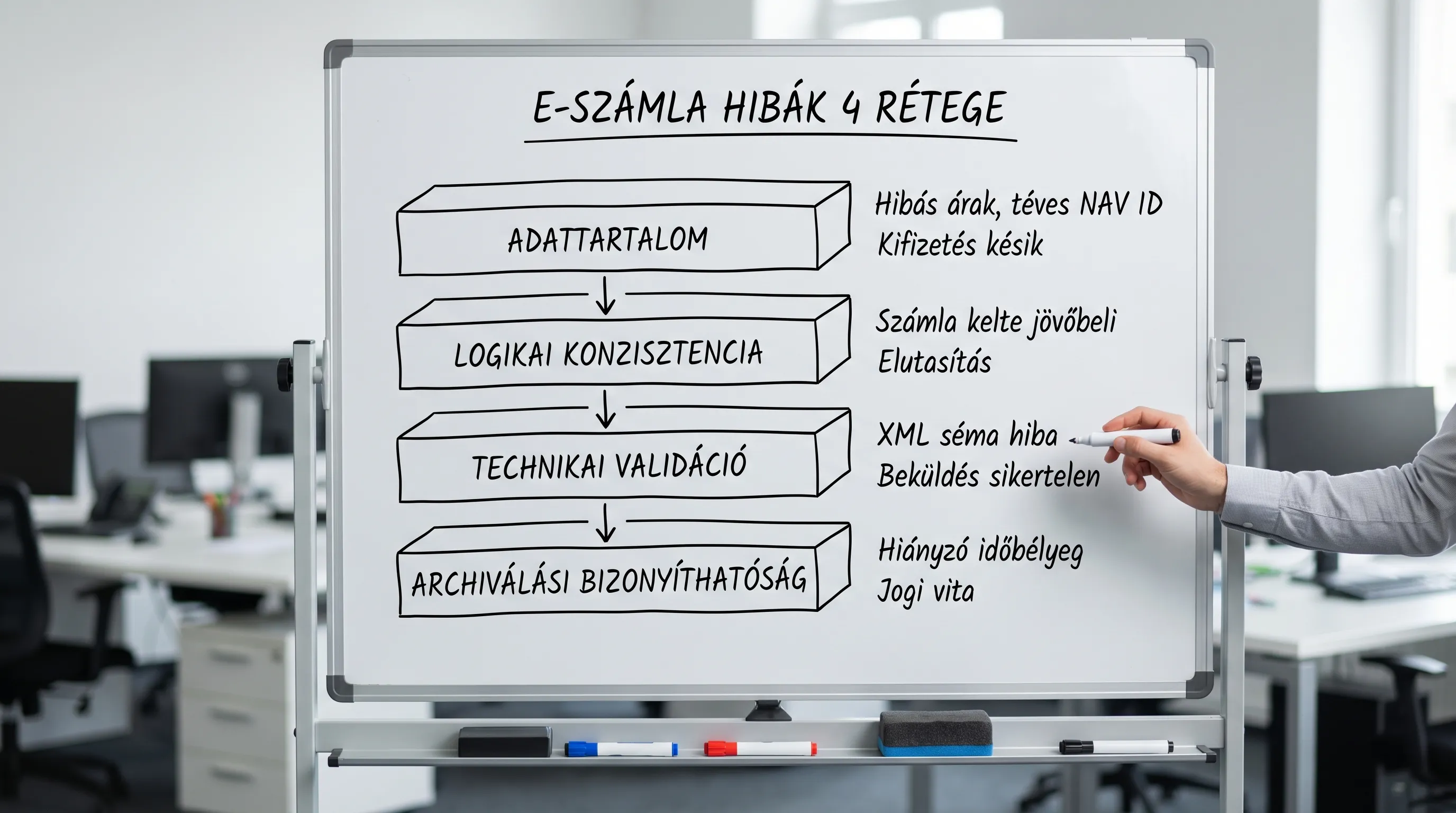
The most common formatting errors: 4 "error layers" where the invoice goes wrong
When it comes to electronic invoices, it’s a good idea to examine errors across four layers, because each one is identified in a different place and can be corrected in a different way.
1) Missing or incorrectly filled-in required information
This is the classic "minimum account balance" tier. Typical formatting errors:
Missing or non-unique invoice number (duplicates, incorrect number range, sequential numbering restarted without verification).
The issue date is missing, or it is in a format that the receiving system cannot process.
The seller's information is incomplete (name, address, tax ID number), or the tax ID number is invalid.
Customer data is incomplete, particularly in B2B processes where automated accounting and partner master data matching take place.
The completion date (if applicable) is missing or inconsistent.
The descriptions of the items are too general (“service,” “product”), and they cannot be recorded in the books due to internal recognition rules.
Important: Some of these are legal requirements, while others are “company-specific formal requirements” (such as cost center, PO number, contract number). The latter are not necessarily legal requirements, but they can still lead to rejection if the buyer’s AP process blocks them.
2) Mathematical and logical inconsistencies (formally, "there is a field," but it doesn't add up)
These errors are particularly common in integrations (ERP → billing system → NAV → customer). Typical examples:
The net, gross, and VAT amounts for the line items do not add up to the total (due to rounding, exchange rates, and the handling of multiple VAT rates).
Discrepancy between the VAT rate and the tax amount (for example, a 0% rate but a tax amount is still shown).
A negative quantity or unit price on a document where the recipient does not support this (would expect corrective logic).
The currency and exchange rate fields are missing, or the calculation is inconsistent.
These are often not "substantive issues" but rather formal processing errors: the receiving system cannot reliably process them automatically.
3) Format and validation errors (XSD, schema, field length, character sets)
With structured e-invoices (such as EN 16931-compliant XML), some of the errors are purely technical:
A required field is missing from the schema,
the date format is incorrect,
the field is too long,
You're using the wrong code set (e.g., unit of measure, country code).
In such cases, the invoice typically fails at the validation gate and doesn't get any further.
A useful addition from a developer's perspective:
4) Errors in the form of documentation and archiving (auditability)
Even if the invoice “passes” through the systems, it could fail an audit if you can’t prove:
When did you put it up?
how did you deliver it,
that the inventory has not changed,
so that it remained readable and searchable throughout the retention period.
This issue does not always result in immediate rejection, but it can pose a serious risk (internal controls, partner audits, tax audits). Related topics:
What counts as a “blocking error” and what counts as a “correctable deviation”?
The biggest difference in operation is that the error:
blocked: the invoice cannot be accepted, processed, or submitted (e.g., schema error, missing required field, duplicate invoice number),
can be corrected, but is risky: it passes, but later causes disputes, manual work, or audit questions (e.g., missing PO number, overly general line item description, incomplete proof of delivery),
Warning: This won't cause the process to fail, but it undermines automation over time (for example, inconsistent units of measurement or mixed rounding rules).
The good news is that this logic can be translated into a simple set of rules and measured automatically (error rate, top errors, rejections per partner).
Common formal errors and the correct response (quick reference table)
The table below is not a legal opinion, but rather a practical, operational approach: what to consider “requiring immediate correction” and what to treat as an exception.
Error type | Typical example | Why is that a problem? | Recommended first step |
Required information is missing | Missing customer tax ID number / address | Partner master data synchronization and posting are stuck | Correction, re-billing, or adjustment of master data in consultation with the accountant |
Duplicate account number | The same serial number on two invoices | A legal and technical risk; an audit issue | Number ranges, billing configuration, idempotence in integration |
The numbers don't add up | Total of line items ≠ grand total | Automated accounting and tax audits can fail | Standardization of rounding rules, testing of currency/exchange rate logic |
The logic of VAT is contradictory | The amount of 0% + VAT is still listed | Tax risk and processing error | Verification of tax rate rules, expansion of test cases |
XML schema error | Incorrect date format, missing element | Submission/transfer rejected | Integration of XSD validation prior to publication, version control |
Incorrect character set | Unknown unit code | Customer processing is stuck | Standardization of code sets (EN 16931 compatibility) |
Proof of delivery is missing | It is unclear when he left | In the event of a dispute, it is difficult to prove | Delivery logging, statuses, and confirmation management |
Archiving is not audit-compliant | No traceability, no proof of integrity | Risk during an audit | Review of the archiving process and permissions |
“We found an incorrect e-invoice”—what should we actually do?
The most common mistake is that the team tries to “rewrite” the file after the fact or resend it using the same ID. While this may seem tempting in the short term, it poses a serious audit risk in the long run.
A functional, audit-friendly decision tree looks more like this:
1) Where did the process go wrong?
Before release (internal validation): ideal case—fix it here.
When submitting data to the NAV / via the technical gateway: typically a format or required field error.
Upon receipt by the buyer: often, required company information is missing (PO number, cost center) or there is a discrepancy in the partner master data.
During archiving/auditing: lack of traceability.
2) Is a correction or a reversal necessary?
If the invoice is already in the system as an issued document, the "correction" is typically made via a corrective or reversal entry. The exact method depends on the company and accounting context, so it is advisable to consult with an accountant and tax advisor.
3) Is the error a one-time occurrence or a system-wide issue?
One-time: partner master data issue, a rare exception.
System-wide: rounding, VAT logic, invoice number conflicts, XML version change. This requires rapid stabilization.
Here's some practical help:
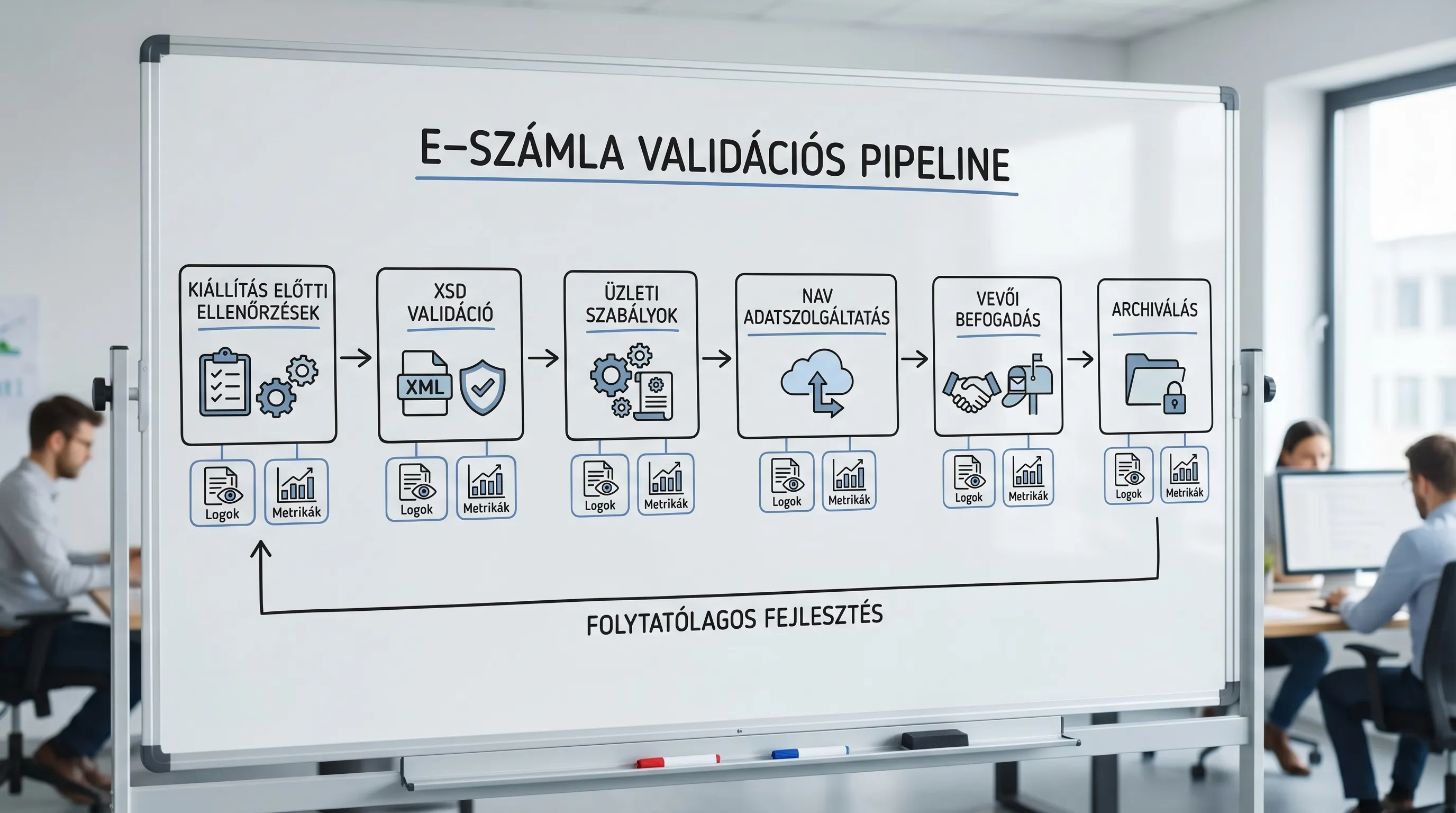
Prevention: the 6 checks that eliminate 80 percent of formatting errors
You don’t need to launch a “major initiative” right away. For most organizations, a few targeted checks will yield quick results.
"Validation" of required fields and master data
Before issuing an invoice, perform a basic check: buyer/seller master data, tax ID format, address, currency, and payment terms.
XSD and business validation as two separate steps
XSD/schema: "technical validity".
Business rules: amounts, VAT logic, dates, rounding.
It’s worth measuring these two separately because they’re handled by different teams (IT vs. Finance).
Numbering and Idempotence in Integration
Duplicate serial numbers and duplicate submissions are typical "hidden" errors. A fundamental principle of integration is that the same event must not be accidentally recorded or submitted twice.
Delivery statuses and logging
Make sure it is traceable:
when did you generate it,
when did you send it,
whether the buyer has received it,
Was there a rejection, and what was the error code?
Archiving: Retrievability and Access
Archiving is not just “storage space.” The question is whether, in 3, 5, or 8 years:
will you find it,
Can it be proven that it has not been altered?
Only those who need it have access.
Metrics: Common Errors and Top Errors
Without metrics, you’re left with nothing but a “gut feeling.” Even a simple dashboard is enough:
rejection rate per partner,
Top 10 causes of errors,
average repair time,
the proportion of invoices subject to manual intervention.
External references (standards and regulatory background)
If you'd like to explore the framework and terminology in more depth:
NAV Online Invoice Portal and Documentation: NAV Online Invoice
eIDAS Regulation (on electronic identification and trust services): EUR-Lex 910/2014
Frequently Asked Questions (FAQ)
What is the difference between a formal error and a substantive error in an e-invoice? A formal error typically involves an error in required data, technical format, or processability (missing fields, schema errors, inconsistent amounts). A content error is more likely to be a business or tax error (e.g., wrong product, incorrect fulfillment, incorrect tax handling). In practice, the two often overlap, because a “content” error can also cause formal inconsistencies.
If the customer rejects the e-invoice citing a formatting error, is it “invalid”? Not automatically. Customer rejection is often due to a processing rule (e.g., missing PO number). However, if mandatory data is missing or the invoice identifiers are problematic, this could pose a genuine compliance risk. In such cases, it’s worth clarifying quickly: is this a legal minimum error or a company acceptance rule?
What will be the most common blocking errors in 2026? For most organizations, the top three are: missing or incorrect partner master data (particularly tax ID and address), inconsistencies in amounts and rounding, and XML/schema validation errors (version changes or incorrect field formats).
Can I make changes to an electronic invoice file after it has already been issued? From an audit and compliance perspective, this is risky. Generally, the correct approach is to follow a standard correction or reversal procedure, or to fix the data or system settings that caused the error. It is advisable to consult with an accountant regarding the specific steps to take.
How can you quickly determine whether an error is related to data, format, or process? The most effective approach is triage based on the “4 layers”: mandatory data content, logical consistency, technical validation (XSD), and archiving evidence. If this is combined with logging and error code collection, most cases can be classified within 15 minutes.
Reliable e-invoicing with fewer rejections: Syneo support
If you regularly receive customer rejections, encounter NAV errors, or have concerns about the auditability of your archiving, it’s a good idea to start with a brief, targeted assessment.
The Syneo team provides support for e-invoicing projects in the areas of process, integration, and information security: rapid triage of errors, development of validation rules, and ensuring compliance with minimum monitoring and archiving requirements.
Next steps: Check out our services on the Syneo website, or read the E-Invoicing 2026 guide to get ready.
