Cloud migration for SMEs: cost, security, scheduling
Other
Cloud migration for SMEs: cost, security, scheduling | Syneo
Practical guide for SMEs on cloud migration: realistic cost estimates, minimum security requirements, and realistic scheduling (discovery → pilot → wave migration → hypercare).
cloud migration, SME, Cloud, FinOps, security, GDPR, migration, backup, cutover, infrastructure
February 18, 2026

For many SMEs, cloud migration is not a "big digital leap" but a very down-to-earth business decision: how much will it cost per month, how much risk are we taking with our data, and when can we make the switch without bringing the company to a standstill?
This article will help you put together a realistic cost estimate, minimum security requirements, and an acceptable schedule before requesting a quote or choosing a supplier.
What do we mean by cloud migration in the case of SMEs?
For SMEs, "moving to the cloud" typically involves three models. The exact cost, security, and timing depend largely on which one you choose.
Switching to SaaS: the system (e.g., CRM, email, document management) is a ready-made service that you subscribe to. Here, the focus of migration is on data, permissions, and processes.
Lift-and-shift (IaaS): You "move" existing servers to virtual machines in the cloud. It can be fast, but it's easy to end up with "expensive servers running in the cloud."
Modernization (PaaS, containers): You partially redesign the system for more scalable, automated operation. More preparation, but better long-term TCO and operability in return.
If your primary goal is to reduce costs, you may also want to read our related article: How does cloud-based software reduce costs?
Costs: what makes up the price of cloud migration?
The most common misconception is that "the cloud is cheaper because there are no servers." The reality is that you will have different types of costs, and without cost control (FinOps basics), it can actually be more expensive.
The 3 layers of costs
One-time migration costs: assessment, planning, data migration, integrations, testing, cutover.
Ongoing cloud costs (run): computing capacity, storage, data traffic, backups, licenses, managed services.
Organizational and security costs: authorization management, auditing, logging, incident management processes, training.
Typical cost elements for SMEs (quick map)
Cost element | What does it apply to? | What drives the cost up/down? | Where do you slip up most often? |
Discovery and architecture | system inventory, dependencies, target architecture | number of inherited systems, documentation | "We'll see as we go along" approach |
Data migration | data quality, mapping, historical data | data duplication, missing master data, old Excel files | lack of data owner, lack of test data |
Integrations | ERP, invoicing, email, file server, APIs | number of interfaces, real-time requirements | "Invisible" integration of manual processes |
Security (baseline) | IAM, MFA, encryption, logging | regulated industry, sensitive data | late start entitlement model |
Operation and support | monitoring, backup, patching, SLA | 0-24 demand, critical systems | unclear responsibilities |
Optimization | cost control, autoscaling, cleanup | technical maturity, labeling | "everything always runs" setting |
Quick, practical cost control measures (FinOps minimum)
The goal here is not to "have a FinOps team," but to have limits and visibility from the first month.
Cost tagging is mandatory: project, system, environment (dev/test/prod), owner.
Spending alerts: weekly and monthly limits, instant alerts for overspending.
Right-sizing and shutdown policy: cleaning up unused resources, running the dev environment during "working hours" where possible.
Security: how can the cloud be "at least as secure" as on-premises?
Cloud security is not automatic. Service providers typically work according to a shared responsibility model: they provide the cloud platform, and you are responsible for access, data, and many configuration decisions. (A good starting point for an overview is the AWS Shared Responsibility Model description; the logic is similar for other major providers.)
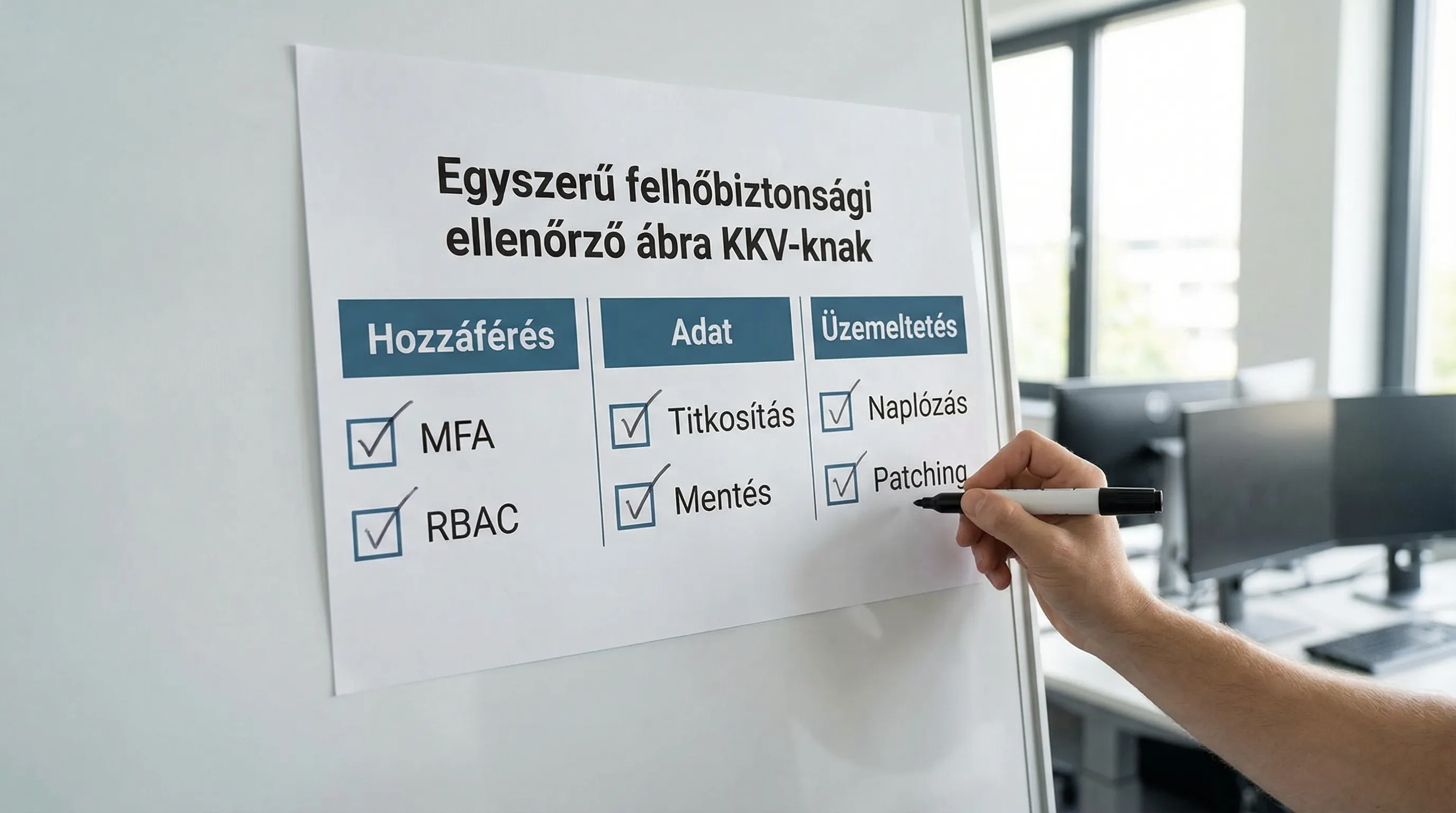
The 7 most important cloud security decisions for SMEs
1) Identity and Access Management (IAM)
Most incidents are not "hacking," but rather overly broad permissions, shared accounts, or missing MFA.
Minimum safety requirements:
MFA for all admin and remote access
Role-based access control (RBAC)
Separation of privileged access (separate admin account, separate logging)
2) Data protection and GDPR
For SMEs, cloud migration is often also a GDPR project. It is not only important where the server is located, but also:
where and for how long you store data,
what rights they have to access it,
how you can prove that you are following the rules.
Summary and official starting point: EDPB (European Data Protection Board).
3) Encryption and key management
Encryption during storage and transmission should be standard.
If you have sensitive data (e.g., health, financial), key management (KMS) and access logging are critical.
4) Backup, restore, ransomware resistance
The cloud is not a backup. The backup strategy is a business issue: how much data loss is acceptable (RPO) and how much downtime (RTO).
Practical minimum:
3-2-1 logic (multiple copies, separate storage, at least one "separate" environment)
immutable backup, where possible (not easily deletable)
restore test (not only backup is made, but it also works)
5) Logging and incident management
If something happens, you need to know what happened. To do this, you need:
central log collection,
alerts,
basic incident procedure (who does what, when).
CIS Benchmarks is a good reference for a detailed, practical baseline.
6) Network segmentation and secure access
The "everything open, then protected with a password" approach is typically a bad start. It is worth clarifying this during the planning stage:
what should be public,
what should be private,
how users log in (VPN, SSO, Zero Trust approaches).
7) Supplier compliance and auditability
For most SMEs, the goal is not to obtain ISO 27001 certification, but to operate in an auditable manner. It is useful if the chosen service provider has recognized certifications, which is a good starting point for understanding the logic: ISO/IEC 27001 overview.
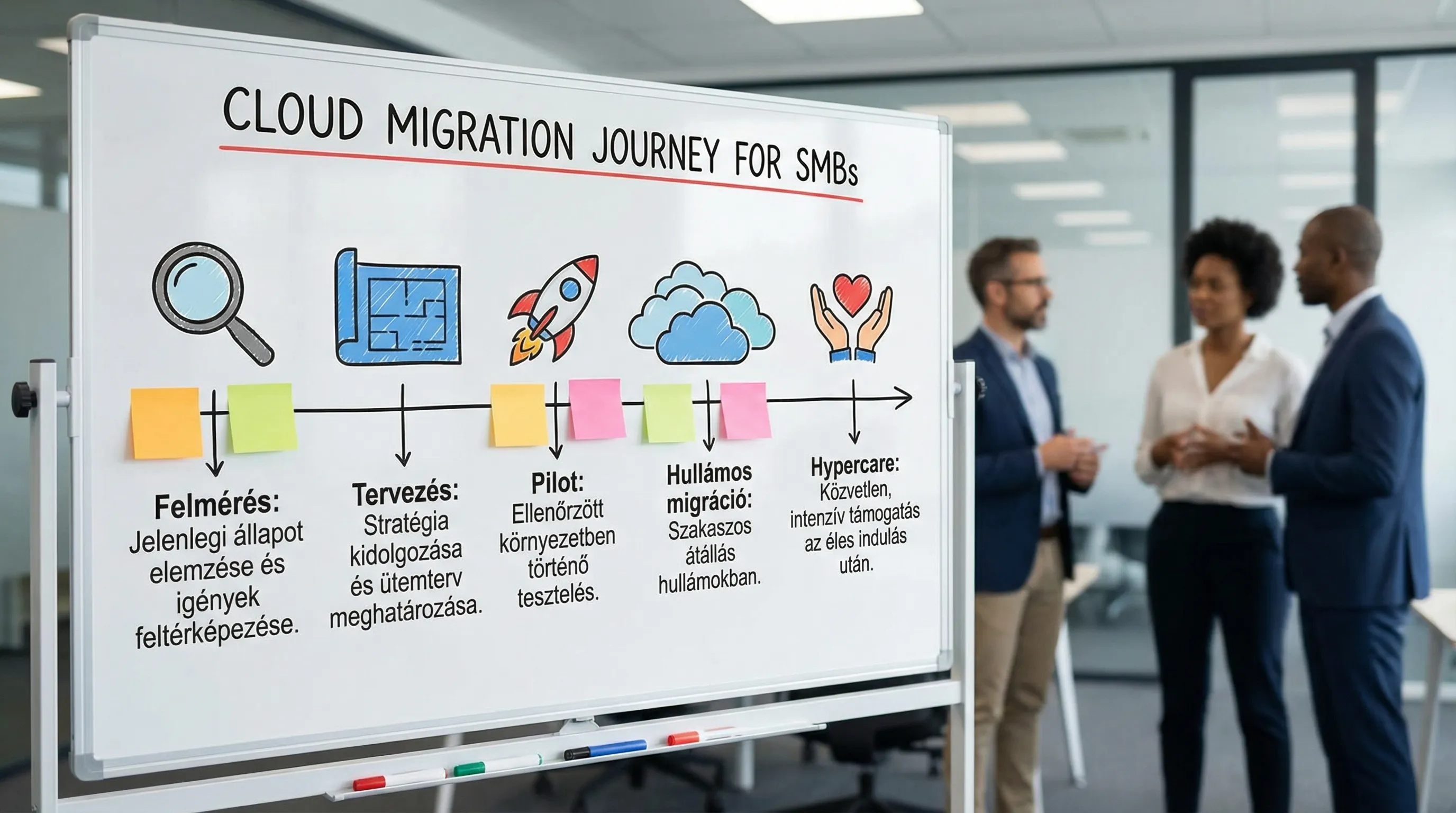
Timeline: How long does cloud migration realistically take?
Most SMEs slip up because they have a "go-live date" but have not developed a migration scenario and rollback plan.
Typical schedule for SMEs (in bands, not promised)
The following timeframes apply if management is available to make decisions, a business manager has been appointed, and the system is not completely a "black box."
Phase | Goal | Typical duration | Tangible output |
Survey (discovery) | system inventory, risks, scope | 1–3 weeks | migration backlog, dependency map |
Planning | target architecture, security baseline, cutover plan | 1–3 weeks | migration plan, RPO/RTO targets, authorization model |
Pilot / proof | 1-2 system, learning cycle | 2–6 weeks | operational pilot, measurement data, refined estimates |
Wave migration | main systems, integrations, data | 4–12 weeks | gradual transitions, stabilization |
Hypercare | increased support after go-live | 2–4 weeks | incident list, repairs, operational handover |
Scheduling decisions that matter most in reality
Big bang or gradual transition?
Big bang: you switch all at once. Shorter transition, greater risk.
Wavy: by system, by process. Longer project, more manageable risk.
For SMEs, a gradual transition is often safer, especially if ERP, CRM, and finance are integrated.
When should the cutover be?
The cutover is not just an IT event. It should be a time when:
low transaction volume,
the business can tolerate "downtime,"
There is an internal key person available for approval.
What should the rollback plan be?
Not having a rollback plan isn't courage, it's risk. At the very least, you should know:
what is the point at which you can still turn back,
how much data would be lost,
who makes the decision.
Common pitfalls that make cloud migration expensive and risky for SMEs
"Let's move first, then optimize."
This can work, but only if cost measurement and owner responsibility are in place from day one. Without this, lift-and-shift can easily become permanent overspending.
Underestimation of integrations
In addition to visible systems, there are also "hidden" integrations: export-import, email rules, Excel-based master data maintenance, manually uploaded files. These must be extracted in discovery.
Late handling of entitlements and data quality
If permissions and master data cleanup are left until the end, go-live will be delayed. This is very similar to the pattern seen in ERP implementations. Related reading: ERP implementation pitfalls: 9 mistakes that cost millions
Security "after the fact"
Security in the cloud is often a configuration issue. If you try to "add it on" later, you'll end up with a lot of rework.
Decision-making framework: when is it worth getting involved (and when is it not)?
Cloud migration is the best decision for SMEs if several of the following apply:
the current infrastructure is at the end of its life cycle (replacement, license, hardware obsolescence),
the operational burden increases (patching, backup, availability),
you want to accelerate development and release (DevOps, automation),
there are compliance or customer requirements (audit, logging, access),
scaling needs arise (seasonal load, new site, new market).
However, if you have a single system that rarely changes and your on-premises environment is stable, then in many cases a more narrowly focused modernization (backup, authorization, monitoring) will provide the best ROI instead of the "cloud."
A practical "SME migration package": what deliverables should you ask your partner for?
A good migration partner doesn't just "copy the servers," but also manages risk and business continuity. Recommended minimum outputs:
System inventory and dependency map (what we talk about)
Célarchitecture and decision log (why it turned out this way)
Security baseline (IAM, logging, backup, encryption minimums)
Cost model and cost control plan (tagging, alerts, optimization)
Cutover and rollback plan (time window, responsibilities, checkpoints)
Operating model (SLA, monitoring, incident management, handover)
If migration is part of a larger digitization program, it is worth thinking at the system level. Syneo's 5F approach can help with this: Step-by-step corporate digitization: a proven framework
Frequently Asked Questions (FAQ)
How much does cloud migration cost for an SME? The cost consists of three parts: one-time migration work, ongoing cloud operation, plus security and organizational expenses. The exact amount depends on the number of systems, integrations, and data quality, so it is worth starting with discovery.
Is the cloud really more secure than your own server? It can be more secure, but not automatically. The service provider and the customer share responsibility, so the quality of IAM, backup, logging, and configuration is crucial.
How long does it take to migrate to the cloud? For SMEs, it typically takes a few weeks to a few months, depending on whether it is a SaaS migration, lift-and-shift, or modernization. Pilot and wave migration often reduce risk.
What is a cutover, and why is it critical? A cutover is the period of live transition. It is critical because it determines business continuity: it requires testing, a rollback plan, communication, and responsible decision-making.
What are the most common cloud cost pitfalls? Oversizing, leaving unused resources running, missing tagging, and lack of spending alerts. It's worth getting these under control in the first month.
What should I pay attention to when moving multiple systems (ERP/CRM/CMS) together? Integrations and data will be the bottleneck. Without a dependency map, designation of data owners, and early clarification of the authorization model, there is a high chance of delays.
Next step: plan your migration so that risks do not become apparent during go-live.
If you are planning cloud migration, the fastest and cheapest way to prevent errors is to conduct a short, structured assessment: system inventory, integrations, data, security baseline, cost model, and a realistic schedule.
The Syneo team supports SMEs from planning to implementation with its experience in digital transformation, DevOps, and information security. See how we can help you and request a consultation on the next steps: Syneo.
