Software Development Curriculum: A 12-Week Study Plan for Beginners
Other
Software Development Curriculum: 12-Week Study Plan for Juniors | Syneo
A 12-week practice-oriented learning plan for junior software developers: weekly focus areas, hands-on exercises, mini-projects, Git, testing, CI, and a portfolio.
software development, junior, curriculum, 12 weeks, study plan, Git, CI, testing, API, PostgreSQL, portfolio, AI tools, onboarding, DevOps, security
March 18, 2026

The "from scratch to junior" journey often falls apart because there are no tangible, measurable outcomes: what you need to know in two weeks, what code you need to produce in six weeks, and what your portfolio should look like by the end of week 12.
This article provides a practice-oriented framework for software development training: a 12-week learning plan for junior developers, featuring weekly focuses, assignments, and a comprehensive mini-project. The plan is designed so that you don’t just learn “topics,” but also the developer routines that teams use on a daily basis (Git, code reviews, testing, debugging, APIs, databases, CI).
Who is it for, and what can you realistically expect after 12 weeks?
This study plan is for you if:
You're just starting out and want to supplement a bootcamp or self-study with a structured schedule
As a junior developer, you want to "catch up" with professional work practices
As a team leader, you're looking for an onboarding plan for new junior employees
A realistic goal after 12 weeks (studying 2–3 hours a day and 4–6 hours on weekends):
Building a small web or API-based application from scratch
Clean Git workflow, readable commits, basic pull request culture
Fundamentals of relational databases (tables, indexes, basic optimization)
Basic testing discipline (unit + minimum integration)
Basic CI (lint, test execution, build)
Basic security awareness (input validation, permissions, and the basics of secret management)
It’s unrealistic to expect to “be an expert in everything,” reach a senior level, or gain in-depth “magician-level” knowledge of any complex framework in such a short time. The goal is to build a solid foundation.
How to use this 12-week study plan?
Most juniors burn out because there’s “too much material.” What really matters here is focus and practical results.
Recommended weekly schedule:
Days 3–4: new material + a short assignment
Day 2: Project work (on the same code, in the same repository)
Day 1: Review, error correction, documentation
The plan is structured around a larger mini-project. You add a new skill every week.
Choosing a stack (don't get stuck on it)
The curriculum is stack-agnostic, but choose one on the first day and stick with it for 12 weeks.
Typical, kid-friendly options:
Backend focus: Node.js + TypeScript or Python + FastAPI
Database: PostgreSQL
API: REST + OpenAPI
Frontend (optional): a simple UI (React or any other well-known framework)
If you're a complete beginner, the most important thing isn't having the "best" stack—it's seeing it through to the end.
Settings to configure right from the start
It’s not worth putting these off, because they have a decisive impact on the quality of learning.
Area | Minimum equipment | Why is it important? |
Version Control | Git | The foundation of the work; every team expects this |
Code Editor | VS Code or a JetBrains IDE | Speeds up editing, formatting, and debugging |
Local execution | Docker (optional, but recommended) | Unified environment, DB is easy to launch |
API test | Postman or Insomnia | Quick check, fault isolation |
Documentation | Markdown README | Portfolio and teamwork (minimum requirement) |
Useful basic links (you don't have to read through everything at once):
The Pro Git Book (free)
MDN Web Docs (Web Fundamentals)
OWASP Top 10 (Security Basics)
The 12-week software development curriculum (weekly schedule)
The plan below leans toward a "junior backend" track, because the API + database + testing triangle provides a very solid foundation. If you're a front-end developer, it's still useful—just swap out the UI component for your own area of focus.
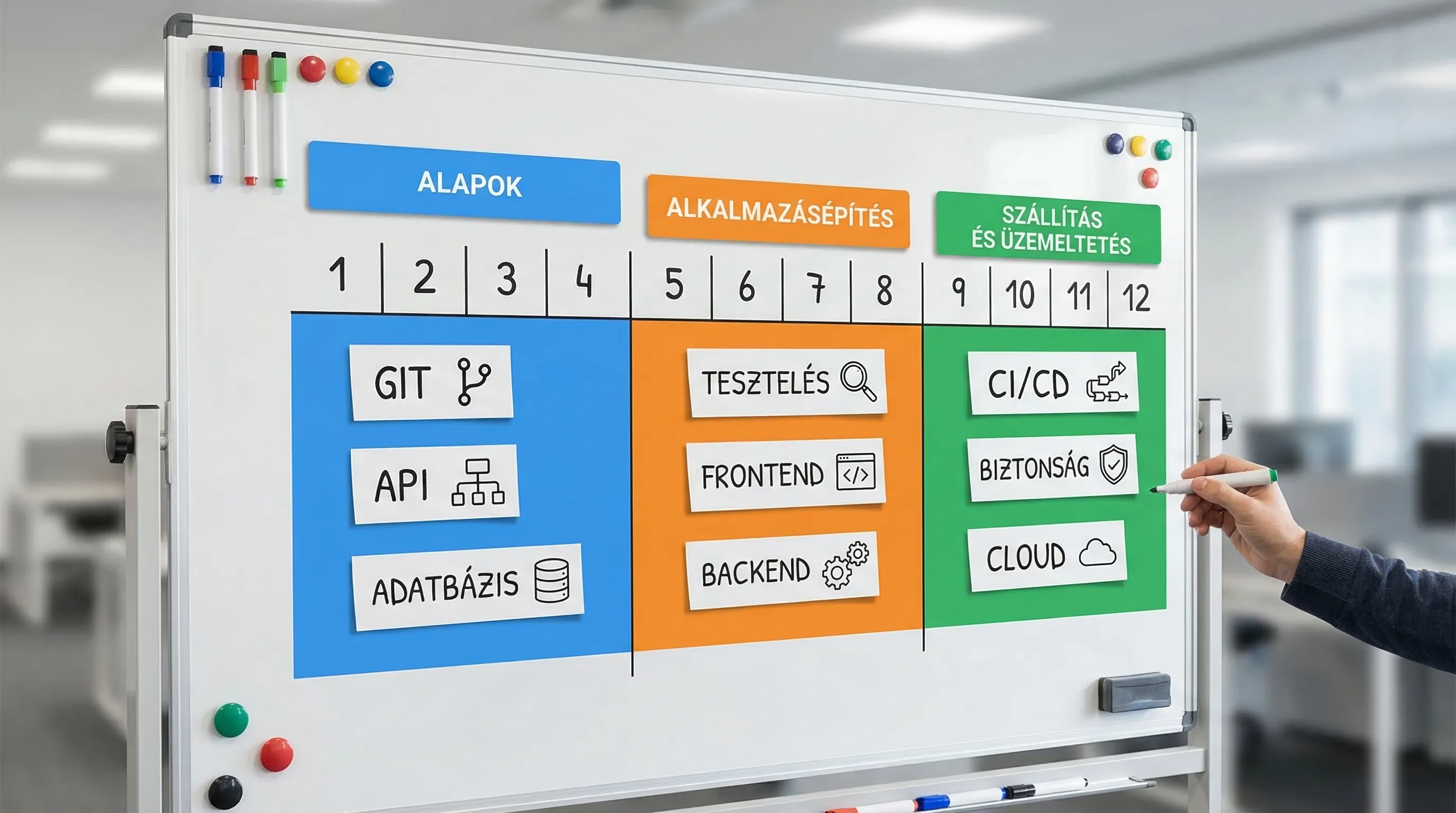
Week 1: Development tools, environment, Git basics
Goal: a stable workstation and basic workflow.
Responsibilities:
Create a Git repository (public or private) and write a standard README
Practice the basics of branching, committing, and merging
Learn the basics of debugging (breakpoints, logging)
Write a small program (a CLI "to-do" list or log parser), just to have a "first release"
Output: repo + 10–20 meaningful commits.
Week 2: Programming Fundamentals, Clean Code, Error Handling
Goal: to write code that is understandable, not just code that works.
Responsibilities:
functions, modules, simple modularization (don't put everything in a single file)
Basic exception handling, error codes, validation
Code style: Introduction of a formatter and linter
Output: Refactored Week 1 code, shorter functions, cleaner structure.
Week 3: Data Structures and Algorithmic Thinking (Junior Level)
Goal: Don’t code “blindly”; understand the cost of operations.
Responsibilities:
Basic usage of lists, maps/dictionaries, sets, stacks/queues
simple search and sorting (not a competition in implementation, but rather in usage)
Describe in the README: when you would choose which option and why
Output: Solutions to 6–10 practice problems, with brief explanations.
Week 4: HTTP, REST basics, first API
Objective: Understand the basics of web communication.
Responsibilities:
HTTP methods, status codes, idempotence
RESTful resource-based approach (e.g., /users, /orders)
Build a simple API (e.g., to-do list, notes, inventory)
Create a very simple OpenAPI description
Output: a deployable API with 5–8 endpoints.
Week 5: PostgreSQL Basics, Schema Design, Migration
Goal: to use the database "intentionally."
Responsibilities:
tables, keys, normalization basics
The concept of an index and when it is needed
Implementation of database migration (using any tool provided by the stack)
Connect the API to the database (CRUD)
Output: Database schema + migrations + documented local setup.
Week 6: Testing Fundamentals (Unit Testing + Integration Testing Basics)
Goal: Have a safety net for changes.
Responsibilities:
unit tests for pure business logic
Integration test for the API (at least the critical path)
Test data management (fixtures, seeds)
Result: The tests run with a single command and actually catch errors.
Note: If you’d like to reinforce this at the team level as well, Syneo’s DevOps material— DevOps Fundamentals: The Path from Zero to Production in 2026—may be helpful in relation to DevOps and quality.
Week 7: Authentication Basics, Authorization, Input Validation
Goal: In addition to "works," it should also be "safe."
Responsibilities:
authentication method (e.g., session-based or token-based solution)
Permission check (at least two roles)
Input validation for all incoming data
Managing secrets using environment variables (don't commit keys)
Output: protected endpoints, role-based logic at a minimum level.
Further reading: OWASP Top 10 for common web risks.
Week 8: Refactoring and Basic Architecture (Layers, Boundaries)
Goal: to avoid ending up with a "spaghetti API."
Responsibilities:
Separate the API layer, the domain logic, and data access
introduce a configuration layer
Write a brief description of the architecture in the repository (what is where, and why)
Output: a clear project structure + documentation.
Week 9: CI Basics (Lint, Test, Build)
Goal: automatic quality gate.
Responsibilities:
Set up CI (e.g., GitHub Actions)
Have the pipeline run Lint, tests, and the build
PR review: merge only after the pipeline turns green
Output: automated checks on every push.
Related: If you want to incorporate security into your pipeline, you might want to check out this article later: DevSecOps in Practice: How to Build a Secure CI/CD Pipeline.
Week 10: Logging, Debugging, "Operational" Thinking
Goal: When something breaks, be able to explain why.
Responsibilities:
structured logs (at least request ID and user ID where possible)
standard error response format (error code, message)
the concept of core metrics (what constitutes success, what constitutes failure)
Result: an API that isn't a nightmare to debug.
Week 11: Deployment approach, containerized execution (optional, but highly recommended)
Goal: It shouldn't just work on your computer.
Responsibilities:
Dockerfile and Docker Compose (API + DB)
Managing environment configurations
Documentation of "one-command" startup
Result: Anyone can set up the project in 10–15 minutes.
Week 12: Capstone week, portfolio, preparation for technical interviews
Goal: to produce a final, presentable result.
Responsibilities:
Choose a real-world problem and “package” the project (e.g., mini warehouse, appointment scheduling, simple ticketing)
Write the final README: installation, execution, architecture, decisions
Write a brief release note: what it can do, and what the next step is
Check the following: code quality, tests, minimum security requirements, CI pass
Output: a polished portfolio that you can open and walk through during an interview.
What should you build for your project? (Great, beginner-friendly ideas)
The project should be small enough that you can finish it, and real enough that you can talk about it.
Good topics:
internal "notes" or "knowledge base" with mini API tags
Inventory management with simple permissions
Appointment scheduling engine (time slots, conflict resolution)
Customer Service Ticket Mini (statuses, comments)
The key points to consider when choosing a project: it should include CRUD, permissions, a database, testing, and CI.
Self-assessment: Minimum junior outcomes (quick assessment chart)
Area | Question | I'm ready if… |
Git | Can I handle PR and manage conflicts? | I'm not afraid of branches, and there's a meaningful commit history |
API | Is the endpoint design consistent? | Status codes and errors are standardized |
DB | Can I explain the pattern? | There are keys, indexes where needed, and migration |
Test | Is there a safety net for critical thinking? | The test really fails if there's an error |
CI | Do I automatically check the quality? | Lint + test runs on every push |
Safety | Am I avoiding basic mistakes? | I'm validating the input; there's an auth key, but no secret in the repo |
Documentation | Is anyone else starting it? | Can be run according to the README |
2026 Update: Using AI Tools as a Junior (Smartly)
AI coding assistants speed things up, but at the junior level, it’s easy to “get away with” not fully understanding the code. A rule of thumb:
Use AI for outlines, alternatives, and explanations
Every time you copy some code, ask yourself, “Can I explain it line by line?”
For security and data protection reasons, never upload company secrets, passwords, or customer data
If you're interested in what developer AI tools are good for—and what they aren't—in 2026, this Syneo article provides some helpful context: AI Software Development in 2026: What Cursor and Its Peers Can Actually Do.
If you coach junior players: how can this be turned into a corporate onboarding plan?
This same 12-week structure works well in a corporate setting if the following conditions are met:
One short mentoring session per week (30–45 minutes) to discuss goals and challenges
mandatory code review (not "nitpicking," but teaching)
Definition of Done (minimum requirements: testing, logging, documentation)
a model project that can serve as a guide
Syneo’s main focus is on custom development and IT/AI consulting, but if your company wants to make the training of junior staff more predictable (workflow, quality gate, DevOps baseline), it’s worth approaching it as a mini delivery system, not just as “training.” With this approach, we’re happy to provide a framework and practical guidance, aligning team operations with your existing processes.
