NAV Online Data Connection: Setup, Testing, Monitoring
E-Invoice
NAV Online Data Connection: Setup, Testing, Monitoring | Syneo
How to set up and maintain the NAV Online Invoice data connection? Setup checklist, test package, error handling, and monitoring for businesses.
NAV, online data connection, testing, monitoring, key management, idempotence, retry, logging, e-invoicing, integration, DevOps, security
April 16, 2026

For most companies, the NAV Online Invoice data reporting system “just works” until a key rotation, a network outage, a schema change, or an unexpected spike in invoice volume occurs. It is only then that it becomes clear that the NAV online data connection is not actually a one-time setup, but a small yet critical integration system: authentication, message sending, acknowledgment handling, logging, error correction, and monitoring.
This article provides a practical overview of:
how to set up the NAV online data connection (securely and in a way that can be audited),
how to test in a way that doesn't put the accounting and IT departments under pressure in a live environment,
What is the minimum level of monitoring required to ensure that you don't discover errors days later?
What does the NAV online data connection mean in practice?
The core of the NAV Online Invoice system is that the invoicing system (or ERP, web store, billing engine) automatically provides data on issued invoices. The "connection" typically consists of API calls, where:
the application authenticates (technical user, keys),
sends the invoice data in the format required by the NAV,
receives the processing confirmation,
and handles errors, resubmissions, and status queries.
Important: Successful data reporting is not just about “submitting the request”; it becomes an operational process (logs, alerts, responsible parties, traceability).
Important resource for developers and operators: the NAV’s official website and documentation are available on the Online Invoice portal.
Setup: Prerequisites and Decision Points (Boxed vs. Custom)
Before you get into the technical details, clarify how your company’s online data connection with the NAV is set up.
Box-based billing / cloud-based billing: Typically, the service provider handles the API integration, while your role is to verify company data, permissions, technical users, and correct settings.
ERP / custom invoicing / online store invoicing: The connection with the National Tax and Customs Administration (NAV) is your responsibility; monitoring and error handling are critical here.
The common thread between the two approaches is this: on the corporate side, there must be an owner (either from the business or IT department) who is responsible for ensuring that the connection remains operational at all times and that appropriate action is taken in the event of any changes.
Setting up an online data connection with NAV: A practical checklist
The checklist below is intentionally designed with an "operational" perspective in mind; it doesn't end with registration.
Area | What should you set up or check? | Typical responsible person |
Access and roles | Who is the main administrator? Who manages the technical user account and keys? Appoint a deputy. | IT + Finance |
Technical user | Create a separate technical user account for integration, not a personal account. | IT |
Key Management | Secure key storage (secrets vault), rotation policy, access logging. | IT Security / DevOps |
Environments | Clear separation between test and production environments (configuration, keys, endpoints). | IT |
Time synchronization | Stable time (NTP), because signature and timestamp-based verifications can be sensitive. | IT operations |
Message validation | Schema validation (where applicable), and verification of required fields and master data prior to submission. | Development |
Error Handling | Retry/backoff, idempotence, dead-letter queue, or "failed items" queue. | Development + Operations |
Logging | Request IDs, invoice IDs, response codes, and error codes can be retrieved. | Oops |
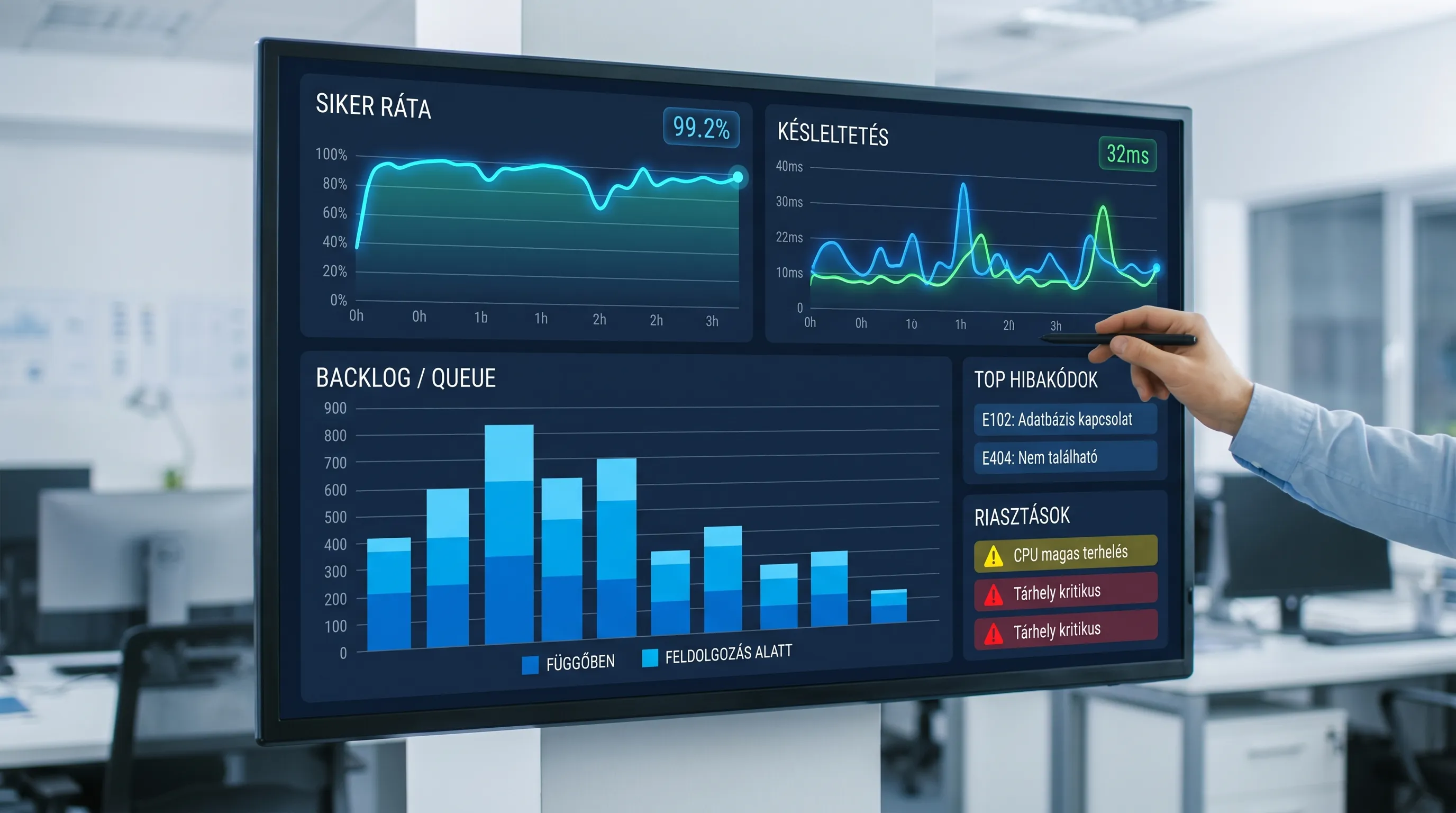
Monitoring and Alerts | Success rate, backlog/queue, response time, error code trends, "no traffic" anomaly. | Oops |
If you’re interested in the broader compliance landscape surrounding e-invoicing and the National Tax and Customs Administration (NAV), you may want to check out Syneo’s summary of e-invoicing regulations for 2026.

Test: How can you check if it will remain stable in a live environment?
A “successful test” isn’t just about submitting an invoice to the test environment once; it’s about covering the scenarios that tend to cause problems in production: cancellations, modifications, peak periods, network instability, and duplicate submissions.
Minimum test suite (smoke test + operational realism)
You can prevent a lot of inconvenience by taking the following tests:
Smoke test: submitting a sample invoice, verifying the response, and checking for the presence of correlation IDs in the logs.
Modification/cancellation process: whatever your system supports, make sure to handle it all the way through on the NAV side as well (don’t just stick to the “happy path”).
Duplicate submission: Simulate the same request being sent twice (e.g., the client retries after a timeout). This will reveal whether the system is idempotent.
Network error and retry: timeout, 5xx-type response, DNS error. The goal is for the system not to discard the invoice, but to queue it for resending.
Mini load test: You don’t need a performance testing lab, but a brief “peak” simulation can help you see if the queue and processing hold up.
Pre-go-live "checklist" (what to check before going live)
Go-live requirement | What does it mean? | Why is it important? |
Keys and configuration are fine | Sharp keys only in sharp environments; access restricted | Most incidents are caused by "incorrect configuration" |
Handling Defective Items | Is there a list or dashboard where failed deliveries are displayed? | Don't let the mistake go unnoticed |
Alerts are active | Error rate, backlog, "no data" alert | Don't let the accountant be the first to notice |
Runbook complete | What should you do if the success rate drops? What information is needed for an error ticket? | MTTR decreases |
If stabilizing data reporting to the NAV is also a goal, Syneo’s article on common errors in NAV e-invoicing and quick fixes may be helpful (particularly due to triage logic and retry patterns).
Monitoring: What should you measure to avoid operating blindly?
With the NAV online data connection, the purpose of monitoring is not to produce “pretty graphs,” but rather to:
spot the deterioration in time,
quickly identify incorrect invoices,
and be able to demonstrate (through audits and internal controls) that the process is monitored.
Recommended minimum metrics (SLIs) and alerts
Metrics | What does it measure? | Typical alarm logic (common sense) |
Submission success rate | Ratio of successful submissions to total submissions | If the situation continues to deteriorate, the incident |
Processing delay | How long does it take from the issuance of the invoice to its successful submission? | If there is an issue with women, backlog, or NAV availability |
Backlog / queue size | How many submissions are waiting to be processed? | If it keeps growing, it's either a capacity issue or a fault |
Error Code Trends | Which error is the most common (authentication, validation, server)? | A particular type of error suddenly spikes |
Retry count | How many times did you have to try again? | If the connection is high-latency or unstable, or if the endpoint is faulty |
“No data” anomaly | No submissions within the specified time frame | It’s still suspicious even if “in theory, there is an invoice” |
Logging: What Makes a Log Useful in the Event of an Incident?
From an operational standpoint, the biggest difference between a “log” and a “usable log” is that with the latter, you respond to these within 5 minutes:
Which invoices are affected?
What error code did you get?
Was it a one-time glitch or a trend?
Did we try resending it? What was the result?
Minimum requirements: Each submission must have a unique correlation ID, and the log must include the internal account ID (or account number), date and time, response status, and NAV-side references (as listed in the response).
Common sources of errors and quick troubleshooting steps
Problems with the NAV online data connection typically fall into three categories. If you follow this triage process, the fix will be faster.
1) Authentication and authorization
Common symptoms: a sudden surge in rejections, authentication-related errors.
Check to see if there has been a key rotation or expiration, or if the test and production configurations have been mixed up.
Check who has access to the keys and whether there has been any "manipulation."
2) Data and format (validation)
Common symptom: an error in the NAV response indicating a schema issue, a required field, or data validation failure.
Require a pre-submission check (master data, taxpayer information, rounding rules, required fields).
If this error occurs regularly, it is often not a "NAV error," but rather a data quality or mapping issue.
Regarding the management of data-side risks: Syneo’s article on data quality audits, while focused on AI, is also very useful when it comes to integrating profiling and quality SLAs.
3) Integration and operation (time, network, retry)
Common symptoms: timeouts, intermittent 5xx errors, and an increase in the backlog.
Include a retry/backoff mechanism and set an upper limit (do not allow infinite retries).
Whether it’s a “faulty row” or a dead-letter-style solution, where the items do not disappear.
Check the status of DNS, proxy, firewall, certificate chain, and time synchronization.
Security minimums (keys, access, auditing)
The NAV connection keys are essentially the "master keys" for integration, so it’s worth at least setting these up:
Don't store keys and passwords in the code; store them in a dedicated secrets store instead.
Access should be restricted (only those services and people who absolutely need it should have access).
Establish a rotation schedule (and document who does what, when, how they test, and how they roll back).
Keep a log of administrative changes.
If you’re interested in learning more about access management and auditability, here’s a helpful related article: e-invoice login: access management and security best practices.
When is it a good idea to set up a separate project to resolve issues with the NAV connection?
For many companies, the NAV online data connection is a “secondary feature,” but in certain situations, it’s definitely worth launching a dedicated stabilization sprint:
Multiple systems handle invoicing (ERP + online store + billing), and there is no centralized control,
Rejections are common, and there is manual follow-up work,
There is no monitoring; problems only come to light when the finance department raises an issue,
Auditability is required (internal controls, ISO, supplier requirements),
The environment is changing rapidly (billing process, integration layer, DevOps transition).
In such cases, the goal is typically to establish a “minimum operational level” within 2–4 weeks: setting up logos, alerts, retry/idempotence, a runbook, and assigning responsibilities.
Frequently Asked Questions (FAQ)
What makes a NAV online data connection setup “good”? It’s not just that a test transmission goes through once, but that it includes key management, error handling, logging, and alerts—meaning it’s both operable and auditable.
Is it enough for the invoicing software to be “connected” to the NAV? In many cases, yes, but it’s still a good idea to regularly check statuses and errors, especially if you have multiple locations, multiple invoicing channels, or integrations.
What is the most common reason for a connection to fail in production? Typically, these include configuration and key issues, mixing up environments, time synchronization problems, and data quality errors that occur only with certain invoice types.
What is the minimum monitoring required if we don’t have a dedicated SRE/DevOps team? At a minimum: deployment success rate, number of backlog items/pending tasks, top error codes, and an “no data transmission” alert that triggers when traffic drops unexpectedly.
What should I ask the developers or vendor for when a custom integration is being developed? There should be documented error handling (retry, dead-letter), logging with correlation IDs, a monitoring dashboard, and a brief runbook describing how to resolve common issues.
Next step: Assessment of a stable NAV data connection and implementation of monitoring
If you want to ensure that your online connection with the NAV doesn’t pose any “hidden risks,” the Syneo team can assist you with a brief, targeted assessment and stabilization process (checking settings, conducting a test run, monitoring, and establishing minimum operational requirements).
For more information and to schedule a consultation, visit the Syneo website and contact us to discuss your current billing structure (which system you use for billing, your transaction volume, and whether you experience frequent NAV errors).
