AI Agents in Business: Use Cases, Integrations, and ROI Measurement
AI
AI Agents in Business: Use Cases, Integrations, and ROI Measurement | Syneo
A Practical Guide to Implementing AI Agents in Enterprises: Typical Use Cases, Integration Patterns (ERP/CRM/Ticketing), Security, and Measurable ROI for Pilots.
AI agent, agent, RAG, integration, ROI, pilot, customer service, sales ops, financial back office, procurement, IT ops, digitalization, artificial intelligence, Syneo
April 3, 2026
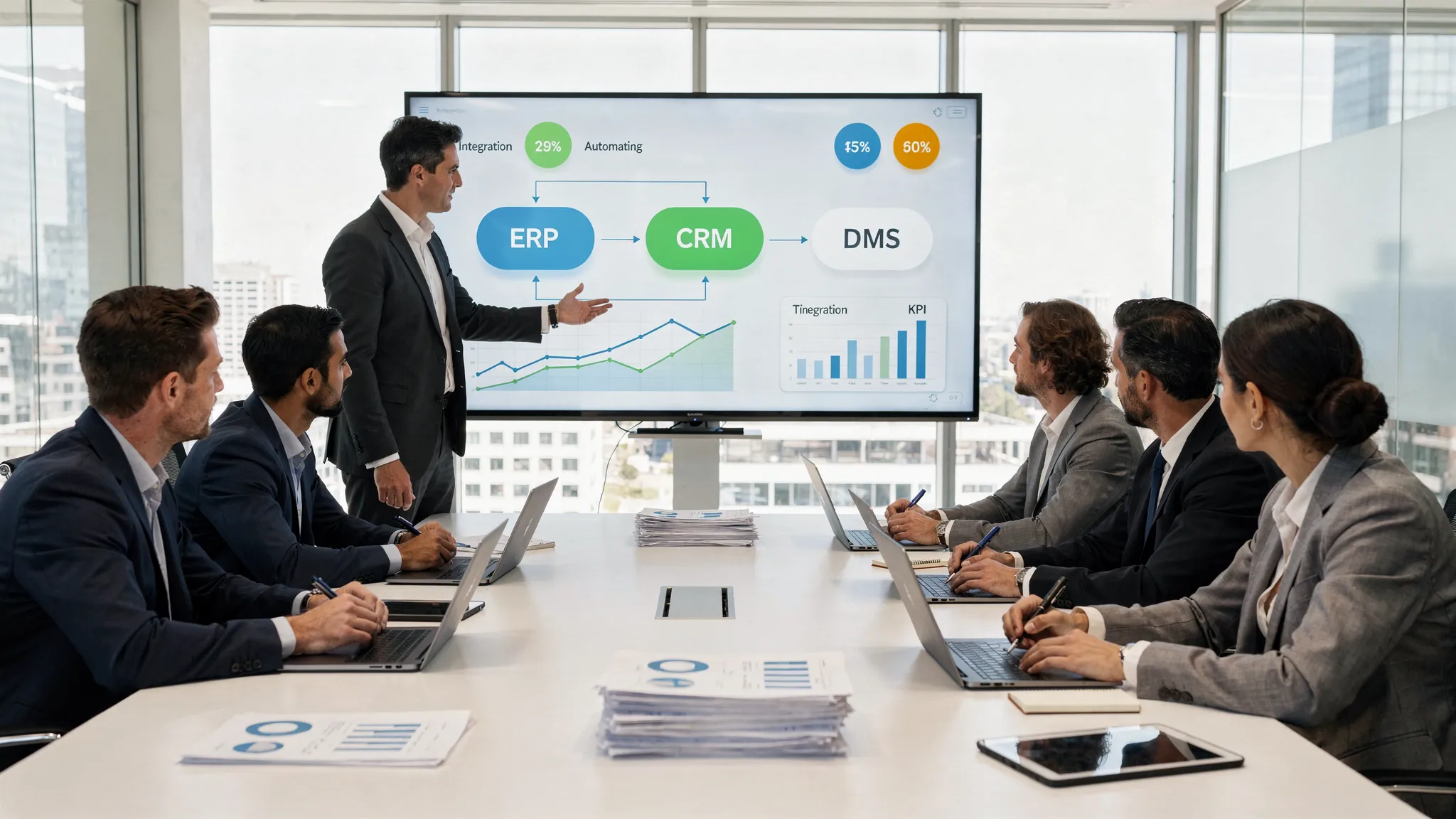
An AI agent delivers real business value when it does more than just “respond”— it performs tasks within a business process, calls tools (APIs), retrieves data (RAG), seeks approval at decision points, and then closes out the work in an auditable manner. For most companies, the question isn’t whether it’s worth considering an agent, but rather which use case to prioritize first, how to integrate it into an ERP/CRM/ticketing/DMS environment, and how to measure ROI so that a clear go/no-go decision can be made after the pilot.
This article provides decision-makers and IT leaders with a practical framework: typical use cases, integration patterns, and a measurement model that goes beyond simply claiming “we saved time.”
What counts as an AI agent in a corporate environment?
In a corporate context, an AI agent is a solution that:
You are given a goal (e.g., “Resolve 30% of the bug tickets without human intervention, if a known solution exists”).
Makes plans (outlines steps, schedules checks).
Uses tools (e.g., CRM search, ERP status query, ticket management update, sending emails, knowledge base query).
It operates within defined parameters (authorization, data quality rules, approval points).
Can be logged (who initiated it, what data was accessed, what was changed, and what the result was).
The difference compared to "chat"-style AI solutions is that the key to success here lies in integration and embedding the solution into existing processes. A good starting point for this is Syneo’s previous article on the choice between an AI agent and a chatbot, if the distinction isn’t yet clear: AI Agent vs. Chatbot: Which Delivers a Faster ROI?
Use cases: Where does an AI agent provide quick and measurable value?
The "best" use case is usually found where three conditions are met simultaneously:
There are many repetitive, predictable steps (even if there are exceptions).
There are available data and systems (knowledge base, DMS, CRM, ERP, ticketing).
The output can be converted into monetary terms (time, cost of errors, revenue, SLA, risk).
1) Customer service triage and partial automation
The agent doesn't just respond, but also, for example:
categorizes incoming inquiries,
checks the customer's status in the CRM,
provides a suggested solution from the knowledge base,
In simple cases, it closes the ticket; in complex cases, it prepares the response and the next steps.
Typical integrations: ticketing systems (e.g., Jira Service Management, Freshdesk, Zendesk), CRM, knowledge bases/DMS, email channels.
Measurable metrics: deflection/containment, average handling time (AHT), first response time, reopening rate, CSAT. A useful supplement to the measurement logic is Syneo’s guide: “Implementing a Corporate Chatbot: How to Measure True ROI?”
2) Sales ops agent: quote preparation and administrative automation
Typical task:
collection of lead data (CRM, web, previous communications),
preparation of a bid template,
proposal for the next step (follow-up, meeting),
Filling out CRM fields, logging activities.
Typical integrations: CRM, email and calendar, document templates (DMS), CPQ/quoting process (if applicable).
Measurable impact: reduction in sales admin time, response time (speed-to-lead), quote turnaround time, and pipeline data quality.
3) Financial back-office agent: handling invoices and approval exceptions
For example, the agent:
detects exceptions (discrepancies between the purchase order and the invoice, missing fields),
asks the relevant person for the missing information,
prepares and documents the accounting proposal.
Typical integrations: ERP, DMS, e-invoicing/reception system, workflow/approval.
Measurable impact: reduction in touchless transactions, exception rate, processing time, error rate, and closing time. Related context: Digitization of accounting: automation from e-invoices to the general ledger
4) Procurement Agent: Collecting supplier quotes and preparing comparisons
In practice, this often involves collecting and organizing data:
processing incoming bids,
comparison based on the list of requirements,
Identifying gaps and generating clarifying questions,
Draft decision document.
Typical integrations: email, DMS, procurement system (if applicable), ERP product master data.
Measurable impact: reduction in cycle time, number of corrections, and time spent on decision preparation.
5) IT Ops Agent: Automating access requests and standard changes
Examples:
requesting and setting up standard access rights (RBAC roles),
Password reset and basic troubleshooting playbooks,
Incident triage and runbook execution (with approval steps).
Typical integrations: IAM/SSO, ticketing, CMDB (if available), monitoring/alerting.
Measurable impact: reduction in MTTR, reduction in L1 workload, change failure rate, SLA.
6) Internal knowledge agent: retrieving policies, processes, and project materials using RAG
Here, the value of the agent is not the "correct answer," but rather:
specific reference (which document, which section),
respect for rights,
version control and source coding.
Typical integrations: DMS (SharePoint/Confluence-style), permission system, search index.
Measurable impact: reduced search time, fewer repetitive questions, and shorter onboarding time.
7) Production/maintenance agent: work order generated from an alert (human-in-the-loop)
The goal is not for the agent to “manage production,” but rather to:
prioritizes alerts,
collects context (last maintenance, parts, history),
suggests the next steps and creates a worksheet in the CMMS.
Typical integrations: CMMS, ERP, sensor/SCADA data (read-only), DMS.
Measurable impact: reduction in unplanned downtime, MTTR, and unnecessary service calls.
A quick and effective method for selecting agent use cases is the 30-day pilot approach, which Syneo details separately: AI pilot in 30 days: use cases, data, KPIs, risks
Integrations: The "True" Architecture of the Enterprise AI Agent
The cause of most failures is not the model itself, but rather the fact that the agent cannot access the systems where it needs to operate securely and reliably. The following integration building blocks are common to most companies.
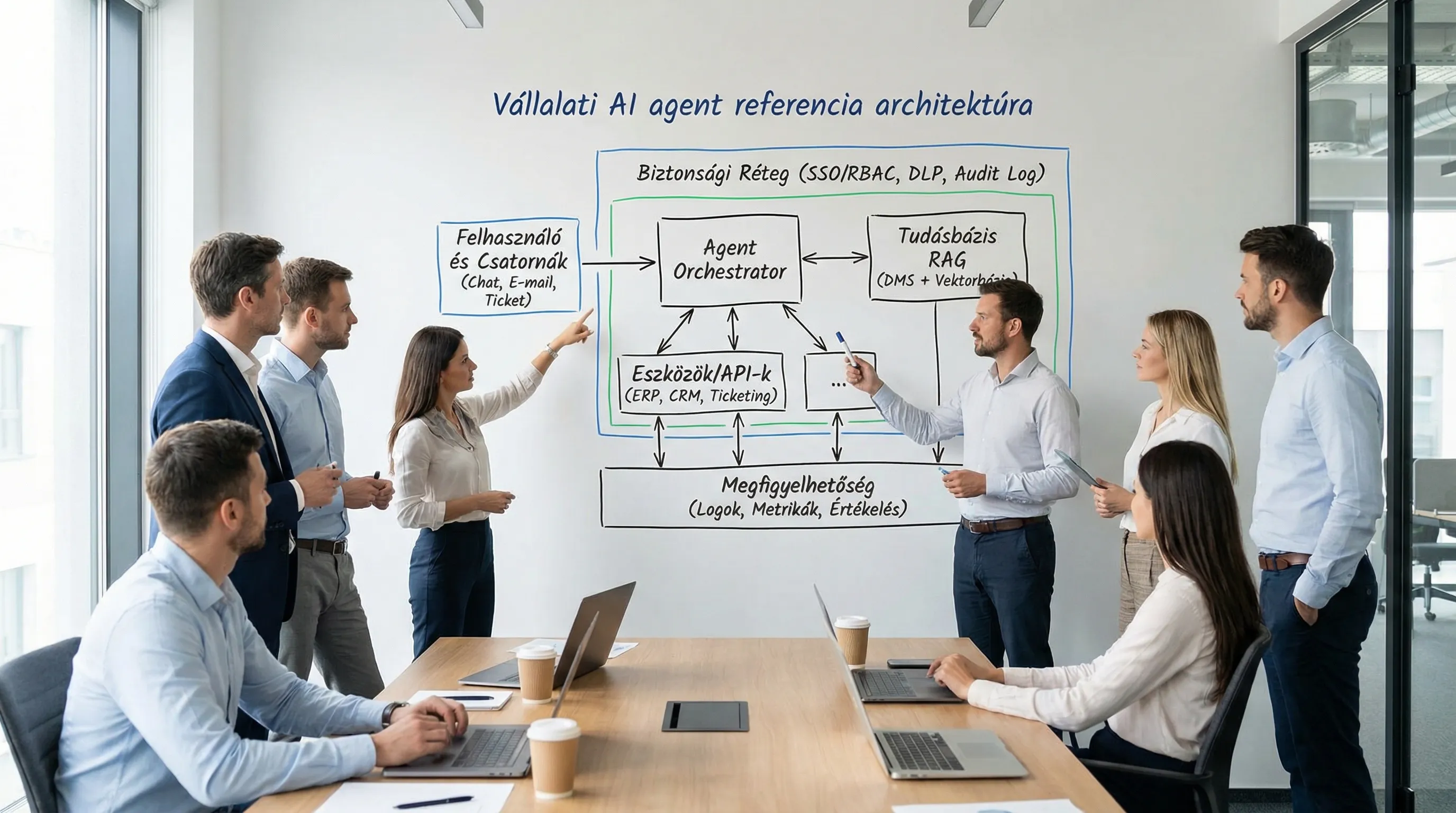
Integration patterns that make the agent scalable
API-first, tool calling: the agent calls operations that are deterministic and testable (e.g., “create_ticket,” “update_crm_contact,” “get_invoice_status”). This reduces the risk of “hallucinated” operations.
Integration layer (iPaaS/ESB/event bus): If you have many systems, it’s a good idea to use an intermediary layer to prevent point-to-point integrations from becoming unmanageable. Syneo’s overview of integration provides useful background: System Integration: How to Connect ERP, CRM, and BI?
RAG (retrieval-augmented generation) for enterprise knowledge: since the model does not “remember,” keeping the knowledge up to date works well through indexing, access controls, and versioning.
Human-in-the-loop approval: typically required for financial, legal, and access control processes. The agent prepares the request, and the responsible party approves it.
Idempotent, reversible operations: if the agent makes a mistake, there should be a way to undo it (especially when writing ERP/CRM systems). This is a matter of system and process design, not a “quick fix.”
Security and compliance—factors worth incorporating right from the start of integration
SSO and RBAC: The agent should display data based on the user’s permissions, not using a “superadmin” token.
Service accounts and key management: rotation, least privilege, auditability.
Logging: requests, tool calls, decision points, approvals.
Data minimization: Only send as much data to the model as is necessary.
Practical risk management resources:
Measuring ROI for AI agents: a framework to keep the pilot on track
There are two common mistakes when measuring ROI:
we measure only "by feel" (demo effect), there is no baseline or control group,
We’re only counting time, and the costs don’t include maintenance, security, and operations.
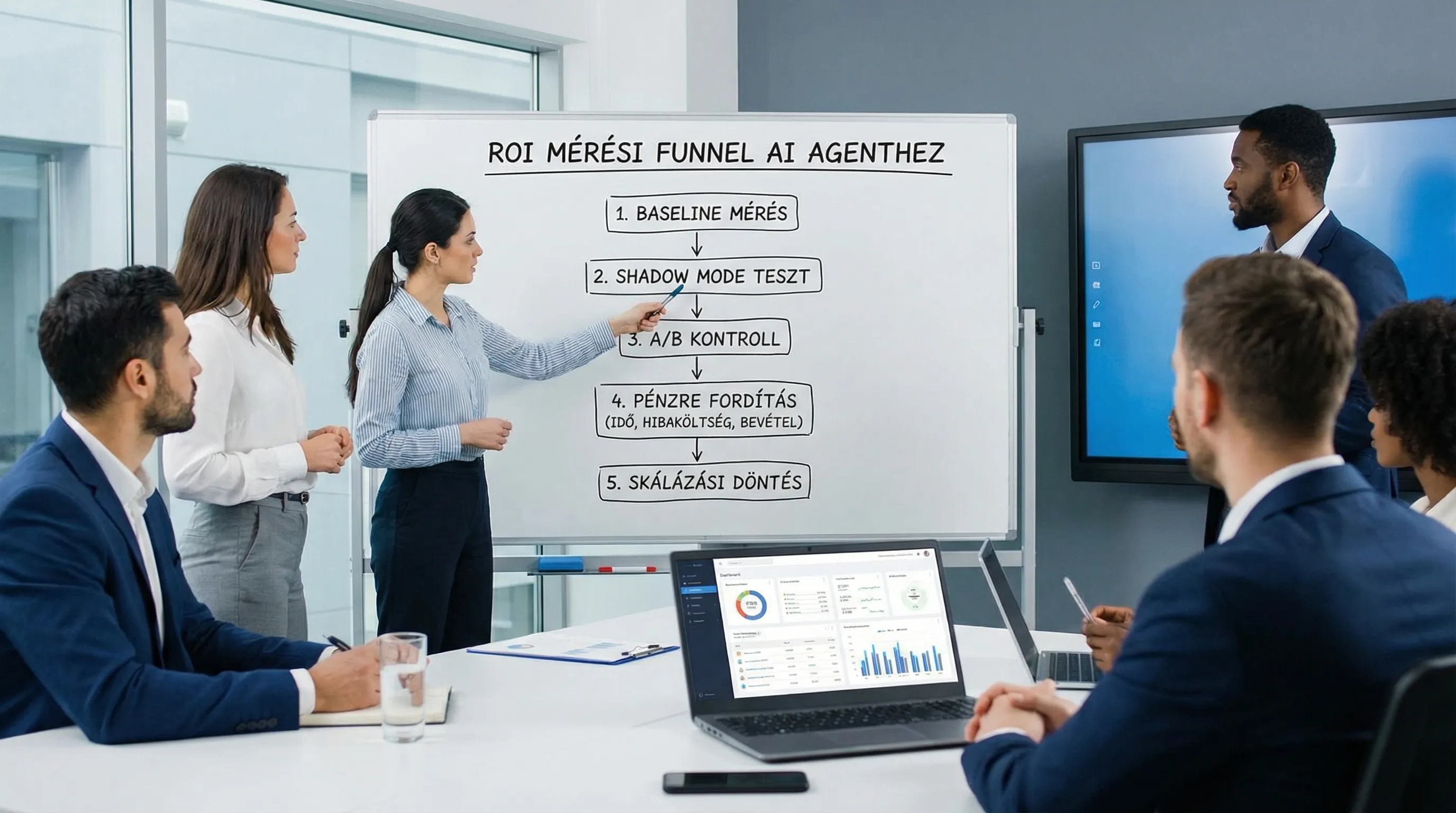
1) Baseline and measurement design (before the first sprint)
The minimum required elements:
Baseline time window: typically 2–4 weeks of historical data.
Event-level logic: what constitutes a "closed case," a "successful operation," or an "exception."
Control: Group A/B, or "shadow mode" (the agent makes a recommendation but does not yet enter it into the system).
2) KPIs in three layers: output, outcome, and financial
When it comes to agents, it is particularly useful to distinguish between technical performance and business results.
Layer | What should you measure? | Example | Why is it important? |
Output (agent performance) | accuracy, device call success rate, fallback rate | “98% of API calls are successful” | Stability, quality of integration |
Outcome (process) | throughput time, AHT, reopening, error rate | “AHT -22%” | Is the process really improving? |
Money (business) | savings, revenue, reduction in risk/loss | “0.5 FTE of L1 capacity will be freed up” | For decision-making and scaling |
3) TCO: What to Include to Avoid "Surprise ROI"
With AI agents, costs typically consist of more than just licensing fees. Here is a practical breakdown of the total cost of ownership (TCO):
Category | Typical items | Comment |
Build (one-time) | discovery, process design, integration, testing, security controls | Integration is often the biggest challenge |
Run (continuous) | Operation, monitoring, incident management, model/configuration updates | Adjust to SLOs |
Usage | token/execution, vector search, storage | It depends heavily on the channels |
Risk/Compliance | DPIA, audit, DLP, log retention | Mandatory depending on the sector |
Change | training, SOP updates, management controls | Without adoption, there is no ROI |
4) ROI formula and decision thresholds
The classic ROI formula works if the benefits and costs are clearly defined:
ROI = (annualized profit − annualized cost) / annualized cost
When making this decision, it’s a good idea to set 2–3 thresholds in advance:
Minimum technical threshold: integration stability and quality (e.g., device call success rate, error rate).
Minimum business threshold: the target value for the selected KPIs (e.g., reduction in AHT, touchless rate).
Guardrail: Quality deterioration or risk must not exceed the threshold (e.g., the reopening rate must not increase).
Quick checklist: What questions should you ask before hiring or building an agent?
What are the first 1–2 use cases where baseline data is available and results can be measured quickly?
In which systems should the agent write, and where is it sufficient for the agent to only read?
Will there be an integration layer, or will it be point-to-point (and who will maintain it)?
What does human-in-the-loop approval look like for critical steps?
Who is the process owner, and who is the "product owner" for the agent?
What are the minimum logging and auditing requirements, and where will they be stored?
What are the specific criteria for the go/no-go decision in 30–60 days?
When data quality is uncertain, it’s often faster to conduct a targeted assessment first: Data Quality Audit: Why Do AI Projects Fail?
Frequently Asked Questions (FAQ)
What is the best initial use case for an AI agent in an SME? Generally, it’s where there are many repetitive administrative tasks (customer service triage, sales administration, invoice exception handling), an existing system (CRM/ERP/ticketing), and KPIs that can be measured within 30 days.
Does the AI agent need write access to the ERP? Not always. In many pilot projects, read-only access and “recommendations” are sufficient, with data being recorded only after human approval. Grant write access only if the operations are idempotent, loggable, and retrievable.
How can you measure an AI agent’s ROI without introducing bias? Without a baseline and a control group (A/B testing or shadow mode), the measurement is likely to be skewed by the demo effect. You need event-level logic, predefined KPIs, and guardrails.
Which integrations tend to take the most time? Typically, these include access control (SSO/RBAC), indexing DMS content for RAG, and the "write" side business rules and error handling for ticketing/ERP systems.
What are the most common security risks associated with agents? Prompt injection, overly broad permissions, inadequate logging, excessive disclosure of sensitive data, and uncontrolled writing to the system. The OWASP LLM Top 10 is a good starting point for best practices.
Next step: use case, integration plan, and measurable pilot
If you're considering implementing an AI agent, the quickest route is usually a brief, structured preparation process:
use case selection with a measurement plan,
integration map (ERP/CRM/DMS/ticketing),
minimum security and audit requirements,
A 30-day pilot, after which a clear go/no-go decision will be made.
The Syneo team can support you with both consulting and implementation, from assessment and integration to ROI measurement. For further context, we recommend checking out Syneo’s digital transformation framework: Corporate Digital Transformation Step by Step: A Proven Framework. Then, contact us at syneo.hu to discuss the next steps.
