AI agent vs. chatbot: Which one delivers a faster ROI?
AI
AI Agent vs. Chatbot: Which One Delivers a Faster ROI? | Syneo
Decision-Making Framework for 2026: When to Choose a Chatbot vs. an AI Agent, Which KPIs Matter, and How to Plan a 30–90-Day Pilot That Delivers a Quick ROI.
AI agent, chatbot, ROI, pilot, KPI, integration, digitization, TCO, security, CRM, ERP, operations
March 21, 2026

Many companies fail to achieve a return on their AI automation investments because they opt for a chatbot when they actually need an AI agent—or, conversely, they embark on an overly complex agent project when a well-defined chatbot could deliver results in just 4–8 weeks.
In this article, you’ll find a quick ROI-focused decision-making framework: when to consider a chatbot versus an AI agent, which KPIs to track, and what hidden costs to expect in 2026.
Chatbots and AI agents: What’s the difference from a business perspective?
These two concepts are often conflated in the market, even though they represent different skill levels and different levels of risk.
Chatbot (LLM-based or rule-based)
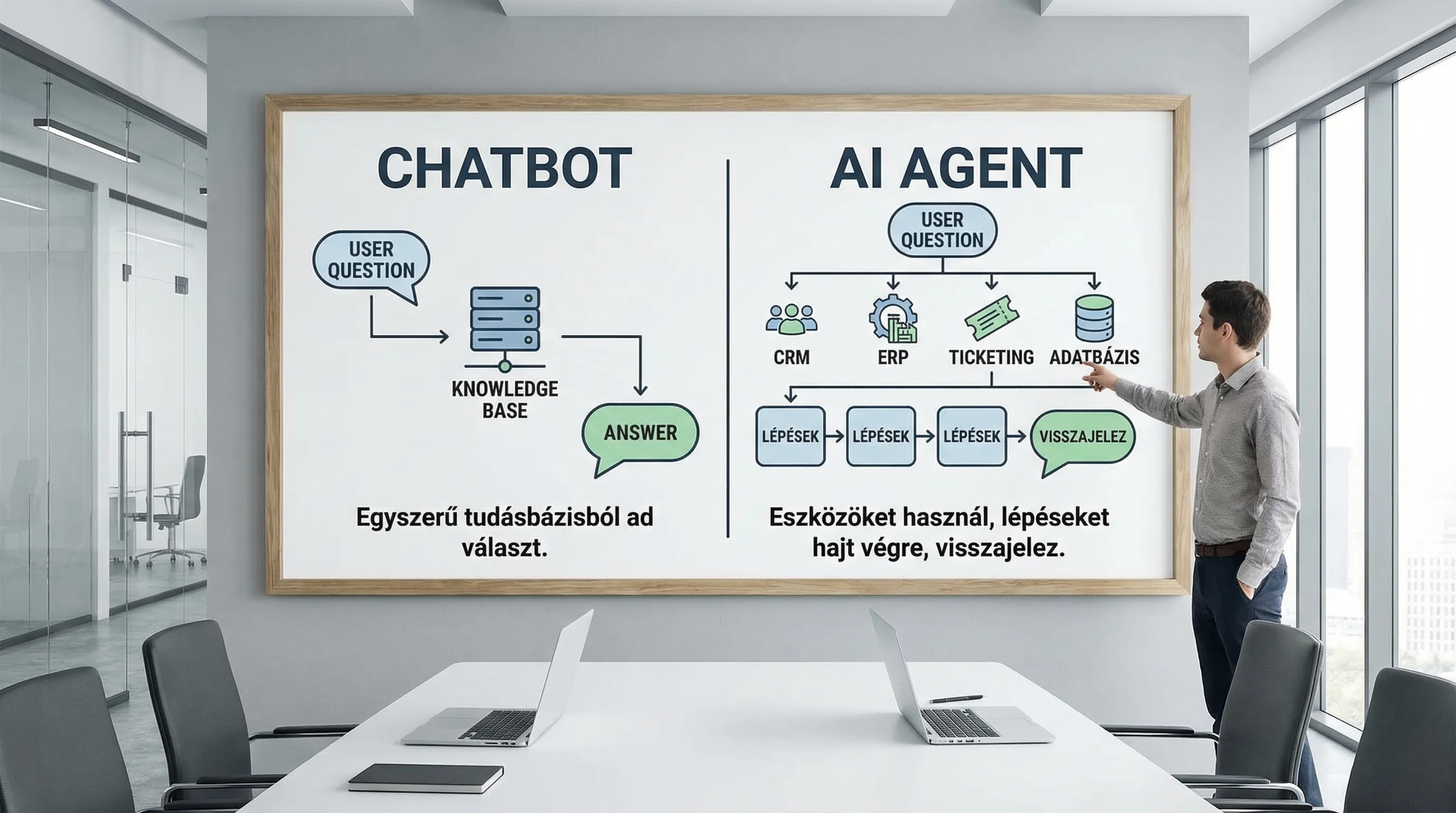
The primary purpose of a corporate chatbot is to provide information through conversation, clarify questions, and resolve as many issues as possible without human intervention.
Typical patterns:
Knowledge base-driven Q&A (FAQ, policies, product information)
Customer service "triage" (categorization, data requests)
Lead qualification (sales screening)
AI agent
The AI agent is designed not only to respond, but also to perform tasks: take actions within systems, retrieve data, fill out forms, modify tickets, initiate orders, generate reports, and then provide feedback.
Typical patterns:
Executing multi-step processes (workflows)
Tool usage (APIs, databases, ERP/CRM)
In some cases, "human-in-the-loop" approval
To put it simply:
Chatbot = conversation and response
AI agent = conversation plus action in systems
What does “quick ROI” mean in this context, and why is it different for chatbots and agents?
A quick ROI typically means that at least one monetizable metric shows demonstrable improvement within 30 to 90 days.
For most organizations, these are the KPIs that are easiest to quantify in monetary terms:
Deflection/containment: the number of inquiries that do not reach a human agent (reduction in customer service costs)
Decrease in AHT (Average Handle Time): shorter average handling time
Improved FCR (First Contact Resolution): fewer reopened cases, fewer rounds
Reduced lead times for internal processes (e.g., procurement, finance, IT)
Improved conversion (sales): more qualified leads, faster response times
Reduced error costs: fewer manual errors, fewer complaints
The difference: With chatbots, ROI is often achieved quickly through capacity and time savings. With agents, ROI often comes from end-to-end process costs, but more preparation is required due to integrations and controls.
If you’d like to quantify your chatbot’s ROI in greater detail, there’s a separate, detailed guide for that: Implementing a corporate chatbot: how to measure the true ROI?
When does a chatbot deliver a faster ROI?
A chatbot pays for itself the fastest when there is a high volume of inquiries, the questions are repetitive, and the solution requires few system operations.
Typical use cases with a quick ROI
1) Customer Service Q&A and Knowledge Base (RAG)
If you have (or can quickly set up) an internal knowledge base—including FAQs, product documentation, terms of service, and process descriptions—the chatbot can quickly achieve containment.
2) Triage and data collection
During the conversation, the chatbot collects the necessary data (e.g., customer ID, order number, description of the issue), structures the ticket, and thereby reduces handling time.
3) Sales pre-screening
Instant response time, simple needs assessment, followed by referral to a representative or scheduling a meeting. Here, the quick ROI often comes from a reduction in lost leads.
When is it possible to quickly deploy a "simple" chatbot?
A chatbot delivers a quick return on investment if most of the following are true:
The knowledge base is written, versioned, and updatable (it’s not just stored in people’s heads)
There is no need for 5–10 external system integrations to achieve the baseline value
"Human fallback" is acceptable (if unsure, pass it on to a human)
The channel (website, customer portal, internal chat)
Practical example of customer service optimization: AI-powered customer service: SLA improvement in 30 days
When does an AI agent deliver a faster ROI?
An AI agent delivers a quick ROI when the main source of that return isn’t the responses it provides, but the fact that the system does the work for you.
Typical use cases for quick ROI with an agent
1) Resolve a ticket using the "resolve" step at
It doesn't just respond; for example:
restores permissions according to the restoration process,
initiates a password reset (in accordance with the policy),
modifies the device assignment,
Updates the status in the CRM for RMA/CS cases.
2) Automation of back-office processes
For example, in finance and accounting: data verification, reconciliation, listing of exceptions, and preparation of the approval workflow. (If you’re interested in the “invoice-to-general ledger” process: Digitization of Accounting: Automation from E-Invoices to the General Ledger)
3) CRM Operations and Sales Administration
For example, entering meeting notes into the CRM, creating tasks, suggesting next steps, and pipeline maintenance. (Related: How to Integrate AI into Your CRM System)
When is it easy to recoup the cost of an agent quickly?
A quick ROI from the agent is typically realistic if:
The process is standardized and measurable (not handled on a case-by-case basis)
There are one or two key systems for which a stable API or integration is available
The risk can be managed using safeguards (approval, logging, limited access)
We have identified the process owner who will decide on exceptions
If you'd like to see the technical aspects of building an agent step by step: AI Agent Development 2026: A Step-by-Step Guide for Beginners
Decision Chart: Does a Chatbot or an AI Agent Deliver a Faster ROI?
The table below provides "default" answers for the most common business scenarios. In reality, hybrid setups are also common, such as a chatbot on the front end and an agent in the background.
Scenario / use case | Faster ROI, typically | Why | Critical prerequisite |
Many recurring questions, few specific exceptions | Chatbot | Knowledge Base + Containment: Quickly Measurable | Up-to-date content and a solid backup plan |
The SLA needs to be improved; triage and categorization are required | Chatbot (or chatbot + simple agent) | AHT and FCR could improve rapidly | Ticket taxonomy, measurable baseline |
A task must be performed (status update, form, system operation) | AI agent | The savings come from replacing manual labor | Integration + Authorization Model |
Internal administrative process involving many manual clicks | AI agent | End-to-end turnaround time is reduced | Stable process steps, exception handling |
Many channels, multiple languages, high volume | Chatbot for the first time | Fast scaling, standard responses | Knowledge Base Governance |
Robust compliance, auditing, and segregated permissions | Chatbot or limited agent | Agents need stricter oversight | RBAC, logging, approval |
Hidden Costs (TCO) in a Nutshell: What Slows Down the Return on Investment?
A quick ROI is rarely hindered by the cost of the model itself. The most common cost drivers are actually these:
1) Data quality and knowledge base maintenance
For chatbots, expanding and updating their knowledge base will be an ongoing task, while for agents, it will be the "what-to-do-when" rule set. In AI projects, this is often the number one risk, especially if the data in the source systems is inaccurate. Related: Data quality audit: why do AI projects fail?
2) Integrations and Error Handling
When working with an agent, there almost always comes a point where you can’t move forward without integration. At that point, architecture, idempotence, retries, logging, and monitoring determine the TCO. Related: System Integration: How to Connect ERP, CRM, and BI?
3) Security and Compliance (GDPR, EU AI Act, NIS2)
The more "permissions" you grant an agent, the more important authorization, logging, approval, and supplier risk management become.
Official website of the EU AI Act: European Commission
AI Risk Management Framework: NIST AI RMF
If you’re an SME and are interested in the minimum controls for 2026: Cybersecurity for SMEs: 10 Minimum Controls for 2026
Quick Pilot Plan: How to Demonstrate ROI in 30–60 Days?
The goal is the same in both cases: a baseline, a measurement, and a narrow scope, followed by a go/no-go decision.
Chatbot pilot (typically 2–6 weeks)
Baseline: Top 20 issues, current AHT, ticket volume, CSAT
Knowledge package: 30–100 pages of “high-quality” sources (policies, product descriptions, processes)
Arming: on a single channel, with a clearly visible manual activation
Metrics: containment, fallback rate, AHT change, rate of inaccurate responses
AI agent pilot (typically 4–8 weeks)
One process, one goal: for example, “status check + update” or “data verification + preparation for approval”
Integration 1–2: CRM or ticketing, plus one data source
Guardrails: restricted access, logging, approval required before certain actions
Metrics: turnaround time, number of human interventions, error rate, re-opening
If you’re looking for a comprehensive, risk-mitigated pilot methodology (use cases, data, KPIs, risk register): AI Pilot in 30 Days
A hybrid solution: when the fastest ROI isn’t an “either-or” choice
For many organizations, the best combination is:
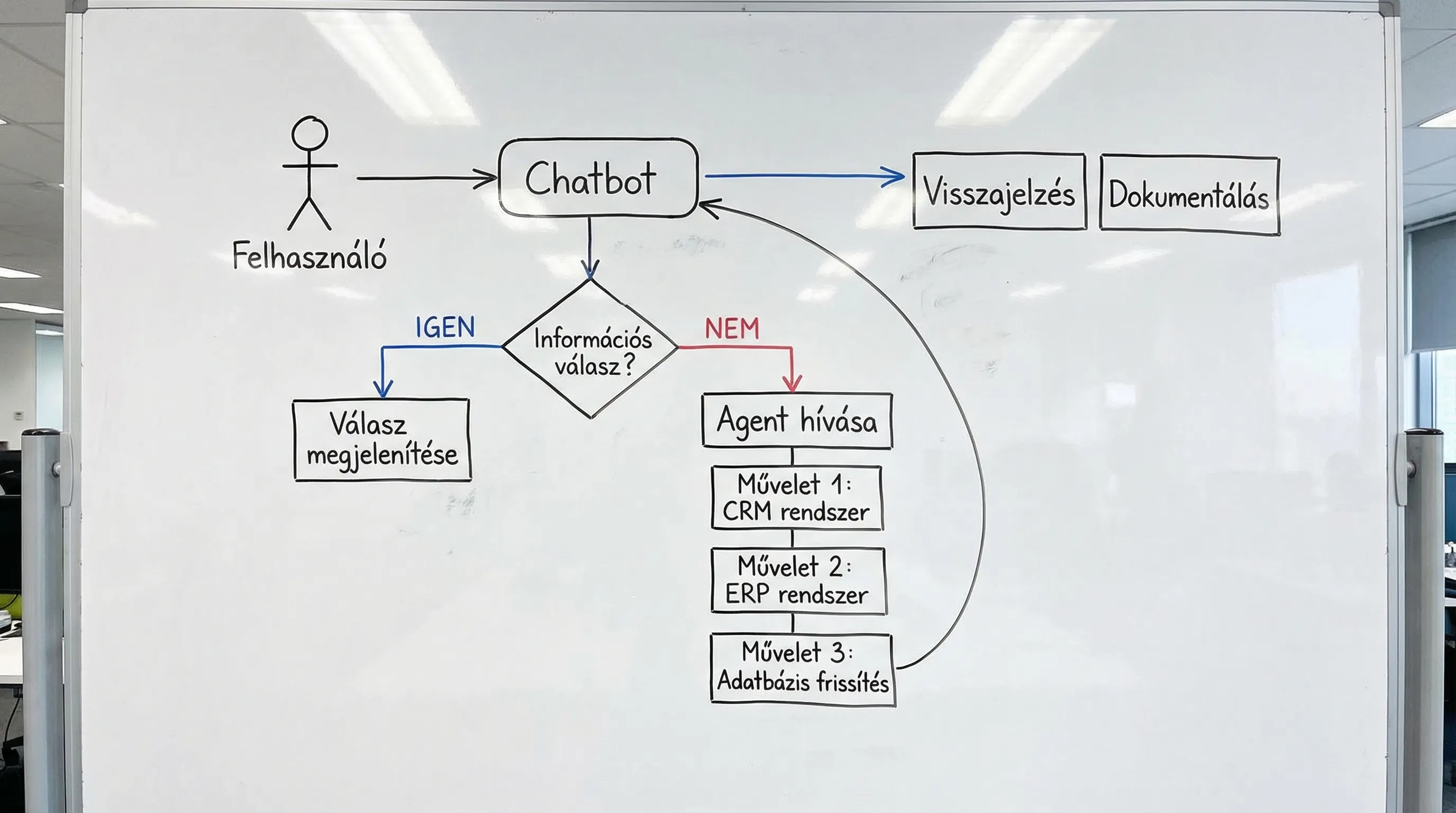
Chatbot on the interface: asks questions, clarifies details, requests data, and communicates
Agent in the background: performs only the necessary, controlled actions
This results in a quick ROI because the chatbot quickly reduces the workload, while the agent specifically replaces the most costly manual steps.
Common pitfalls that eat into your return on investment
The scope is too broad at the start. This is especially true for Agent: if the pilot involves 10 tools, 6 systems, and 30 exceptions, you won’t see a quick ROI.
There is no designated "owner" for the process. Without a process owner, decision-making grinds to a halt at every exception, and the project slows down.
Optimization without measurement. If there is no baseline, no control group, and no A/B testing, then ROI becomes a matter of debate, not a fact.
Security after the fact. Without access controls, logging, vendor terms, and data management, risk will erode business value.
Frequently Asked Questions
AI agent vs. chatbot: which is cheaper? In the short term, chatbots are typically cheaper because they require less integration and access control. With agents, the TCO is often driven up by integration, error handling, and governance.
How long does it typically take to see a return on investment? With chatbots, improvements in containment and AHT are often visible within 2–8 weeks. For agents, it typically takes 4–12 weeks, depending on the amount of integration and approval logic required.
Can a chatbot be turned into an AI agent later on? Yes, this is a common evolution: first a knowledge base and triage, followed by controlled "action" steps. It’s important to have logging and a metrics framework in place from the very beginning.
What data is needed for a quick ROI? For chatbots, well-structured knowledge bases and conversation logs. For agents, process steps, exception logs, and at least one robust system integration (API, permissions, audit log).
What does “human-in-the-loop” mean, and when is it required? It means that a human must approve certain actions before they are carried out (such as financial transactions or changes to customer data). It is recommended even when a quick ROI is expected, especially if the cost of errors or compliance risks are high.
Next step: For a quick ROI, choose a scope, not a buzzword
If you want to objectively determine within 2–3 weeks whether a chatbot or an AI agent will deliver a faster ROI for your processes, it’s a good idea to start with a brief assessment: selecting use cases, establishing baseline KPIs, defining minimum data and integration requirements, and setting up risk controls.
The Syneo team supports such pilot projects with AI and digital transformation consulting, integration, and custom development, always focusing on measurable business value. Details: Syneo
