AI Agents in the Workplace: 7 Use Cases and an Implementation Plan
AI
AI Agents in the Workplace: 7 Use Cases and an Implementation Plan | Syneo
A practical guide featuring 7 enterprise AI agent use cases and a 30–90-day implementation plan: pilot, integration, data management, security, and KPIs for fast, low-risk deployment.
AI agent, AI, agent assist, RAG, use case, pilot, implementation, integration, data protection, ERP, CRM, DevOps, KPI
March 20, 2026

Corporate expectations regarding AI agents have now become a reality: it’s not about “just another chatbot,” but rather an assistant that, when integrated into business processes, can search for information, provide decision recommendations, and initiate actions in a controlled manner (such as opening a ticket, preparing a quote, or starting an approval process). The difference between recreational and productive use generally depends not on the quality of the model, but on the selection of use cases, integration, data quality, and controls.
This article presents seven typical enterprise use cases that deliver value quickly, followed by an implementation plan that allows you to move from a pilot to full-scale operation in 30 to 90 days with minimal risk.
What is an AI agent in a corporate setting (and how is it different from a chatbot)?
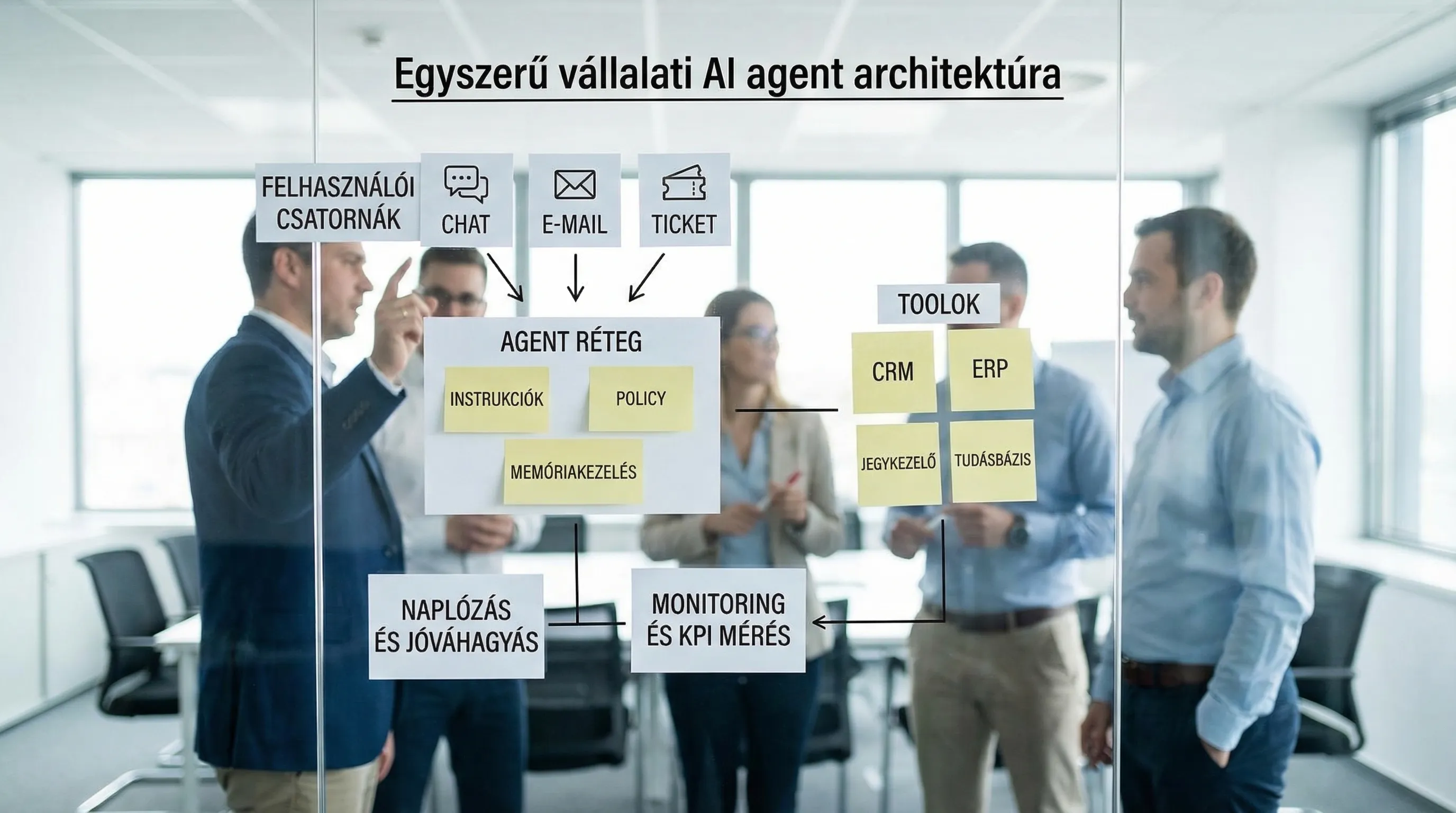
In corporate terms, an AI agent is a software component that:
accepts requests in natural language (from employees or the system),
has access to corporate knowledge (documents, SOPs, tickets, CRM/ERP data), typically via a RAG or search solution,
call tools (API, workflow, ticketing, email, database queries),
and it does all this using safeguards (authorization, logging, approval, restrictions, quality measurement).
At most companies, the best first step is when the agent isn’t yet on “autopilot” but acts as an agent assistant: it makes suggestions, fills in forms, summarizes information, and the user approves it.
Type of solution | What is it actually good for? | Typical risk | Recommended starting point |
Chatbot (public or basic Q&A) | General information, simple questions | Hallucination, an answer with no source | Low-priority topics |
Copilot-style assistant | Text, summary, email, document | Data breach, improper access | Corporate account + policies |
AI agent (with tools) | Supporting process steps, initiating operations | Incorrect operation, lack of audit, prompt injection | Human approval + logging |
If your team prefers to take a technical approach to development, Syneo’s detailed guide, “Building an AI Agent 2026,” could be a useful resource.
7 enterprise AI agent use cases that could realistically be implemented by 2026
We have selected the following use cases so that they can be integrated into typical ERP/CRM/ticketing environments and measured over a 30–90-day period.
1) Customer Service Triage Agent (ticket classification + suggested responses)
What does it do? It categorizes, prioritizes, and summarizes incoming emails, forms, and chat messages, then generates a suggested response and routes it to the appropriate team.
What does it take? A knowledge base, product documentation, past tickets, and ticket management integration.
KPI ideas:
First Response Time (FRT)
Average handling time (AHT)
First-contact resolution rate (FCR)
deflection or containment (if there is a chat channel)
Guardrail: Human approval required before submission, PII masking, and mandatory citation of sources.
A Good Starting Point for Measurement and ROI: Implementing a Corporate Chatbot: How Do You Measure the True ROI?
2) Sales and CRM Agent (summaries, next steps, quote preparation)
What does it do? It compiles summaries from meeting notes and CRM activities, suggests tasks, drafts emails, and prepares the content for proposal templates.
What do you need? CRM access (with the appropriate permissions), product and pricing policies, templates, and an approval process.
KPI ideas:
Reduction in time spent on administrative tasks (sales time)
quote turnaround time
Pipeline hygiene (percentage of missing fields)
Guardrail: The agent should not “make up” a price or a commitment. Instead, the system should request data or use a template, and flag any uncertain parts.
Related (AI + CRM) Approach: How to Integrate AI into Your CRM System
3) Procurement Agent (comparing quotes, preparing correspondence with suppliers)
What does it do? It summarizes incoming bids (PDFs, emails, spreadsheets), compares them based on predefined criteria, then prepares decision-making materials and suggests follow-up questions for the supplier.
What does it take? A procurement policy (approval thresholds), supplier master data, contract templates, and a document repository.
KPI ideas:
Turnaround time: RFQ → decision
Percentage of incomplete bids (number of rounds)
percentage of auditable decision minutes
Guardrail: a recommendation rather than a decision. The final choice is a human responsibility; the agent’s role is to prepare the groundwork and ensure accountability.
4) Financial Administration Agent (support for invoice processing and exception handling)
What does it do? It extracts data from invoices, runs checks (on partners, fulfillment, VAT logic, and PO matching), suggests account assignments, and opens an exception if something is wrong.
What does it require? Invoice channel (e-invoice / OCR / IDP), ERP integration, approval workflow, logging.
KPI ideas:
touchless ratio (processing without human intervention)
Proportion of exceptions and their distribution by cause
accounting turnaround time
Guardrail: Validation and audit trails are required for financial items. It is helpful if the agent specifies, for each proposal, which rules and data were used to arrive at that conclusion.
Related detailed overview: Digitization of accounting: automation from e-invoices to the general ledger
5) HR and internal knowledge agent (onboarding, policy Q&A, internal requests)
What does this role entail? It provides new hires and employees with answers to questions about internal policies and procedures, assists with onboarding checklists, and prepares standard HR requests.
What does it take? Organizing the internal document repository, setting access levels (not everything is visible to everyone), and integrating HR workflows.
KPI ideas:
Decrease in the number of HR tickets by topic
Shorter onboarding time (time to productivity)
internal search success rate
Guardrail: Authorization is key. The agent’s response must not disclose sensitive HR data and must always comply with company policy.
6) IT Service Desk Agent (incident triage, runbook recommendations, change preparation)
What does it do? Based on the incident description, it suggests a category, related previous cases, and runbook steps, and prepares a change request (CAB documentation) if necessary.
What does it require? A ticketing system, a CMDB or asset inventory, runbooks, and access to logs and monitoring (under strict control).
KPI ideas:
MTTR (Mean Time to Restore)
first-line resolution rate
rate of failed escalations
Guardrail: The agent should not be granted automatic "write" access to critical systems from the outset. As a starting point, a proposal, a summary, and controlled, approval-based steps are recommended.
For DevOps and operations: DevOps Fundamentals: From Scratch to Production
7) Executive decision support agent (BI explanations, narrative reports, ad hoc queries)
What does it do? The manager asks questions in natural language about KPIs, variances, and trends. The agent queries the BI layer or database, then provides a source-cited explanation and highlights any uncertainties.
What does it take? A semantic layer, standardized KPI definitions, access permissions, an "SQL tool" or BI API, and logged queries.
KPI ideas:
report generation cycle time
ad hoc analysis run
Reduction in KPI disputes (due to standardized definitions)
Guardrail: The agent should only use data that it has queried or obtained from a reliable source. The term “hallucination” here typically stems from a misinterpreted definition, which is why KPI semantics are critical.
Quick Comparison Table of Use Cases (Value, Complexity, Time)
Use case | Typical business value | Need for integration | Realistic "time-to-value" |
Customer Service Triage | Improved SLA, reduced load | ticketing + knowledge base | 3–6-week pilot |
Sales/CRM Representative | more time for sales, better hygiene | CRM + Templates | 4–8 weeks |
Procurement Preparation | Faster decisions, better audits | Document Repository + Workflow | 6–10 weeks |
Financial administrative support | higher touchless rate, fewer errors | ERP + Invoice Channel | 6–12 weeks |
HR Knowledge Agent | Fewer internal issues, faster onboarding | DMS + IAM | 4–8 weeks |
IT Service Desk Agent | Reduced MTTR, improved triage | ticketing + runbook | 4–10 weeks |
Decision-support agent | faster analysis, standardized KPIs | BI/DB + semantics | 6–12 weeks |
Implementation Plan: How to Turn an AI Agent into a Production Solution?
The reason for most failures isn’t that “the AI isn’t working,” but rather that it hasn’t been configured:
what we consider success (KPIs, baseline),
where the process (integration) takes place,
who is responsible (governance),
and under what conditions it can go live.
1) Selecting use cases based on scoring (don’t let the loudest request win)
A quick, practical scoring system in 5 dimensions:
business value (time, money, SLA)
measurability (there is a baseline, there is data)
integration capabilities (API, workflow)
risk (data, compliance, erroneous operation)
Adoption (who will use it, how much training is needed)
If you'd like a concrete, pilot-oriented roadmap for this, here's a good starting point: AI Pilot in 30 Days: Use Cases, Data, KPIs, Risks
2) Data and knowledge: What can the agent “read,” and what constitutes a reliable source?
Two common mistakes:
the document repository is full of duplicates and outdated SOPs,
It isn't specified what counts as the "source of truth" (ERP? CRM? wiki? SharePoint?).
It’s worth conducting at least a basic data quality and knowledge audit, especially if the agent relies on structured data. Related framework: Data Quality Audit: Why Do AI Projects Fail?
3) Integration: the agent’s value lies where the process runs
A corporate AI agent generally pays off when it doesn’t just talk, but also prepares or initiates the next step. This requires robust integration (APIs, events, iPaaS, data pipelines).
If you have multiple systems—such as ERP, CRM, and BI—it’s a good idea to first create an integration map and an error-handling template: System Integration: How to Connect ERP, CRM, and BI?
4) Safety and Compliance in 2026: Minimum Baseline
For an AI agent, security is not an optional extra, but a prerequisite. This is especially true when the agent accesses corporate data or initiates an operation.
Minimum practical requirements (prior to the pilot phase):
SSO, RBAC, least privilege (who can ask what, who can see what)
logging: prompt, response, sources used, tool calls, user ID
Handling of PII and sensitive data (masking, DLP-type rules, retention)
human approval for critical operations
evaluation: accuracy, source reliability, error rate, "don't know" rate
Protection against prompt injection and unauthorized data requests
For background on the regulatory framework, we recommend reading the European Commission’s summary page on the EU AI Act: Artificial Intelligence Act.
5) Pilot: Prove your worth within 30 days; don’t “build a system”
A good pilot does three things well:
narrow scope (1 team, 1 channel, 1 process step),
a measurable baseline (the same metric used before and after),
shadow or assist mode (it suggests this first, but does not execute it automatically).
Typical deliverables of a pilot project include: a working agent prototype, a proof of integration, a KPI report, a risk register, and a go/no-go recommendation.
6) Deployment and Operations: AgentOps as a New “Product”
Once the agent is removed from the pilot, it becomes a product just like any other internal system:
versioning (prompts, policies, tools)
monitoring (quality, drift, cost, latency)
Incident management and rollback
teaching cycle (based on user feedback)
It helps a lot here if you’re building from a DevOps/DevSecOps perspective, because you’re already familiar with the release cadence and the controls.
Recommended roles and responsibilities (even on a small scale)
Role | Primary responsibility | Typical deliverable |
Business owner | business objective, priority | KPI targets, scope |
Product Owner / Process Owner | user flow, exceptions | user stories, acceptance |
IT/Integration | systems, APIs | integration plan, logging |
Data Controller | resources, quality | source of truth, cleaning backlog |
Security/Compliance | policies, audits | authorization, risk register |
Operation | smooth ride | monitoring, incident response guide |
When is it a good idea to bring in an external partner?
External funding typically pays off quickly when:
integration of multiple systems is required (ERP/CRM/ticketing/BI),
you work in a regulated environment (audit, NIS2, GDPR, AI Act),
You want a quick, measurable pilot project that can be completed in 30–90 days without relying on internal resources.
In such situations, Syneo typically provides assistance with assessments, pilot projects, integration support, and implementation, all tailored to your existing processes. If you’re interested in the basics, a good place to start is: IT Consulting: When Is It Needed and What Do You Get in Return?

Conclusion: The first good AI agent isn’t the smartest one, but the one that’s easiest to measure
An “AI agent in the enterprise” will only provide a real competitive advantage if the solution isn’t a standalone system, but is integrated into a process, operates with measurable KPIs, and incorporates security and compliance controls. Start with a use case where you have a baseline and data, and where the agent significantly speeds up at least one step in the process.
If you’d like a 30-day pilot schedule and a prioritized list of use cases tailored to your environment, you can find related materials on the Syneo website: syneo.hu.
